An administrator discovers that a VMware Cloud Foundation (VCF) workload domain four-node vSAN cluster is experiencing a network partition. The workload domain vCenter displays a "vSAN duster partition" warning. The performance across the cluster is degraded and the objects are showing as non-compliant. What could be causing the network partition?
-
A
IGMP snooping is disabled on the multicast group.
-
B
The VLAN was changed on the physical switch port.
-
C
Jumbo frames are configured on the vSphere distributed switch (VDS).
-
D
The vSAN Witness service was added to the vMotion network.
Reveal answer details
Close answer details
Correct answerB
ExplanationA vSAN cluster network partition occurs when vSAN nodes cannot communicate over the designated vSAN network. In VMware Cloud Foundation workload domains, the vSAN network relies on L2 adjacency, consistent VLAN configuration, and stable multicast/BUM behavior (in older versions). VCF 9.0 uses unicast-mode vSAN, so multicast-related issues (such as IGMP snooping configuration) are no longer relevant. A network partition can occur when the VLAN ID on the physical switch port differs from the VLAN configured on the vSphere Distributed Switch (VDS) for the vSAN VMkernel adapters. The documentation emphasizes that consistent VLAN configuration across the physical and virtual network is required for proper vSAN cluster communication. If a switch port is reconfigured--intentionally or accidentally--to use a different VLAN, the node becomes isolated from the rest of the vSAN cluster, causing: "vSAN cluster partition" warnings in vCenter degraded performance
objects marked asnon-compliant
resyncs that cannot complete Option A (IGMP snooping) does not apply because modern vSAN uses unicast, not multicast. Option C (Jumbo frames) would cause packet loss only if inconsistently configured, but it does not cause a full network partition. Option D (vSAN Witness on vMotion) is relevant only for stretched clusters and does not cause a partition in a standard four-node cluster.
An administrator has received reports of high CPU ready times on several Virtual Machines (VMs) running within a VMware Cloud Foundation (VCF) workload domain and has been tasked with collecting detailed metrics for all running Virtual Machines from each ESX host. Which command line utility will enable the administrator to collect the required metrics?
-
A
-
B
-
C
-
D
Reveal answer details
Close answer details
Correct answerD
ExplanationTo collect detailed per-VM CPU metrics--especially CPU Ready (%RDY) --the correct command-line utility on an ESXi host is esxtop. This tool provides real-time, low-level performance data for CPU, memory, disk, and network usage, and is the authoritative method for diagnosing CPU contention issues in VMware environments. When troubleshooting high CPU Ready times, esxtop allows administrators to: View CPU contention at the VM level Inspect co-stop, wait, and scheduling delays Monitor NUMA distribution and pCPU saturation Capture historical performance snapshots using batch mode The other options do not provide the necessary VM-level CPU scheduling metrics: Option A.: vimtop: Only available on vCenter Server Appliance (VCSA), not ESXi; does not show VM CPU
ready.
Option B: esxcli: Used for configuration and health checks; not for real-time CPU metrics.
Option C: vim-cmd: Used to manage VMs via vSphere API bindings; not a performance monitoring tool.
An administrator attempts to configure a Microsoft Certificate Authority in VMware Cloud Foundation (VCF)
Operations supplying a certificate template name of VMware. The attempt fails with error, "Certificate authorities update failed." What is the possible cause of this failure?
-
A
The user account has only the "Enroll" permission on the certificate template.
-
B
The user account does not have the "Enroll" permission on the certificate template.
-
C
The user account does not have the "Read" and "Autoenroll" permission on the certificate template.
-
D
The user account has only the "Read" and "Enroll" permission on the certificate template.
Reveal answer details
Close answer details
Correct answerA
ExplanationTo successfully configure a Microsoft Certificate Authority (CA) VMware Cloud Foundation (VCF) in Operations (formerly vRealize/Aria Operations), the service account used for the integration must have specific permissions on the Certificate Template (e.g., the "VMware" template). Required Permissions:The VCF 9.0 and Aria Operations documentation explicitly states that the service account must be assigned Read and Enroll permissions on the target Certificate Template.
1. Read:This permission is critical for the "Discovery" and "Validation" phase. It allows VCF Operations to query the CA, list available templates, and read the template's properties (like Key Usage and Extended Key Usage) to ensure they meet the security requirements (e.g., Server Authentication, Non-
Repudiation).
2. Enroll:This permission allows the account to actually submit a Certificate Signing Request (CSR) via the interface and receive a signed certificate. The Cause of Failure (Option A):If the user account is configured withonly the "Enroll" permission, it effectively lacks the "Read" permission. Without "Read", VCF Operations cannot "see" or validate the template during the configuration wizard. The application attempts to fetch the template details, fails (because the template is invisible to it), and throws the error"Certificate authorities update failed." Why other options are incorrect: Option D (Read and Enroll):This is the correct and recommended configuration. If the user had these permissions, the operation would succeed (assuming other prereqs like Basic Auth are met).
Option C (Autoenroll):The Autoenroll permission is designed for Windows Group Policy-based background renewal. It is not required for the VCF Operations API-based integration, which relies on explicit "Enroll" calls.
An Administrator has been tasked with creating a new VMware Cloud Foundation (VCF) Automation Region named Region-2. The following information has been provided: The current environment has two workload domains named WLD1 and WLD2.
The workload domains share one NSX Local Manager deployment.
A VCF Automation Region named region-1 exists that uses the shared NSX Local Manager deployment. When creating the second Region in VCF Automation, the administrator sees "No results" when attempting to select a NSX Local Manager for the Region. What should the Administrator do to resolve this issue?
-
A
Add an additional NSX Edge Cluster In WLD1.
-
B
Deploy a third workload domain that includes a new, dedicated NSX Local Manager deployment.
-
C
Deploy an additional vSphere cluster in WLD1.
-
D
Ensure that that the NSX Manager is deployed in HA mode.
Reveal answer details
Close answer details
Correct answerB
ExplanationIn VMware Cloud Foundation (VCF) Automation, each Automation Region must be associated with a dedicated NSX Local Manager. A single NSX Local Manager instance cannot be reused across multiple Automation Regions. In the provided scenario: The existing environment has WLD1 and WLD2, both sharing one NSX Local Manager.
Region-1 in VCF Automation already consumes this shared NSX Local Manager.
When creating Region-2, the interface shows "No results" when selecting an NSX Local Manager. This behavior matches documented VCF Automation constraints:an NSX Local Manager can only be mapped to a single Automation Region. Once it is consumed by one region, it is not available for any additional region. To create a second region (Region-2), a new NSX Local Manager instance must exist in the environment.
The only supported method to obtain a new NSX Local Manager is to deploy a new workload domain, because NSX Local Manager is deployed as part of every VI Workload Domain. Thus, the administrator must deploy a new (third) workload domain, which includes its own NSX Local Manager package, allowing Region-2 to be created successfully.
An administrator is troubleshooting network connectivity issues on a VMware ESX host configured with a dedicated VMware vSAN vSphere Distributed Switch (vDS) port group. The VMware vSAN vDS port group has two physical adapters and two uplinks assigned. After a failure of the active physical adapter, the vSAN vDS connection over the vSAN network was lost. What is the cause of the issue?
-
A
The vSAN storage policies are misconfigured.
-
B
VLAN tagging is not correctly configured on the vDS.
-
C
A physical adapter is set to "Not Used" in the vDS configuration.
-
D
The vDS failover policy does not allow fallback.
Reveal answer details
Close answer details
Correct answerC
ExplanationIn vSAN ESA or OSA networking configured through a dedicated vSphere Distributed Switch (vDS), each vSAN vmkernel port must have at least one Active physical uplink available at all times. The scenario describes a vDS with two physical adapters and two uplinks, but after failure of the active uplink, vSAN traffic was lost. This only occurs when the second physical NIC is not actually assigned to the vSAN port group --typically because its uplink is set to "Unused". In such a misconfiguration: vSAN traffic only uses the single active uplink.
When that uplink fails, vSAN has no failover path, causing immediate connectivity loss. Option A (storage policies) does not affect network uplink behavior.
Option B (VLAN tagging) could cause connectivity failure but would not suddenly break only after an uplink failure.
Option D (failover policy not allowing fallback) affects recovery order, not immediate redundancy.
Question 6
Multiple choice
An administrator is responsible for supporting a VMware Cloud Foundation (VCF) fleet and has been tasked with deploying VMware Cloud Foundation (VCF) Operations for Logs. To complete this task, the administrator needs to configure a new offline depot within VCF Operations fleet management. The following information has been provided to the administrator to complete the task: Offline Depot Type: Webserver
Repository URL: http://10.138.148.160/depot/
Username: depotuser
Password: P@sswordl23!
Accept imported certificate: True When the administrator attempts to configure the depot, the following error message is presented: Either the depot URL provided is partial or invalid or not reachable or download token is invalid. Check logs for more details. The administrator completes the following troubleshooting steps: 1. Confirms the Repository URL is valid by connecting to it through a web browser.
2. Reviews the command used to create the depot: 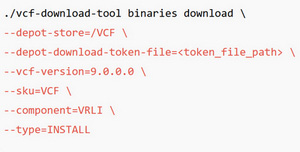 3. Confirms that the downloaded folder and files were copied into the /depot shared folder on the web server hosting the repository Which two actions must the administrator take to resolve the issue? (Choose two.)
-
A
Reconfigure the web server to share the /vcf/ folder containing the depot files.
-
B
When configuring the offline depot, the Repository URL should be changed to http://10.138.148.160.
-
C
When configuring the offline depot, the OfflineDepotType should be changed to Local Path.
-
D
Reconfigure the Fleet Manager appliance to share the /data/ folder.
-
E
When configuring the offline depot, the Repository URL should be changed to https://10.138.148.160/depot/.
Reveal answer details
Close answer details
Correct answersA, E
ExplanationTo resolve the "partial or invalid or not reachable" error when configuring the VCF 9.0 Offline Depot, the administrator must address two critical misconfigurations related to the protocol and the file path mapping: Switch to HTTPS (Option E): VMware Cloud Foundation 9.0 enforces HTTPS by default for all depot connections to ensure security.
The administrator's configuration uses http://, which the VCF Fleet Manager will reject (or fail to connect to) unless the system has been explicitly modified via internal properties files to allow insecure transport.
Changing the Repository URL to https://10.138.148.160/depot/ aligns with the default security requirements of the VCF 9.0 binaries download and validation process. Reconfigure Web Server Pathing (Option A): The command --depot-store=/VCF instructs the download tool to create a repository structure rooted at / VCF. The administrator then copied this "downloaded folder" into the /depot folder on the web server, resulting in a nested path (e.g., /var/www /html/depot/VCF/...). However, the configured URL is.../depot/, which points to the parent directory where the required index.json or metadata files are not immediately visible. The administrator must reconfigure the web server (e.g., via DocumentRoot or Alias settings) to explicitly share the specific /vcf/ (or /VCF/) folder content at the target URL so the Fleet Manager can locate the manifest files.
An administrator has observed that the vSphere Global Inventory is only available from the management domain vCenter. The Global Inventory is not available from the workload domain's vCenter. Why is the "Global Inventory" missing from the workload domain's vCenter?
-
A
VCF SSO and vCenter Linking have not been configured.
-
B
Supervisor Management has not been enabled.
-
C
An inventory sync was not run following the workload domain creation.
-
D
An external VIDB instance has not been configured.
Reveal answer details
Close answer details
Correct answerA
ExplanationThe Global Inventory List (GIL) is only available when multi-vCenter SSO domain linking is configured. In VMware Cloud Foundation, the management domain vCenter is deployed first and becomes the root vCenter for global inventory data. For workload domains, their vCenter Servers must beregistered into the same SSO domain and linked with the management-domain vCenter in order for the global inventory data (VMs, hosts, clusters, content libraries) to appear. If a workload domain vCenter is not SSO-linked, it operates in its own identity domain, and thereforecannot access or present Global Inventory, resulting in exactly the symptom described: the management domain vCenter shows the GIL, while the workload domain vCenter does not. Option B (Supervisor Management) relates to vSphere with Tanzu and has no impact on Global Inventory.
Option C (inventory sync) is incorrect--there is no manual sync required; GIL relies entirely on SSO linking.
Option D (VIDB) is not related to vCenter linking or inventory visibility; it is used by VCF Identity Broker. Therefore, the reason the Global Inventory is missing from the workload domain vCenter is thatSSO/ vCenter Linking has not been configured, which is required for federation across all VCF vCenters.
An administrator is managing a VMware Cloud Foundation (VCF) environment. They receive a request from the developers to enable vDefend - Distributed Firewall. However, they noticed It cannot be enabled due to a missing license. Where must the new license be applied?
-
A
-
B
-
C
-
D
Reveal answer details
Close answer details
Correct answerB
ExplanationvDefend-Distributed Firewall is a security capability delivered by NSX within VMware Cloud Foundation.
Although VCF components such as SDDC Manager, VCF Operations, and VCF Automation rely on licensing frameworks, the enforcement and activation of NSX features--including Distributed Firewall-- occur entirely within NSX Manager. To enable vDefend (Distributed Firewall), NSX Manager must detect a valid NSX license that includes security features. Without applying the correct license directly to NSX Manager: The Distributed Firewall feature remains locked vDefend cannot be enabled in workload domains Security rules and micro-segmentation capability remain unavailable VCF does not apply NSX security licensing at the SDDC Manager, VCF Automation, or VCF Operations layers. Instead, NSX Manager handles all feature entitlement checks internally. Therefore, the new license must be installed directly in NSX Manager, under: System # Licensing # NSX # Add License Options A, C, and D are incorrect because none of those components control NSX feature activation.
An administrator is troubleshooting a problem with NSX. Which command can be used to validate installed NSX VIBs on the ESX host?
-
A
-
B
-
C
-
D
Reveal answer details
Close answer details
Correct answerB
ExplanationWhen troubleshooting NSX on an ESXi host, VMware requires verification that NSX VIBs (vSphere Installation Bundles) are installed and in the correct state. VIBs are responsible for NSX datapath, control-plane modules, and kernel extensions on ESXi. The authoritative and documented method to list VIBs on an ESXi host is the command: esxcli software vib list This command displays all installed kernel modules, version numbers, NSX packages, and their installation status. For NSX-T (now part of VCF networking), administrators expect to see VIBs such as nsx-aggservice, nsx-bridge nsx-esx-datapath,, and others. If any required NSX VIBs are missing or inconsistent, the ESXi host will fail to join NSX transport nodes or will show "Not Ready." Option A (esxtop) is for performance monitoring and does not show VIB information.
Option C (nsxcli get version) checks NSX version on Edge Nodes or host transport nodes butdoes not list VIBs.
Option D (esxcfg software list) is an outdated and invalid command.
Question 10
Single choice
An administrator has successfully created a new Organization for All Apps In VMware Cloud Foundation (VCF) Automation. When logging into the new organization using the first user account, only the Overview tab is visible. What is a possible cause of this issue?
-
A
The first user account was assigned the Organization Auditor Role.
-
B
The first user account was assigned the Organization User Role.
-
C
The first user account was assigned a Custom Role.
-
D
The first user account was assigned the Organization Administrator Role.
Reveal answer details
Close answer details
Correct answerB
ExplanationThis issue stems from an incorrect role assignment during the user creation process in VMware Cloud Director (VCF Automation). Organization Administrator Role (Option D): This role grants full control, including visibility of the Administration tab (to manage users, groups, and settings), Data Centers, and Monitor tabs. If the user were an Admin, they would see all tabs. Organization Auditor Role (Option A): This is a read-only role, but by definition, an Auditor can view anything an Organization Administrator can see (including the Administration settings), just without edit rights. Therefore, an Auditor would still see the Administration tab. Organization User Role (Option B): This is a consumer-level role designed for deploying and managing vApps. By default, this role does not have access to the Administration tab or high-level organization settings. If the organization is new and has no vApps or VDCs populated yet, a user with this role might see a very restricted view (effectively just a dashboard or "Overview") because they lack the rights to see the administrative configuration menus. Conclusion: The fact that the "Administration" tab is missing (implied by "only Overview is visible") identifies the user as an Organization User (or a restricted Custom Role) rather than an Administrator or Auditor.
Question 11
Single choice
An administrator attempts to update the VMware vCenter root account password through VMware Cloud Foundation (VCF) Operations. The attempt fails with the following error message, "Failed to authenticate with the guest operating system using the supplied credentials." What is the cause of the failure?
-
A
The password does not meet policy requirements.
-
B
The password was previously updated on the vCenter directly.
-
C
-
D
The SSH service is not running.
Reveal answer details
Close answer details
Correct answerB
ExplanationVMware Cloud Foundation 9.0 Operations manages credentials for integrated components such as vCenter Server through its internal password vault. When administrators modify passwordsdirectly on the component --such as manually changing the vCenter root password--VCF Operations is no longer able to authenticate using its stored credentials. As a result, any password rotation or update operation initiated through VCF Operations fails during the validation step. The error "Failed to authenticate with the guest operating system using the supplied credentials" is a direct symptom of this condition. VCF Operations attempts to log in to vCenter using thepreviously stored credential, which no longer matches the actual root password. Documentation describes this as an "out-of-sync credential state," and the resolution is to perform password remediation to re-synchronize VCF Operations with the system. Option A (password complexity) is irrelevant because complexity is validated only after authentication.
Option C (vCenter down) would generate connectivity errors, not authentication errors.
Option D (SSH disabled) does not prevent password rotation because VCF Operations uses VMware Tools guest operations, not SSH, for authentication.
|