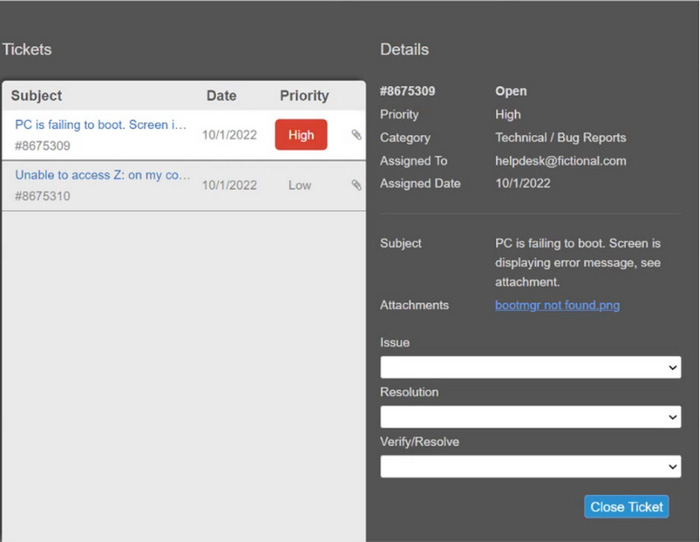
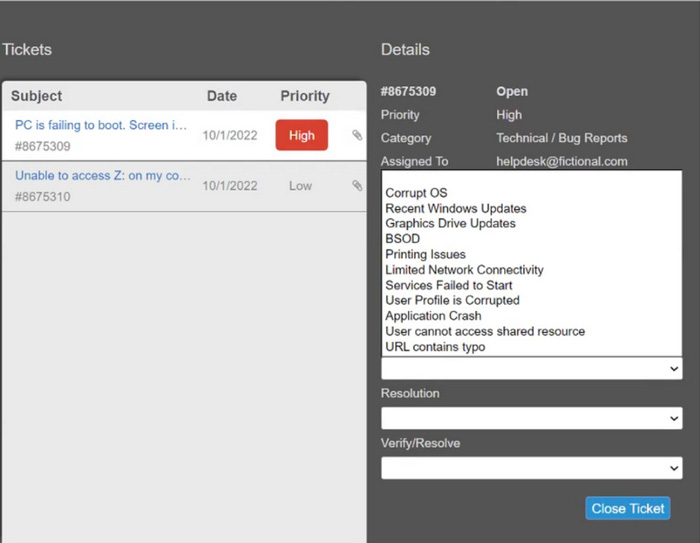
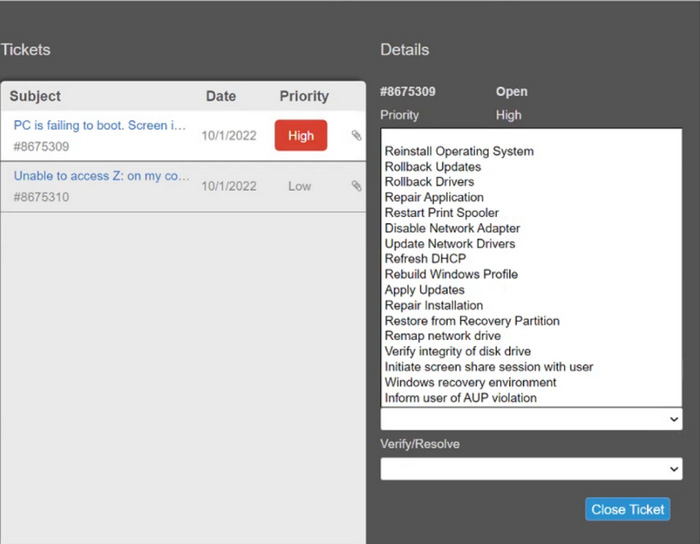
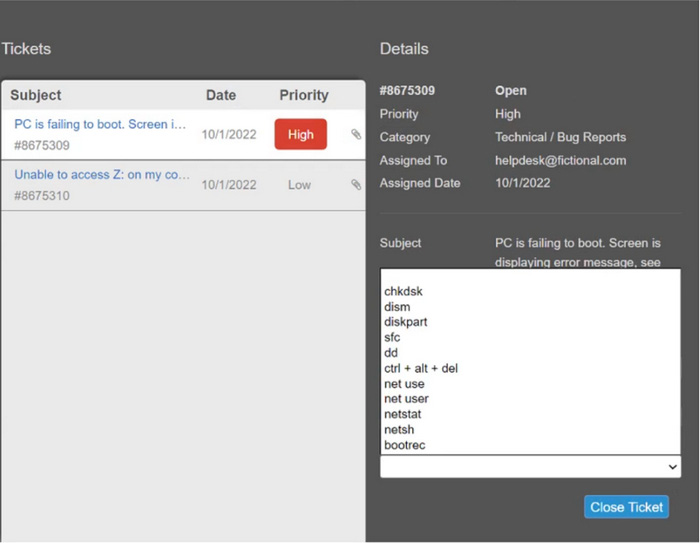
Which of the following features can a technician use to ensure users are following password length requirements?
-
A
-
B
-
C
-
D
Reveal answer details
Close answer details
Correct answerA
ExplanationGroup Policy is a feature in Windows that allows network administrators to manage and configure operating system, application settings, and user settings in an Active Directory environment. It can enforce password policies across the network, including password length requirements, making it the best tool for ensuring compliance with security policies.
A technician is an administrator on a messaging application for a private work group of mixed departments.
One of the technician's colleagues discloses to the group that their employer recently suffered a major security breach and shared details about the breach to the group. Which of the following should the technician do first?
-
A
Ignore the messages as all of the group members work for the same employer.
-
B
Remove the colleague from the group and ask members to delete the messages.
-
C
Message the colleague privately and ask the colleague to delete the messages immediately.
-
D
Contact the supervisor and report the colleague with screen shots of the messages
Reveal answer details
Close answer details
Correct answerD
ExplanationIn the case of a security breach disclosure, it's crucial to follow proper protocol to handle sensitive information responsibly: Ignore the messages: Not appropriate as it disregards the potential impact and severity of the breach.
Remove the colleague and ask members to delete the messages: While it might limit the spread of the information, it doesn't address the breach reporting requirement. Message the colleague privately: Might help in immediate removal of messages but does not follow the proper chain of command and reporting protocols. Contact the supervisor: The correct action, as it ensures that the incident is handled by higher authorities who can take appropriate measures. Reporting with screenshots ensures that there is evidence of the disclosure. References:
CompTIA A+ Exam Objectives [220-1102] - 2.7: Given a scenario, use proper communication techniques and professionalism.
Which of the following helps ensure that a piece of evidence extracted from a PC is admissible in a court of law?
-
A
-
B
Valid operating system license
-
C
Documentation of an incident
-
D
Reveal answer details
Close answer details
A user reports that an Android mobile device takes a long time to boot, and all applications crash when launched. The user installed the applications from a third-party website. Which of the following steps should the technician complete to diagnose the issue?
-
A
Scan the system for malware.
-
B
Clear the web browser cache.
-
C
Enroll the device in an MDM system.
-
D
Confirm the compatibility of the applications with the OS.
Reveal answer details
Close answer details
Correct answerA
ExplanationWhen an Android device experiences slow boot times and application crashes after installing apps from a third-party website, scanning the system for malware is a critical first step. Third-party sources can often host malicious software that can compromise device performance and security. A malware scan can identify and remove such threats, potentially resolving the performance issues and application instability.
Clearing the web browser cache, enrolling the device in an MDM system, and confirming app compatibility are useful steps but do not address the immediate concern of potential malware introduced by third-party app installations.
A technician has been tasked with installing a workstation that will be used tor point-of-sale transactions.
The point-of-sale system will process credit cards and loyalty cards. Which of the following encryption technologies should be used to secure the workstation in case of theft?
-
A
Data-in-transit encryption
-
B
-
C
-
D
Reveal answer details
Close answer details
Correct answerD
ExplanationDisk encryption should be used to secure the workstation in case of theft. Disk encryption can help to protect data on the hard drive by encrypting it so that it cannot be accessed without the correct encryption key.
The calendar application on an employee's smartphone is experiencing frequent crashes, and the smartphone has become unresponsive. Which of the following should a technician do first to resolve the issue?
-
A
Reinstall the application on the smartphone.
-
B
Update the smartphone's OS.
-
C
Reset the smartphone to factory settings.
-
D
Reveal answer details
Close answer details
Correct answerD
ExplanationRebooting the smartphone is the first and simplest step to resolve the issue of frequent crashes and unresponsiveness. Rebooting clears the memory, closes the background apps, and refreshes the system.
It can also fix minor glitches and bugs that may cause the calendar app or the smartphone to malfunction 12. The other options are either too drastic or unnecessary. Reinstalling the application may not solve the problem if the issue is with the smartphone itself. Updating the smartphone's OS may not be possible or helpful if the device is unresponsive or incompatible. Resetting the smartphone to factory settings will erase all the data and settings on the device, which should be the last resort.
References:
1 How to Reboot an Android Smartphone or Tablet (https://www.lifewire.com/reboot-android-smartphone-or-tablet-4127180)
2 How to Restart or Shut Down a Smartphone or Tablet (https://www.computerhope.com/issues/ch001912.htm)
.
Which of the following is used to integrate Linux servers and desktops into Windows Active Directory environments?
-
A
-
B
-
C
-
D
Reveal answer details
Close answer details
Correct answerC
ExplanationSamba is a software suite that allows Linux servers and desktops to integrate with Windows Active Directory environments. Samba can act as a domain controller, a file server, a print server, or a client for Windows networks. Samba can also provide authentication and authorization services for Linux users and
devices using Active Directory.
A technician is troubleshooting boot times for a user. The technician attempts to use MSConfig to see which programs are starting with the OS but receives a message that it can no longer be used to view startup items. Which of the following programs can the technician use to view startup items?
-
A
-
B
-
C
-
D
Reveal answer details
Close answer details
Correct answerD
ExplanationWhen troubleshooting boot times for a user, a technician may want to check which programs are starting with the operating system to identify any that may be slowing down the boot process. MSConfig is a tool that can be used to view startup items on a Windows system, but it may not always be available or functional. In this scenario, the technician receives a message that MSConfig cannot be used to view startup items. As an alternative, the technician can use Task Manager (taskmgr), which can also display the programs that run at startup. To access the list of startup items in Task Manager, the technician can follow these steps: Open Task Manager by pressing Ctrl+Shift+Esc.
Click the "Startup" tab.
The list of programs that run at startup will be displayed.
A user reports receiving constant, unwanted pop-ups and being unable to close the browser window.
These issues have impacted the user's productivity and may have caused the user's files to be altered. Which of the following should a technician do to address these issues with minimal impact to the user?
-
A
Use System Restore to recover the OS files.
-
B
Wipe the computer and install a new copy of the OS.
-
C
Identify whether the disk partition table has been reduced in size.
-
D
Perform a full-system, antivirus scan and check browser notifications.
Reveal answer details
Close answer details
Correct answerD
ExplanationFor issues related to constant, unwanted pop-ups and browser window problems, a careful approach that minimizes impact to the user's data and productivity is advisable: Perform a full-system, antivirus scan: This step involves using antivirus software to scan the entire system for malware or adware that might be causing the pop-ups and browser issues. Check browser notifications: Some unwanted pop-ups may result from browser notification permissions inadvertently granted to malicious or spammy websites. Reviewing and adjusting these settings can help stop the pop-ups.
Question 10
Single choice
Which of the following best describes when to use the YUM command in Linux?
-
A
-
B
To change folder permissions
-
C
-
D
Reveal answer details
Close answer details
Question 11
Single choice
A technician is finalizing a new workstation for a user. The user's PC will be connected to the internet but will not require the same private address each time. Which of the following protocols will the technician MOST likely utilize?
-
A
-
B
-
C
-
D
Reveal answer details
Close answer details
Correct answerA
ExplanationDHCP stands for Dynamic Host Configuration Protocol and it is used to assign IP addresses and other network configuration parameters to devices on a network automatically. This is useful for devices that do not require the same private address each time they connect to the internet.
Question 12
Single choice
A user is trying to use proprietary software, but it crashes intermittently. The user notices that the desktop is displaying a "low memory" warning message. Upon restarting the desktop, the issue persists. Which of the following should a technician do next to troubleshoot the issue?
-
A
-
B
-
C
Reinstall and update the failing software.
-
D
Decrease the page file size.
Reveal answer details
Close answer details
Correct answerC
ExplanationThe troubleshooting steps should start with re-install and update, software can have memory leaks or other issues that cause it to use more memory than it should, leading to low memory warnings
Question 13
Multiple choice
A technician needs to reimage a desktop in an area without network access. Which of the following should the technician use? (Choose two.)
-
A
-
B
-
C
-
D
-
E
-
F
Reveal answer details
Close answer details
Question 14
Multiple choice
A technician needs to configure a newly installed SSD. Which of the following tools should the technician use? (Select two).
-
A
-
B
-
C
-
D
-
E
-
F
Reveal answer details
Close answer details
Correct answersD, F
ExplanationTo configure a new SSD, the technician would use diskmgmt.msc (Disk Management) and diskpart.msc (Diskpart). These tools allow for partitioning, formatting, and managing the SSD. Disk Management is a graphical utility that provides easy access to these tasks, while Diskpart is a command-line tool with advanced features for disk configuration. Diskmgmt.msc: A GUI-based tool used to manage disk partitions. Diskpart.msc: A command-line utility used for advanced disk configuration. References:
CompTIA A+ 220-1102 Exam Objectives, Domain 1.3 Operating Systems - Microsoft Management Console
Question 15
Single choice
While staying at a hotel, a user attempts to connect to the hotel Wi-Fi but notices that multiple SSIDs have very similar names. Which of the following social-engineering attacks is being attempted?
-
A
-
B
-
C
-
D
Reveal answer details
Close answer details
Correct answerA
ExplanationAn evil twin is a type of social-engineering attack that involves setting up a rogue wireless access point that mimics a legitimate one. The attacker can then intercept or modify the traffic of the users who connect to the fake SSID. The attacker may also use phishing or malware to steal credentials or personal information from the users
Question 16
Single choice
A user's Windows 10 workstation with an HDD is running really slowly. The user has opened, closed, and saved many large files over the past week. Which of the following tools should a technician use to remediate the issue?
-
A
-
B
-
C
-
D
Reveal answer details
Close answer details
Correct answerA
ExplanationOver time, especially with frequent opening, modification, and saving of large files, a hard disk drive (HDD) can become fragmented. Fragmentation occurs when pieces of individual files are scattered across the disk, leading to longer read and write times, which can significantly slow down the computer. Disk defragmentation reorganizes these fragmented files, placing the pieces closer together on the drive, which improves access time and overall system performance. Disk Defragment: Using the Disk Defragment tool on a Windows 10 system with an HDD will help in reorganizing the data more efficiently, thus potentially remedying the slow performance issue. The Registry Editor (B) is a tool that allows for the viewing and editing of the Windows registry and is generally not used for performance improvement but rather for system settings and configuration adjustments. System Information (C) provides a detailed look at the computer's hardware and system details but does not offer tools for performance improvement. Disk Cleanup (D) can help free up space on the hard drive by removing temporary files and system files that are no longer needed, which can indirectly improve performance but is not the primary tool for addressing fragmentation.
Question 17
Single choice
A company uses shared drives as part of a workforce collaboration process. To ensure the correct access permissions, inheritance at the top-level folder is assigned to each department. A manager's team is working on confidential material and wants to ensure only the immediate team can view a specific folder and its subsequent files and subfolders. Which of the following actions should the technician most likely take?
-
A
Turn off inheritance on the requested folder only and set the requested permissions to each file manually.
-
B
Turn off inheritance at the top-level folder and remove all inherited permissions.
-
C
Turn off inheritance at the top-level folder and set permissions to each file and subfolder manually.
-
D
Turn off inheritance on the requested folder only, set the requested permissions, and then turn on inheritance under the child folders.
Reveal answer details
Close answer details
Correct answerD
ExplanationTurning off inheritance on the specific folder requested by the manager and setting the requested permissions, followed by turning on inheritance under the child folders, ensures that only the immediate team has access to the confidential material while maintaining the broader permissions structure for other folders and files. This action isolates the folder's permissions from the top-level inheritance, providing a focused security measure for sensitive content.
Question 18
Single choice
A technician is troubleshooting a computer with a suspected short in the power supply. Which of the following is the FIRST step the technician should take?
-
A
-
B
Disconnect the power before servicing the PC.
-
C
Place the PC on a grounded workbench.
-
D
Place components on an ESD mat.
Reveal answer details
Close answer details
Correct answerB
ExplanationThe first step a technician should take when troubleshooting a computer with a suspected short in the power supply is B. Disconnect the power before servicing the PC. This is to prevent any electrical shock or damage to the components. A power supply can be dangerous even when unplugged, as capacitors can maintain a line voltage charge for a long time. Therefore, it is important to disconnect the power cord and press the power button to discharge any residual power before opening the case. The other steps are also important for safety and proper diagnosis, but they should be done after disconnecting the power.
Question 19
Single choice
A user's system is infected with malware. A technician updates the anti-malware software and runs a scan that removes the malware. After the user reboots the system, it once again becomes infected with malware. Which of the following will MOST likely help to permanently remove the malware?
-
A
-
B
-
C
-
D
Reveal answer details
Close answer details
Correct answerB
ExplanationAlthough updating the anti-malware software and running scans are important steps in removing malware, they may not be sufficient to permanently remove the malware if the user keeps engaging in behaviors that leave the system vulnerable, such as downloading unknown files or visiting malicious websites. Therefore, educating the user on safe computing practices is the best way to prevent future infections and permanently remove the malware. Enabling System Restore, Booting into safe mode, and scheduling a scan are not the most efficient ways to permanently remove the malware. Enabling System Restore and Booting into safe mode may help in some cases, but they may not be sufficient to permanently remove the malware. Scheduling a scan is also important for detecting and removing malware, but it may not be sufficient to prevent future infections. https://partners.comptia.org/docs/default-source/resources/comptia-a-220-1102-exam-objectives-(3-0)
Question 20
Multiple choice
A user contacted the help desk to report pop-ups on a company workstation indicating the computer has been infected with 137 viruses and payment is needed to remove them. The user thought the company-provided antivirus software would prevent this issue. The help desk ticket states that the user only receives these messages when first opening the web browser. Which of the following steps would MOST likely resolve the issue? (Select TWO)
-
A
Scan the computer with the company-provided antivirus software
-
B
Install a new hard drive and clone the user's drive to it
-
C
Deploy an ad-blocking extension to the browser.
-
D
Uninstall the company-provided antivirus software
-
E
Click the link in the messages to pay for virus removal
-
F
Perform a reset on the user's web browser
Reveal answer details
Close answer details
Correct answersC, F
Explanation"The user thought the company-provided antivirus software would prevent this issue." The most likely steps to resolve the issue are to deploy an ad-blocking extension to the browser and perform a reset on the user's web browser. Ad-blocking extensions can help to prevent pop-ups and other unwanted content from appearing in the browser, and resetting the browser can help to remove any malicious extensions or settings that may be causing the issue.
Question 21
Single choice
A technician needs to join a Windows client to a domain. Which of the following is required?
-
A
-
B
-
C
Enterprise administrative permissions
-
D
Reveal answer details
Close answer details
Correct answerC
ExplanationJoining a Windows client to a domain requires Enterprise administrative permissions because only domain administrators or authorized users can add computers to an Active Directory (AD) domain. Option A: Local access, Incorrect. A user does not need to be physically near the computer; the action can be performed
remotely.
Option B: Internet connection, Incorrect. A domain join occurs over a local network, not the internet.
Option D: Computer MAC address, Incorrect. MAC addresses are used for network identification but are not required to join a domain.
Steps to Join a Domain: Open Settings > System > About > Domain or Workgroup Settings Click Change settings > Change
Enter the domain name and provide admin credentials Restart the computer References:
CompTIA A+ 220-1102, Objective 1.6 ?Windows Installation and Configuration
Question 22
Single choice
A customer needs to purchase a desktop capable of rendering video. Which of the following should the customer prioritize?
-
A
-
B
-
C
-
D
Reveal answer details
Close answer details
Correct answerC
ExplanationFor rendering video, the most critical component a customer should prioritize in a desktop is: GPU (Graphics Processing Unit): The GPU is specifically designed to handle complex graphics and video rendering tasks. A powerful GPU will significantly improve performance in video rendering applications.
NIC (Network Interface Card):
Important for network connectivity but irrelevant for video rendering. USB: Useful for peripherals but does not impact video rendering capabilities. HDMI: An important output interface for connecting monitors but not crucial for the rendering process itself.
References:
CompTIA A+ 220-1102 Exam Objectives, Section 1.8: Explain common OS types and their purposes, including hardware components for specific tasks.
GPU importance in video rendering documentation.
Question 23
Single choice
Windows updates need to be performed on a department's servers. Which of the following methods should be used to connect to the server?
-
A
-
B
-
C
-
D
Reveal answer details
Close answer details
Question 24
Single choice
A change advisory board authorized a setting change so a technician is permitted to implement the change. The technician successfully implemented the change. Which of the following should be done NEXT?
-
A
Document the date and time of change.
-
B
Document the purpose of the change.
-
C
-
D
Document findings of the sandbox test.
Reveal answer details
Close answer details
Correct answerA
ExplanationAfter implementing a change authorized by the change advisory board (CAB), the technician should document the date and time of change as part of the post-implementation review. This helps to track the change history, verify the success of the change, and identify any issues or incidents caused by the change. Documenting the purpose of the change, the risk level, and the findings of the sandbox test are all part of the pre-implementation activities that should be done before submitting the change request to the
CAB. References:
https://www.manageengine.com/products/service-desk/itil-change-management/cab-change-advisory-board.html
https://www.servicenow.com/content/dam/servicenow-assets/public/en-us/doc-type/success/quick-answer/
change-advisory-board-setup.pdf
Question 25
Single choice
A user is experiencing frequent malware symptoms on a Windows workstation. The user has tried several times to roll back the state but the malware persists. Which of the following would MOST likely resolve the issue?
-
A
Quarantining system files
-
B
Reimaging the workstation
-
C
Encrypting the hard drive
-
D
Disabling TLS 1.0 support
Reveal answer details
Close answer details
Correct answerC
ExplanationEncrypting the hard drive would most likely resolve the issue
Question 26
Single choice
A user is unable to access a remote server from a corporate desktop computer using the appropriate terminal emulation program. The user contacts the help desk to report the issue. Which of the following clarifying questions would be most effective for the help desk technician to ask the user in order to understand the issue?
-
A
What is the error message?
-
B
Does the program work on another computer?
-
C
Did the program ever work?
-
D
Is anyone else having this issue?
Reveal answer details
Close answer details
Correct answerA
ExplanationThe most effective clarifying question for the help desk technician to ask the user in order to understand the issue is A. What is the error message? This question will help the technician to identify the possible cause and solution of the problem, as the error message will provide specific information about the nature and location of the error, such as the server name, the port number, the protocol, the authentication method, or the network status. The error message will also help the technician to troubleshoot the issue by following the suggested steps or searching for the error code online. This question is more effective than the other choices because:
B. Does the program work on another computer? is not a very helpful question, as it will not reveal the
source of the error or how to fix it. The program may work on another computer for various reasons, such as different network settings, firewall rules, permissions, or software versions. However, this question will not tell the technician what is wrong with the user's computer or the remote server, or what needs to be changed or updated to make the program work. C. Did the program ever work? is not a very relevant question, as it will not address the current issue or how to resolve it. The program may have worked in the past, but it may have stopped working due to changes in the network configuration, the server status, the software updates, or the user credentials. However, this question will not tell the technician what has changed or how to restore the program functionality. D. Is anyone else having this issue? is not a very useful question, as it will not explain the reason or the solution for the error. The issue may affect only the user, or multiple users, depending on the scope and the impact of the error. However, this question will not tell the technician what is causing the error or how to fix it for the user or the others.
References:
How to Troubleshoot Terminal Emulation Problems - Techwalla : How to Read and Understand Windows Error Messages - Lifewire : How to Troubleshoot Network Connectivity Problems - How-To Geek : How to Troubleshoot Software Problems - dummies : How to Troubleshoot Common PC Issues For Users -
MakeUseOf
Question 27
Single choice
A user is unable to browse a website on a PC. Which of the following commands should a technician use to verify the PC's DNS resolution for the website?
-
A
-
B
-
C
-
D
Reveal answer details
Close answer details
Correct answerA
ExplanationThe nslookup command is a network administration tool used for querying the Domain Name System (DNS) to obtain domain name or IP address mapping or for any other specific DNS record. It's the most direct way to verify if a PC can resolve a website's domain name to its IP address.
Here's why the other options are not the primary tools for this task: Option B: hostname: This command displays the hostname of the computer.
Option C: tracert: This command traces the route packets take to reach a specific destination. It can help identify network connectivity issues but doesn't directly test DNS resolution.
Option D: netstat: This command displays active network connections and listening ports.
It's not used for DNS troubleshooting.
How to use nslookup: Open a command prompt.
Type nslookup <website address> (e.g., nslookup google.com) and press Enter. The output will show the DNS server used and the IP address(es) associated with the website.
Question 28
Single choice
Which of the following Wi-Fi protocols is the MOST secure?
-
A
-
B
-
C
-
D
Reveal answer details
Close answer details
Correct answerA
Explanationhttps://partners.comptia.org/docs/default-source/resources/comptia-a-220-
1102-exam-objectives-(3-0)
Question 29
Multiple choice
A user connected a smartphone to a coffee shop's public Wi-Fi and noticed the smartphone started sending unusual SMS messages and registering strange network activity. A technician thinks a virus or other malware has infected the device. Which of the following should the technician suggest the user do to best address these security and privacy concerns? (Choose two.)
-
A
Disable Wi-Fi autoconnect.
-
B
Stay offline when in public places.
-
C
Uninstall all recently installed applications.
-
D
Schedule an antivirus scan.
-
E
-
F
Reveal answer details
Close answer details
Question 30
Single choice
Which of the following is a situation in which a surge suppressor is considered critical?
-
A
The electrical source is not grounded.
-
B
A device requires 220V or higher.
-
C
A device is being turned on for the first time.
-
D
The electrical source is near high humidity.
Reveal answer details
Close answer details
Question 31
Single choice
A user states that every time they turn on their computer they have to change the computer's time and date. Which of the following should the technician perform FIRST to resolve this issue?
-
A
-
B
Synchronize with a different time date server
-
C
Replace the drive cache battery
-
D
Perform a firmware update
Reveal answer details
Close answer details
Question 32
Single choice
An administrator received a new shipment of mobile devices. Per company policy, all enterprise-issued devices must have two authentication methods, and the organization has already enforced the use of PIN codes as one method. Which of the following device features should the administrator enable?
-
A
-
B
-
C
-
D
Reveal answer details
Close answer details
Question 33
Single choice
A technician is implementing the latest application security updates for endpoints on an enterprise network. Which of the following solutions should the technician use to ensure device security on the network while adhering to industry best practices?
-
A
Automate the patching process
-
B
Monitor the firewall configuration,
-
C
Implement access control lists.
-
D
Reveal answer details
Close answer details
Question 34
Single choice
An administrator needs to back up the following components of a single workstation: 1. The installation of the operating system
2. Applications
3. User profiles
4. System settings Which of the following backup methods can the administrator use to ensure the workstation is properly backed up?
-
A
-
B
-
C
-
D
Reveal answer details
Close answer details
Correct answerB
ExplanationAn image backup captures a complete snapshot of the entire system at a specific point in time, including the operating system, installed applications, user profiles, and system settings. This method is most suitable for backing up the components listed in the question because it ensures that every aspect of the workstation, from the core OS to individual user settings, is preserved and can be restored in its entirety.
This is crucial for quickly recovering a system to a fully operational state after a failure or when migrating to new hardware. Other methods like differential, synthetic, and archive backups do not provide the comprehensive one-step restoration capability that an image backup offers for the complete system recovery.
Question 35
Single choice
A workstation is displaying a message indicating that a user must exchange cryptocurrency for a decryption key. Which of the following is the best way for a technician to return the device to service safely?
-
A
-
B
Reinstall the operating system.
-
C
Install a software firewall.
-
D
-
E
Comply with the on-screen instructions.
Reveal answer details
Close answer details
Question 36
Single choice
A user receives a call from someone claiming to be a technical support agent. The caller asks the user to log in to the computer. Which of the following security measures should the user take to ensure security and privacy?
-
A
Only accept calls from known people.
-
B
Disregard any suspicious emails.
-
C
Update the antivirus software.
-
D
Enable two-factor authentication.
-
E
Install a malware scanner.
Reveal answer details
Close answer details
Correct answerA
ExplanationThis is a scenario of a potential tech support scam, where a fraudster pretends to be a technical support agent and tries to trick the user into giving them access to the computer, personal information, or money.
The user should not trust any unsolicited calls from unknown people claiming to be from tech support, as they might be trying to install malware, steal data, or charge for fake services. The user should only accept calls from known people, such as their IT department, their service provider, or their software vendor, and verify their identity before logging in to the computer. The user should also report any suspicious calls to the appropriate authorities or organizations.
References:
How to protect against tech support scams1
Avoid and report Microsoft technical support scams2 How to Protect Against Technical Support Scams3
How To Recognize and Avoid Tech Support Scams4
Question 37
Single choice
A systems administrator is configuring centralized desktop management for computers on a domain. The management team has decided that all users' workstations should have the same network drives, printers, and configurations. Which of the following should the administrator use to accomplish this task?
-
A
Network and Sharing Center
-
B
-
C
-
D
-
E
Reveal answer details
Close answer details
Question 38
Single choice
Which of the following filesystem formats would be the BEST choice to ensure read and write compatibility of USB flash drives across several generations of Microsoft operating systems?
-
A
-
B
-
C
-
D
Reveal answer details
Close answer details
Correct answerD
ExplanationThe best filesystem format to ensure read and write compatibility of USB flash drives across several generations of Microsoft operating systems is FAT32. FAT32 stands for File Allocation Table 32-bit and is a filesystem format that organizes and manages files and folders on storage devices using 32-bit clusters.
FAT32 is compatible with most Microsoft operating systems since Windows 95 OSR, as well as other operating systems such as Linux and Mac OS X. FAT32 can support storage devices up to 2TB in size and files up to 4GB in size. APFS stands for Apple File System and is a filesystem format that organizes and manages files and folders on storage devices using encryption, snapshots and cloning features. APFS is compatible with Mac OS X 10.13 High Sierra and later versions but not with Microsoft operating systems natively. Ext4 stands for Fourth Extended File System and is a filesystem format that organizes and manages files and folders on storage devices using journaling, extents and delayed allocation features.
Ext4 is compatible with Linux operating systems but not with Microsoft operating systems natively.
Question 39
Single choice
A systems administrator is creating periodic backups of a folder on a Microsoft Windows machine. The source data is very dynamic, and files are either added or deleted regularly. Which of the following utilities can be used to `mirror the source data for the backup?
-
A
-
B
-
C
-
D
Reveal answer details
Close answer details
Correct answerC
ExplanationRobocopy is a command-line utility that can be used to mirror the source data for the backup. It can copy files and folders with various options, such as copying only changed files, preserving attributes and permissions, and retrying failed copies. Robocopy is more powerful and flexible than copy or xcopy, which are simpler commands that can only copy files and folders without mirroring or other advanced features.
Copy-Item is a PowerShell cmdlet that can also copy files and folders, but it is not a native Windows utility and it requires PowerShell to run.
References:
https://windowsreport.com/mirror-backup-software/
Question 40
Single choice
A remote user is experiencing issues connecting to a corporate email account on a laptop. The user clicks the internet connection icon and does not recognize the connected Wi-Fi. The help desk technician, who is troubleshooting the issue, assumes this is a rogue access point. Which of the following is the first action the technician should take?
-
A
Restart the wireless adapter.
-
B
Launch the browser to see if it redirects to an unknown site.
-
C
Instruct the user to disconnect the Wi-Fi.
-
D
Instruct the user to run the installed antivirus software.
Reveal answer details
Close answer details
Correct answerC
ExplanationThe first action the technician should take is to instruct the user to disconnect the Wi-Fi . This is because rogue access points can be used to steal sensitive information from users, and it is important to prevent the user from accessing the network until the issue has been resolved. Restarting the wireless adapter or running the installed antivirus software may not be effective in this situation, as they do not address the root cause of the problem . Launching the browser to see if it redirects to an unknown site may also not be helpful, as it does not provide any information about the Wi-Fi connection itself .
Question 41
Single choice
A user is attempting to make a purchase at a store using a phone. The user places the phone on the payment pad, but the device does not recognize the phone. The user attempts to restart the phone but still has the same results. Which of the following should the user do to resolve the issue?
-
A
Turn off airplane mode while at the register.
-
B
Verify that NFC is enabled.
-
C
Connect to the store's Wi-Fi network.
-
D
Enable Bluetooth on the phone.
Reveal answer details
Close answer details
Correct answerB
ExplanationThe user should verify that NFC is enabled on their phone. NFC is a technology that allows two devices to communicate with each other when they are in close proximity NFC (Near Field Communication) technology allows a phone to wirelessly communicate with a payment terminal or other compatible device. In order to use NFC to make a payment or transfer information, the feature must be enabled on the phone. Therefore, the user should verify that NFC is enabled on their phone before attempting to make a payment with it. The other options, such as turning off airplane mode, connecting to Wi-Fi, or enabling Bluetooth, do not pertain to the NFC feature and are unlikely to resolve the issue. This information is covered in the Comptia A+ Core2 documents/guide under the Mobile Devices section.
Question 42
Single choice
A user receives a call from someone who claims to be from the user's bank and requests information to ensure the user's account is safe. Which of the following social-engineering attacks is the user experiencing?
-
A
-
B
-
C
-
D
Reveal answer details
Close answer details
Correct answerD
ExplanationThe user is experiencing a vishing attack. Vishing stands for voice phishing and is a type of social-engineering attack that uses phone calls or voice messages to trick users into revealing personal or financial information. Vishing attackers often pretend to be from legitimate organizations, such as banks, government agencies or service providers, and use various tactics, such as urgency, fear or reward, to persuade users to comply with their requests. Phishing is a type of social-engineering attack that uses fraudulent emails or websites to trick users into revealing personal or financial information. Phishing does not involve phone calls or voice messages. Smishing is a type of social-engineering attack that uses text messages or SMS to trick users into revealing personal or financial information. Smishing does not involve phone calls or voice messages. Whaling is a type of social-engineering attack that targets high-profile individuals, such as executives, celebrities or politicians, to trick them into revealing personal or financial information. Whaling does not necessarily involve phone calls or voice messages.
References:
CompTIA A + Core 2 (220-1002) Certification Exam Objectives Version 4.0, Domain 3.1
Question 43
Single choice
A user is unable to access the company's network. A technician learns the user's account became inaccessible after multiple unsuccessful login attempts. The user also changed their password before the issue started. Which of the following steps should the technician take to resolve the issue?
-
A
Escalate the user's issue to the network team.
-
B
Reset the user's password.
-
C
Unlock the user's account.
-
D
Verify the user's login and password.
Reveal answer details
Close answer details
Correct answerC
ExplanationReferences:
If multiple unsuccessful attempts led to the account being locked, the technician should unlock the account. Core 2 covers user account management practices, including unlocking accounts and managing failed login attempts (Core 2 Objective 2.5).
Question 44
Single choice
A technician has verified that a user's computer has a virus, and the antivirus software is out Of date. Which of the following steps should the technician take NEXT?
-
A
-
B
use a previous restore point,
-
C
Educate the end user about viruses
-
D
Download the latest virus definitions
Reveal answer details
Close answer details
Correct answerD
ExplanationThis will ensure that the antivirus software is up-to-date, and can detect any new viruses that may have been released since the last virus definition update. The CompTIA A+ Core 2 220-1002 exam covers this topic in the following domains: 1.3 Explain the importance of security awareness and 2.2 Given a scenario, use secure data management and disaster recovery principles.
Question 45
Multiple choice
A user calls the help desk and reports a workstation is infected with malicious software.
Which of the following tools should the help desk technician use to remove the malicious software?
(Select TWO).
-
A
-
B
-
C
Windows Backup and Restore
-
D
-
E
-
F
Reveal answer details
Close answer details
Correct answersA, E
ExplanationThe correct answers are
E. Windows Defender and
A. File Explorer. Windows Defender is a built-in antivirus program that can detect and remove malicious software from a workstation. File Explorer can be used to locate and delete files associated with the malicious software
Question 46
Single choice
When a user is browsing a website on a smartphone, a pop-up appears. The pop-up states that the system has been breached and directs the user to an application to resolve the breach. Which of the following should the user do?
-
A
Close the website and ignore the pop-up
-
B
-
C
Download and install the application to resolve the issue
-
D
Analyze the smartphone to find the source of the breach
Reveal answer details
Close answer details
Correct answerA
ExplanationThis is a scareware scam that attempts to trick users into installing malicious applications. The best action is to close the website and ignore the pop-up.
Option B: Replace the smartphone, Incorrect. The phone is likely not compromised; it is just displaying a
fake warning.
Option C: Download and install the application to resolve the issue, Incorrect. Doing so could infect the device with malware.
Option D: Analyze the smartphone to find the source of the breach, Unnecessary, as there is no real breach. References:
CompTIA A+ 220-1102, Objective 2.5 ?Common Security Threats
Question 47
Single choice
A newly hired employee is trying to enroll a personal mobile device in the company's mobile device management system. After the initial attempt, the employee receives a notification stating, "not compliant - call support.' Which of the following is the reason why the employee is receiving this message?
-
A
-
B
-
C
The device has been jailbroken.
-
D
The account has no profile picture.
Reveal answer details
Close answer details
Question 48
Single choice
A user reports a hardware issue to the help desk. Which of the following should the help desk technician do first when responding to the user?
-
A
Ask the user for the model number of the hardware.
-
B
Offer a temporary replacement device to the user.
-
C
Submit the issue to the manufacturer.
-
D
Remotely install updates to the device driver.
Reveal answer details
Close answer details
Question 49
Single choice
A company was recently attacked by ransomware. The IT department has remediated the threat and determined that the attack method used was email. Which of the following is the most effective way to prevent this issue from reoccurring?
-
A
-
B
Malware preventionsoftware
-
C
-
D
Stateful firewall inspection
Reveal answer details
Close answer details
Correct answerC
ExplanationTo prevent ransomware attacks via email, the most effective way is End user education (C). Educating users about the dangers of phishing emails, how to recognize suspicious emails, and the importance of not clicking on unknown links or attachments can significantly reduce the risk of ransomware infections.
Awareness and training can empower users to act as the first line of defense against such cyber threats
Question 50
Single choice
A technician is installing RAM in a new workstation and needs to protect against electrostatic discharge. Which of the following will best resolve this concern?
-
A
-
B
-
C
-
D
Reveal answer details
Close answer details
Question 51
Single choice
A user's computer unexpectedly shut down immediately after the user plugged in a USB headset. Once the user turned the computer back on, everything was functioning properly, including the headset. Which of the following Microsoft tools would most likely be used to determine the root cause?
-
A
-
B
-
C
-
D
Reveal answer details
Close answer details
Correct answerA
ExplanationEvent Viewer is a Microsoft tool that records and displays system events, errors, warnings, and information. Event Viewer can help troubleshoot and diagnose problems, such as unexpected shutdowns, by showing the details of what happened before, during, and after the incident. Event Viewer can also show the source of the event, such as an application, a service, a driver, or a hardware device. By using
Event Viewer, a technician can identify the root cause of the unexpected shutdown, such as a power failure, a thermal event, a driver conflict, or a malware infection.
Question 52
Single choice
A technician needs lo formal a USB drive to transfer 20GB of data from a Linux computer to a Windows computer. Which of the following filesystems will the technician MOST likely use?
-
A
-
B
-
C
-
D
Reveal answer details
Close answer details
Correct answerC
ExplanationSince Windows systems support FAT32 and NTFS "out of the box" and Linux supports a whole range of them including FAT32 and NTFS, it is highly recommended to format the partition or disk you want to share in either FAT32 or NTFS, but since FAT32 has a file size limit of 4.2 GB, if you happen to work with huge files, then it is better you use NTFS
Question 53
Single choice
Each time a user tries to go to the selected web search provider, a different website opens. Which of the following should the technician check FIRST?
-
A
-
B
-
C
-
D
Reveal answer details
Close answer details
Correct answerC
ExplanationWhen a user experiences unexpected or erratic behavior while browsing the internet, it could be caused by the DNS servers. DNS translates human-readable domain names (like google.com) into IP addresses, which computers can use to communicate with web servers. If the DNS servers are not functioning correctly or have been compromised, it can result in the browser being redirected to unintended websites.
Question 54
Single choice
A technician installed a new application on a workstation. For the program to function properly, it needs to be listed in the Path Environment Variable. Which of the following Control Panel utilities should the technician use?
-
A
-
B
-
C
-
D
Reveal answer details
Close answer details
Correct answerA
ExplanationSystem is the Control Panel utility that should be used to change the Path Environment Variable. The Path Environment Variable is a system variable that specifies the directories where executable files are located.
To edit the Path Environment Variable, the technician should go to System > Advanced system settings >
Environment Variables and then select Path from the list of system variables and click Edit.
Question 55
Single choice
The audio on a user's mobile device is inconsistent when the user uses wireless headphones and moves around. Which of the following should a technician perform to troubleshoot the issue?
-
A
Verify the Wi-Fi connection status.
-
B
Enable the NFC setting on the device.
-
C
Bring the device within Bluetooth range.
-
D
Turn on device tethering.
Reveal answer details
Close answer details
Correct answerC
ExplanationBringing the device within Bluetooth range is the best way to troubleshoot the issue of inconsistent audio when using wireless headphones and moving around. Bluetooth is a wireless technology that allows devices to communicate over short distances, typically up to 10 meters or 33 feet. If the device is too far from the headphones, the Bluetooth signal may be weak or interrupted, resulting in poor audio quality or loss of connection.
Question 56
Single choice
A network administrator is setting up the security for a SOHO wireless network. Which of the following options should the administrator enable to secure the network?
-
A
-
B
-
C
-
D
Reveal answer details
Close answer details
Correct answerB
ExplanationTo secure a SOHO wireless network, enabling WPA3 is the recommended option. WPA3 (Wi-Fi Protected Access3 is the latest security certification program developed by the Wi-Fi Alliance to secure wireless computer networks. It provides cutting-edge security protocols and cryptographic methods to enhance and replace its predecessors, WPA2 and WPA, offering improved protection against brute-force attacks and ensuring better privacy on public networks.
Question 57
Single choice
A user clicks a link in an email. A warning message in the user's browser states the site's certificate cannot be verified. Which of the following is the most appropriate action for a technician to take?
-
A
-
B
Report the employee to the human resources department for violating company policy.
-
C
Restore the computer from the last known backup.
-
D
Close the browser window and report the email to IT security.
Reveal answer details
Close answer details
Question 58
Single choice
The following error is displayed on a user's computer screen: No operating system found Which of the following is the first troubleshooting step a technician should complete?
-
A
Disconnect external storage
-
B
-
C
-
D
Turn on the device in safe mode
Reveal answer details
Close answer details
Correct answerA
ExplanationThe first step is to disconnect external storage (Option A). Sometimes, the system may be attempting to boot from an external drive or USB device instead of the internal hard drive. By removing the external storage, the system will attempt to boot from the correct drive. Flashing the BIOS (Option B) is more complex and typically unnecessary for this issue. Replacing the SATA cable (Option C) may help if there's a hardware issue, but it's not the first troubleshooting step.
Turning on the device in safe mode (Option D) would not work if no operating system is detected. References:
CompTIA A+ Core 2 5.1 - Apply troubleshooting methodologies, including steps for resolving boot issues.
Question 59
Single choice
A user created a file on a shared drive and wants to prevent its data from being accidentally deleted by others. Which of the following applications should the technician use to assist the user with hiding the file?
-
A
-
B
-
C
-
D
Reveal answer details
Close answer details
Correct answerC
ExplanationThe technician should use the File Explorer application to assist the user with hiding the file 1. The user can right-click the file and select Properties. In the Properties dialog box, select the Hidden check box, and then click OK 1.
Question 60
Single choice
A customer is configuring on an old desktop an inexpensive file server to share photos and videos and wants to avoid complicated licensing. Which of the following operating systems should the technician most likely recommend?
-
A
-
B
-
C
-
D
Reveal answer details
Close answer details
Question 61
Single choice
A company acquired a local office, and a technician is attempting to join the machines at the office to the local domain. The technician notes that the domain join option appears to be missing. Which of the following editions of Windows is MOST likely installed on the machines?
-
A
-
B
-
C
-
D
Reveal answer details
Close answer details
Correct answerD
ExplanationWindows Home is the most likely edition of Windows installed on the machines that do not have the domain join option. Windows Home is a consumer-oriented edition that does not support joining a domain or using Group Policy. Only Windows Professional, Education, and Enterprise editions can join a domain
Question 62
Lab simulation
Simulation You need to configure your mobile device to send and receive electronic messages from your company.
Your mobile device must be able to truly synchronize the message state with your desktop, so that when a message is read on your desktop, it is marked as read on your mobile device. These are the proper parameters: 1. Email address: [email protected]
2. Password: P@$$w0rd
3. Pop.techies.com Port: 110 Security: None
4. IMAP.techies.com Port: 993 Security: SSL
5. smtp.techies.com Port: 465 Security: TLS
6. Company SSID: Techies
7. Security: WPA2
8. Passphrase: P@$$w0rd
9. SSID is not broadcasted Instructions: You are not authorized to use the Company's WLAN. The outgoing server does not require login credentials. When you have completed the simulation, please select the done button to submit your answer. 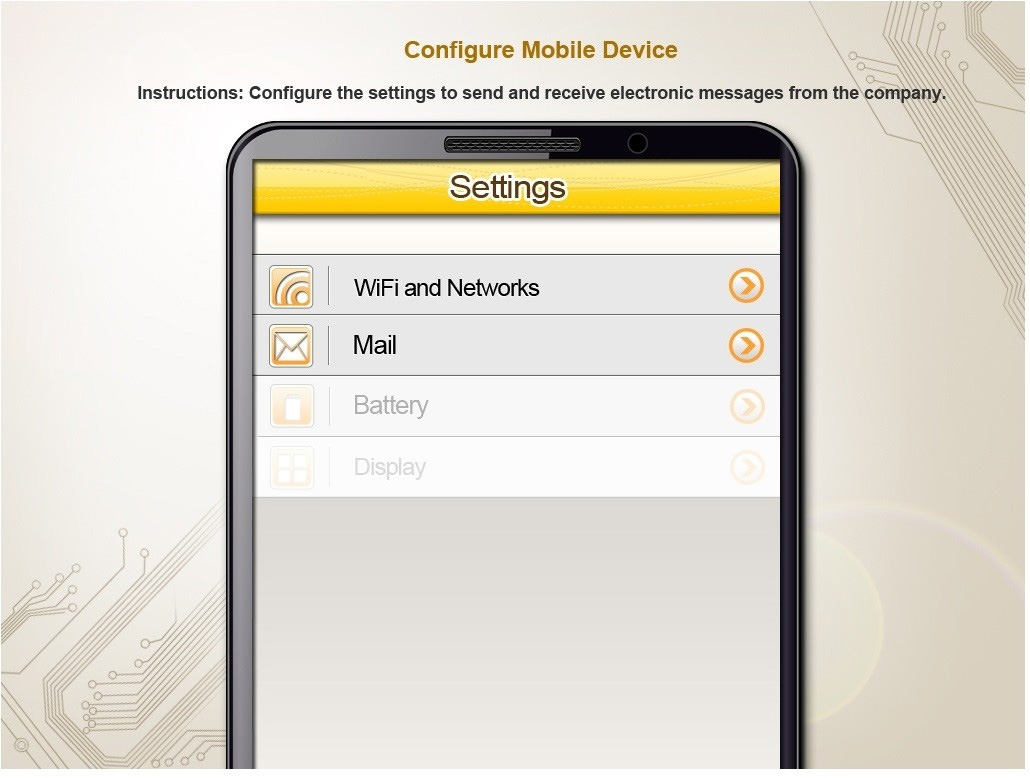 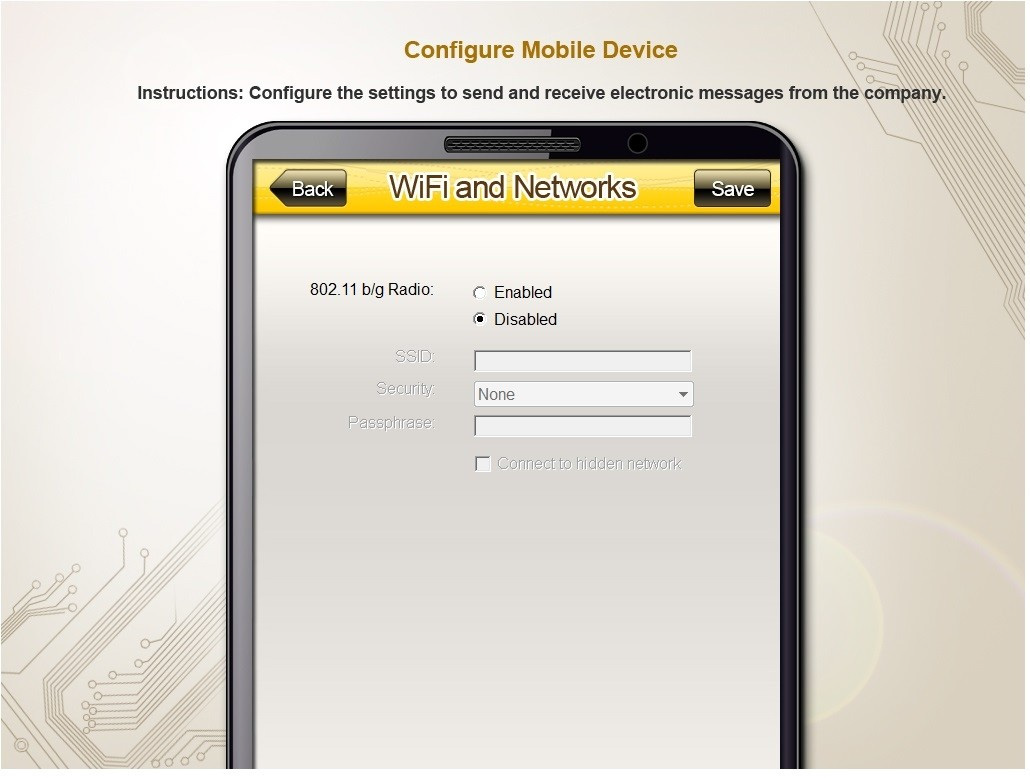 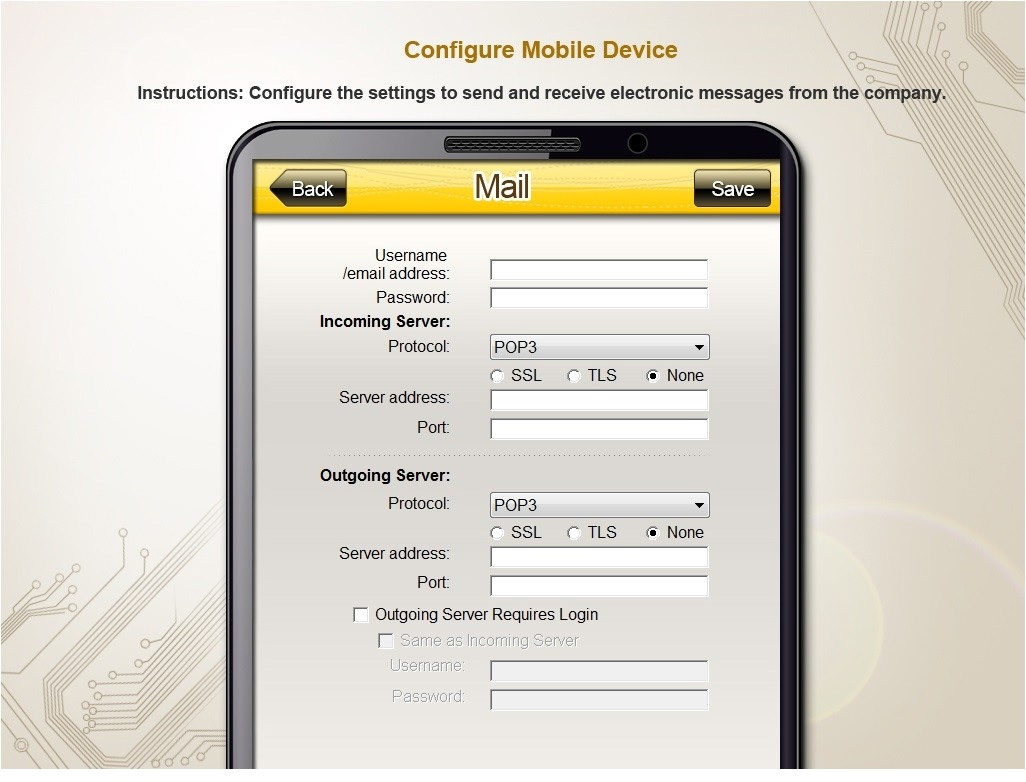
Reveal model answer
Close model answer
Since we are instructed to not use the company's WLAN we only need to worry about the email settings and ignore the WiFi and Networks tab. On the MAIL tab enter information as shown below: 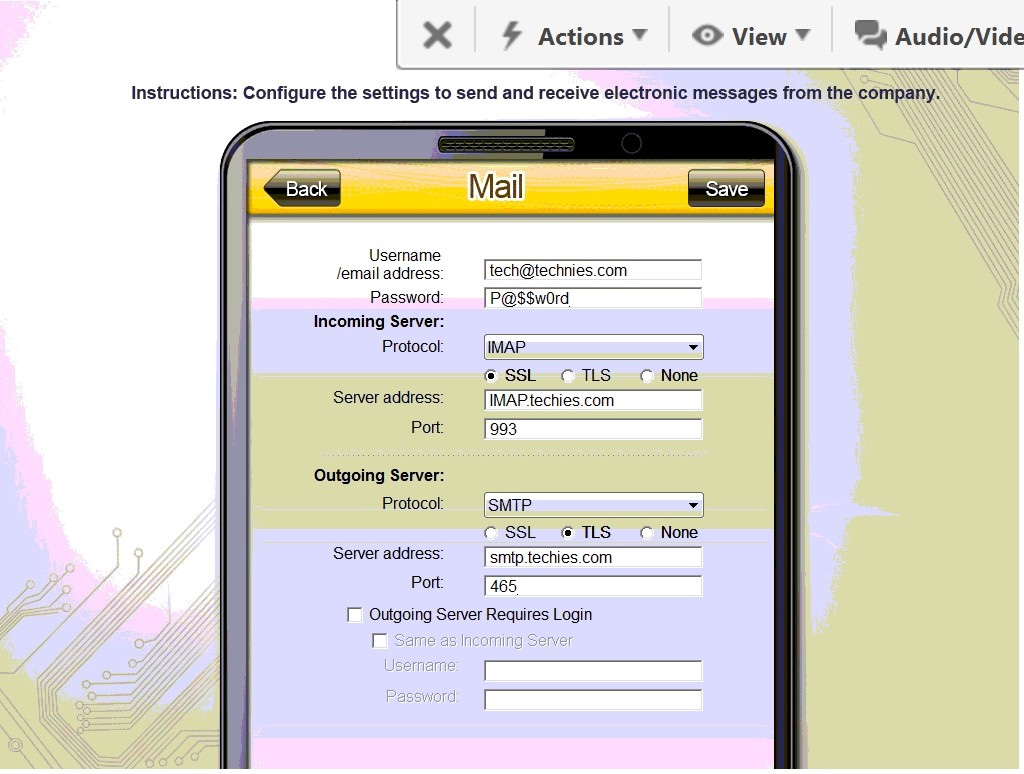
Question 63
Single choice
A user turns on a new laptop and attempts to log in to specialized software, but receives a message stating that the address is already in use. The user logs on to the old desktop and receives the same message. A technician checks the account and sees a comment that the user requires a specifically allocated address before connecting to the software. Which of the following should the technician do to MOST likely resolve the issue?
-
A
Bridge the LAN connection between the laptop and the desktop.
-
B
Set the laptop configuration to DHCP to prevent conflicts.
-
C
Remove the static IP configuration from the desktop.
-
D
Replace the network card in the laptop, as it may be defective.
Reveal answer details
Close answer details
Correct answerC
ExplanationThe new laptop was set up with the static IP it needs to connect to the software. The old desktop is still configured with that IP, hence the conflict.
Question 64
Single choice
Which of the following applications allows a user to create backups in macOS?
-
A
-
B
-
C
-
D
Reveal answer details
Close answer details
Correct answerA
ExplanationTime Machine (Option A) is macOS's built-in backup application. It allows users to automatically back up their entire system, including apps, music, photos, emails, and system files. Time Machine provides an easy way to restore files from a previous state or recover from a system failure. FileVault (Option B) is used for encrypting data, not for backups.
Keychain (Option C) is a password management tool.
Mission Control (Option D) manages open windows and desktops but has no backup functionality. References:
CompTIA A+ Core 2 1.10 - Features and tools of macOS, including backup options like Time Machine.
Question 65
Single choice
A company installed a new backup and recovery system. Which of the following types of backups should be completed FIRST?
-
A
-
B
-
C
-
D
Reveal answer details
Close answer details
Correct answerA
ExplanationThe type of backup that should be completed FIRST after installing a new backup and recovery system is a full backup. This is because a full backup is a complete backup of all data and is the foundation for all other backups. After a full backup is completed, other types of backups, such as differential and incremental backups, can be performed.
Question 66
Single choice
A technician is investigating a workstation that has not received the latest policy changes. Which of the following commands should the technician use to apply the latest domain policy changes?
-
A
-
B
-
C
-
D
Reveal answer details
Close answer details
Correct answerB
ExplanationWhen a workstation has not received the latest policy changes, the gpupdate command is used to manually apply the latest group policies from the domain controller. Option A: sfc /scannowThis command is used to scan and repair corrupted system files, not to update group policies.
Option B: gpupdate /forceThis command forces the workstation to reapply all group policies, ensuring that the latest policies are applied immediately.
Option C: chkdsk /yThis command checks the integrity of the file system and fixes logical file system errors, not to update group policies.
Option D: xcopy /ZpThis command is used for copying files and directories, not for updating group policies. References:
CompTIA A+ 220-1102 Objective 1.6 (Configure Microsoft Windows networking features on a client/ desktop), particularly managing and applying group policies.
Question 67
Single choice
A user receives the following error while attempting to boot a computer. BOOTMGR is missing
press Ctrl+Alt+Del to restart Which of the following should a desktop engineer attempt FIRST to address this issue?
-
A
-
B
-
C
-
D
Reveal answer details
Close answer details
Correct answerA
ExplanationThe error "BOOTMGR is missing" indicates that the boot sector is damaged or missing . The boot sector is a part of the hard disk that contains the code and information needed to start Windows. To fix this error, one of the possible methods is to run Startup Repair from Windows Recovery Environment (WinRE).
Startup Repair is a tool that can automatically diagnose and repair problems with the boot process. References:
"Bootmgr is missing Press Ctrl+Alt+Del to restart" error when you start Windows (https://support.microsoft.com/en-us/topic/-bootmgr-is-missing-press-ctrl-alt-del-to-restart-error-when-you-start-)
windows-8bc1b94b-d243-1027- 5410-aeb04d5cd5e2) Startup Repair: frequently asked questions (https://support.microsoft.com/en-us/windows/startup-repair-)
frequently-asked-questions-f5f412a0-19c4-8e0a-9f68-bb0f17f3daa0)
Question 68
Single choice
A technician needs to document who had possession of evidence at every step of the process. Which of the following does this process describe?
-
A
-
B
-
C
-
D
Reveal answer details
Close answer details
Correct answerC
ExplanationThe process of documenting who had possession of evidence at every step of the process is called chain of custody
Question 69
Single choice
A user requires local administrative access to a workstation. Which of the following Control Panel utilities allows the technician to grant access to the user?
-
A
-
B
Network and Sharing Center
-
C
-
D
Reveal answer details
Close answer details
Correct answerC
ExplanationUser Accounts is a Control Panel utility that allows the technician to manage user accounts and groups on a workstation. The technician can use User Accounts to grant local administrative access to a user by adding the user to the Administrators group. The Administrators group has full control over the workstation and can perform tasks such as installing software, changing system settings, and accessing all files. References:
User Accounts (Control Panel) (https://docs.microsoft.com/en-us/windows/win32/shell/user-accounts)
Local Users and Groups (https://docs.microsoft.com/en-us/windows-server/identity/ad-ds/plan/security-best-practices/local-users-and-groups)
Question 70
Single choice
A user reports a PC is running slowly. The technician suspects it has a badly fragmented hard drive. Which of the following tools should the technician use?
-
A
-
B
-
C
-
D
Reveal answer details
Close answer details
Correct answerC
Explanationdfrgui.exe is a built-in tool in Windows that can be used to defragment a hard drive. Defragmenting a hard drive can improve its performance by rearranging the data on the hard drive so that files are stored in contiguous blocks, which can improve the speed at which the data can be read from the drive. When a hard drive is badly fragmented, it can cause the PC to run slowly as the computer has to work harder to access the scattered data. Therefore final answer is C.
Question 71
Single choice
A technician is modifying the default home page of all the workstations in a company. Which of the following will help to implement this change?
-
A
Insist that the customer is correct and document the concern.
-
B
Listen to the customer and do not speak at all.
-
C
Escalate the issue to the next tier.
-
D
Apologize and ask what would help resolve the issue.
Reveal answer details
Close answer details
Question 72
Single choice
A macOS user reports seeing a spinning round cursor on a program that appears to be frozen. Which of the following methods does the technician use to force the program to close in macOS?
-
A
The technician presses the Ctrl+Alt+Del keys to open the Force Quit menu, selects the frozen application in the list, and clicks Force Quit.
-
B
The technician clicks on the frozen application and presses and holds the Esc key on the keyboard for 10 seconds Which causes the application to force quit.
-
C
The technician opens Finder, navigates to the Applications folder, locates the application that is frozen in the list, right-clicks on the application, and selects the Force Quit option.
-
D
The technician opens the Apple icon menu, selects Force Quit, selects the frozen application in the list, and clicks Force Quit.
Reveal answer details
Close answer details
Correct answerD
ExplanationThe technician opens the Apple icon menu, selects Force Quit, selects the frozen application in the list, and clicks Force Quit. This is the most common method of force quitting a program in macOS. This can be done by clicking on the Apple icon in the top left of the screen, selecting Force Quit, selecting the frozen application in the list, and then clicking Force Quit. This will force the application to quit and the spinning round cursor will disappear.
Question 73
Single choice
A technician is in the process of installing a new hard drive on a server but is called away to another task.
The drive has been unpackaged and left on a desk. Which of the following should the technician perform before leaving?
-
A
Ask coworkers to make sure no one touches the hard drive.
-
B
Leave the hard drive on the table; it will be okay while the other task is completed.
-
C
Place the hard drive in an antistatic bag and secure the area containing the hard drive.
-
D
Connect an electrostatic discharge strap to the drive.
Reveal answer details
Close answer details
Correct answerC
ExplanationThe technician should place the hard drive in an antistatic bag and secure the area containing the hard drive before leaving. This will protect the hard drive from electrostatic discharge (ESD), dust, moisture, and physical damage. Asking coworkers to make sure no one touches the hard drive is not a reliable or secure way to prevent damage. Leaving the hard drive on the table exposes it to ESD and other environmental hazards. Connecting an electrostatic discharge strap to the drive is not enough to protect it from dust, moisture, and physical damage.
Question 74
Single choice
A user contacts the help desk to request assistance with a program feature. The user is in a different building but on the same network as the help desk technician. Which of the following should the technician use to assist the user?
-
A
-
B
-
C
-
D
Reveal answer details
Close answer details
Question 75
Multiple choice
A technician needs to configure a backup solution that will have the least additional expenses and impact on users. Which of the following steps should the technician complete? (Select two.)
-
A
Configure the backup to run when the user logs in
-
B
Configure the backup to run after peak hours
-
C
Use third-party licensed backup software
-
D
Use the built-in OS backup utility
-
E
Configure the backup job to run every hour
-
F
Use an external storage device for the backup
Reveal answer details
Close answer details
Correct answersB, D
ExplanationTo minimize costs and user disruption, the technician should: Option A: Configure the backup to run when the user logs in, Incorrect. This could slow down startup and affect productivity.
Option B: Configure the backup to run after peak hours, This prevents slowdowns during working hours.
Option C: Use third-party licensed backup software, Incorrect. This would increase expenses.
Option D: Use the built-in OS backup utility, This avoids additional licensing costs.
Option E: Configure the backup job to run every hour, Incorrect. Frequent backups may slow down the system unnecessarily.
Option F: Use an external storage device, Incorrect. While useful, it may require additional costs and maintenance. References:
CompTIA A+ 220-1102, Objective 4.1 ?Backup and Recovery Concepts
Question 76
Single choice
When cutting back the protective coating on CAT5 wiring, which of the following is the recommended tool?
-
A
-
B
-
C
-
D
Reveal answer details
Close answer details
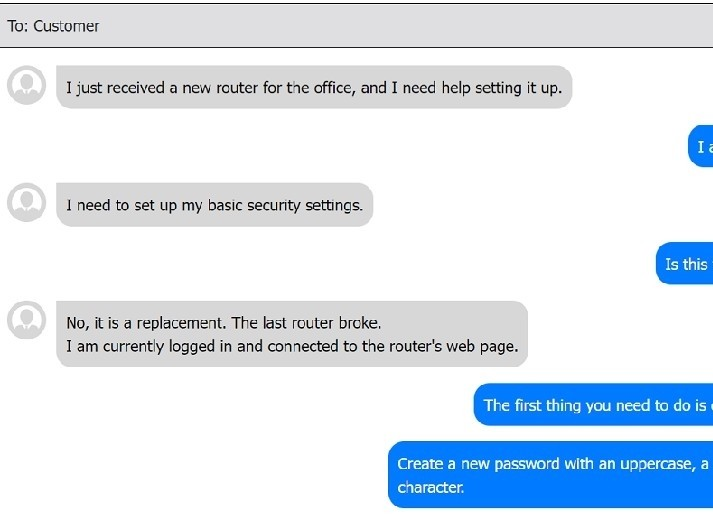
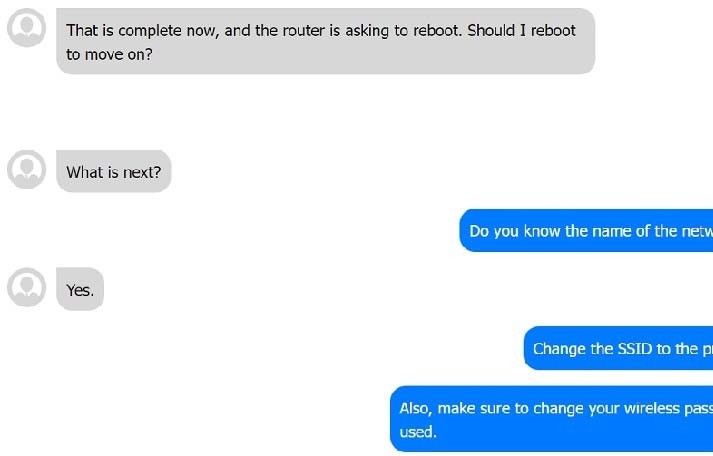
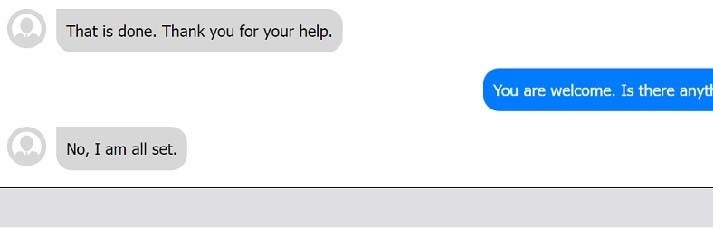
Question 77
Lab simulation
Simulation You have been contacted through the help desk chat application. A user is setting up a replacement SOHO router. Assist the user with setting up the router. INSTRUCTIONS Select the most appropriate statement for each response. Click the SEND button after each response to continue the chat. If at any time you would like to bring back the initial state of the simulation, please click the Reset All button.
Reveal model answer
Close model answer
Question 78
Single choice
A user reported that Windows has crashed several times during the day. A technician needs to check error messages to determine whether the issue pertains to the hardware or an application. Which of the following tools should the technician use?
-
A
-
B
-
C
-
D
Reveal answer details
Close answer details
Correct answerA
ExplanationEvent Viewer (Option A) is the appropriate tool to check for system and application logs, including error messages and crash reports. It helps the technician determine the cause of the crashes by reviewing logged events. Resource Monitor (Option B) tracks real-time usage of system resources but doesn't log errors.
Performance Monitor (Option C) monitors system performance but isn't primarily used for crash diagnostics.
Device Manager (Option D) manages hardware devices but doesn't provide crash logs. References:
CompTIA A+ Core 2 3.1 - Troubleshoot common Windows OS problems using tools like Event Viewer
Question 79
Single choice
An employee recently departed under bad terms, and the client is concerned for their SOHO network security. Which of the following should the technician do FIRST?
-
A
Physically secure the access point
-
B
-
C
Lower the transmission power
-
D
Assign static IP addresses
Reveal answer details
Close answer details
Question 80
Single choice
A technician is editing the hosts file on a few PCs in order to block certain domains. Which of the following would the technician need to execute after editing the hosts file?
-
A
-
B
-
C
Add a new network adapter.
-
D
Reset the network adapter.
Reveal answer details
Close answer details
Correct answerD
ExplanationResetting the network adapter is the best way to apply the changes made to the hosts file on a few PCs.
The hosts file is a text file that maps hostnames to IP addresses and can be used to block certain domains by redirecting them to invalid or local addresses. Resetting the network adapter will clear the DNS cache and force the PC to use the new entries in the hosts file.
Question 81
Single choice
A technician needs to recommend a way to keep company devices for field and home-based staff up to date. The users live in various places across the country and the company has several national offices that staff can go to for technical support Which of the following methods is most appropriate for the users?
-
A
Make office attendance mandatory for one day per week so that updates can be installed.
-
B
Ask users to ensure that they run updates on devices and reboot computers on a regular basis.
-
C
Push updates out via VPN on a weekly basis in a staggered manner so that the network is not affected.
-
D
Configure cloud-based endpoint management software to automatically manage computer updates.
Reveal answer details
Close answer details
Correct answerD
ExplanationFor a company with geographically dispersed staff and the need to keep devices updated, using cloud-based endpoint management software is the most efficient method. This type of software allows IT administrators to remotely manage and push updates to company devices, regardless of their location. It ensures that all devices remain up to date with the latest security patches and software updates without requiring physical access or user intervention. This approach is scalable, reduces the risk of unpatched vulnerabilities, and is convenient for both the IT department and the end-users.
Question 82
Single choice
A customer installed a new web browser from an unsolicited USB drive that the customer received in the mail. The browser is not working as expected, and internet searches are redirected to another site. Which of the following should the user do next after uninstalling the browser?
-
A
Delete the browser cookies and history.
-
B
Reset all browser settings.
-
C
Change the browser default search engine.
-
D
Install a trusted browser.
Reveal answer details
Close answer details
Correct answerD
ExplanationThe customer's web browser is likely infected by a browser hijacker, which is a type of malware that changes the browser's settings and redirects the user to malicious websites. A browser hijacker can also steal the user's personal data, display unwanted ads, and install more malware on the device. To remove a browser hijacker, the user should first uninstall the browser from the Control Panel, then scan the device with an antivirus or anti-malware program, and finally install a trusted browser from a legitimate source.
Deleting the browser cookies and history, resetting the browser settings, or changing the browser default search engine may not be enough to get rid of the browser hijacker, as it may have embedded itself into the system or other browser components.
Question 83
Single choice
Which of the following macOS utilities uses AES-128 to encrypt the startup disk?
-
A
-
B
-
C
-
D
Reveal answer details
Close answer details
Question 84
Multiple choice
Every time a user tries to open the organization's proprietary application on an Android tablet, the application immediately closes. Other applications are operating normally. Which of the following troubleshooting actions would MOST likely resolve the issue? (Choose two.)
-
A
Uninstalling the application
-
B
Gaining root access to the tablet
-
C
Resetting he web browser cache
-
D
Deleting the application cache
-
E
Clearing the application storage
-
F
Disabling mobile device management
Reveal answer details
Close answer details
Question 85
Single choice
A technician needs to track evidence for a forensic investigation on a Windows computer. Which of the following describes this process?
-
A
-
B
Data retention requirements
-
C
Material safety data sheet
-
D
Reveal answer details
Close answer details
Correct answerD
ExplanationChain of custody is a legal term that refers to the chronological documentation or paper trail that records the sequence of custody, control, transfer, analysis, and disposition of materials, including physical or electronic evidence 1. It is important in forensic investigations to establish that the evidence is in fact related to the case, and that it has not been tampered with or contaminated. A technician needs to track evidence for a forensic investigation on a Windows computer by following the proper procedures for collecting, handling, storing, and analyzing the evidence, and documenting every step of the process on a chain of custody form23
Question 86
Single choice
A technician is trying to remove a resilient computer virus. The virus keeps coming back after rebooting the system because some program or service has locked some of the virus' files and is preventing the AV from cleaning the system. Which of the following is the BEST approach to try and remove the virus while minimizing negative impact to the system?
-
A
Use REGSRV32 to deregister the virus DLLs.
-
B
Run the antivirus after rebooting in safe mode.
-
C
Use the repair disk and follow the prompts.
-
D
Use the recovery console to disable all windows services.
Reveal answer details
Close answer details
Question 87
Single choice
A company would like to deploy baseline images to new computers as they are started up on the network. Which of the following boot processes should the company use for this task?
-
A
-
B
-
C
-
D
Reveal answer details
Close answer details
Correct answerD
ExplanationPXE (Preboot Execution Environment) allows a computer to boot from a network server and install a system image remotely. It is commonly used for large-scale deployments because it eliminates the need for physical installation media.
Option A: ISO, Incorrect. ISO files are used for manual installations, but they do not automate network deployments.
Option B: Secure, Incorrect. There is no";secure boot proces"; option for automated deployments. Secure
Boot is a security feature.
Option C: USB, Incorrect. USB boot requires manual installation on each device, making it inefficient for mass deployment. References:
CompTIA A+ 220-1102, Objective 3.3 ?Deployment Methods and Imaging
Question 88
Single choice
A technician is troubleshooting a PC that has been performing poorly. Looking at the Task Manager, the technician sees that CPU and memory resources seem fine, but disk throughput is at 100%. Which of the following types of malware is the system MOST likely infected with?
-
A
-
B
-
C
-
D
Reveal answer details
Close answer details
Correct answerC
ExplanationRansomware is a type of malware that encrypts the files on the victim's computer and demands a ransom for their decryption. Ransomware can cause high disk throughput by encrypting large amounts of data in a short time.
Question 89
Multiple choice
Which of the following file types should be used to install software on a macOS computer? (Select two).
-
A
-
B
-
C
-
D
-
E
-
F
Reveal answer details
Close answer details
Correct answersB, F
ExplanationThe correct answers are
B. .pkg and
F. .dmg. pkg (Package Installer), This is the standard macOS package format for software installations. It often includes installation scripts and can be used for software distribution. dmg (Disk Image File), A macOS disk image file that contains software installers. Users typically mount the file and drag the application into the Applications folder to install it.
Why Other Options Are Incorrect: Option A: .yum, This is used for Linux package management and is not compatible with macOS.
Option C: .msi, This is the Windows Installer package format, not used on macOS.
Option D: .ps1, This is a PowerShell script file used in Windows, not for installing macOS applications. References:
Objective 1.7 ?Identify common features and tools of the macOS/Linux client operating systems.
Question 90
Single choice
A technician has been asked to set up a new wireless router with the best possible security. Which of the following should the technician implement?
-
A
-
B
-
C
-
D
Reveal answer details
Close answer details
Correct answerC
ExplanationWPA3 (Wi-Fi Protected Access version 3) is the latest version of Wi-Fi security and offers the highest level of protection available. It is designed to protect against brute force password attempts and protect against eavesdropping and man-in-the-middle attacks. WPA3 also supports the use of stronger encryption algorithms, such as the Advanced Encryption Standard (AES), which provides additional protection for wireless networks. WPA3 should be implemented in order to ensure the best possible security for the new wireless router.
Question 91
Single choice
A user wants to back up a device's OS and data. Which of the following is the best way to accomplish this task?
-
A
-
B
-
C
-
D
Reveal answer details
Close answer details
Correct answerB
ExplanationA system image is a complete snapshot of everything on a device's storage at a given point in time, including the operating system, installed programs, system settings, and all user files. This method is the best way to back up the OS and data comprehensively because it allows for the restoration of a system to its exact state at the time the image was taken. This is particularly useful in disaster recovery scenarios where it's crucial to restore a system quickly and efficiently to minimize downtime.
Question 92
Single choice
While browsing the internet, a customer sees a window stating antivirus protection is no longer functioning. Which of the following steps should a technician take next? (Select two).
-
A
Isolate the computer from the network
-
B
Enable the firewall service.
-
C
Update the endpoint protection software
-
D
Use System Restore to undo changes.
-
E
Delete the browser cookies
-
F
Reveal answer details
Close answer details
Correct answerA
ExplanationWhen encountering a warning about antivirus protection malfunctioning, the first step should be to isolate the computer from the network to prevent potential spread of malware. Updating the endpoint protection software is also crucial to ensure the latest virus definitions and security features are in place to effectively identify and remove the threat.
Question 93
Single choice
A user in a SOHO asks an off-site, remote technician to connect securely to the user's laptop. The technician is able to connect to the VPN but is unable to connect to the user's laptop. Which of the following settings should the technician review?
-
A
-
B
-
C
-
D
Reveal answer details
Close answer details
Correct answerD
ExplanationWhen a technician is unable to connect to a laptop over a VPN, one of the most common reasons is that the firewall settings on either the laptop or the network are blocking the connection. Wireless protocol: Unrelated, as the technician is already connected to the VPN. DHCP pool: Unlikely to be the issue, as it deals with IP address assignment. Content filtering: Typically involves filtering web content, not affecting direct connections. Firewall: The correct setting to review, as it may block the necessary ports or services required for remote access. References:
CompTIA A+ Exam Objectives [220-1102] - 2.3: Given a scenario, troubleshoot common wired and wireless network problems.
Question 94
Lab simulation
Reveal model answer
Close model answer
Question 95
Single choice
Which of the following combinations meets the requirements for mobile device multifactor authentication?
-
A
-
B
-
C
-
D
Reveal answer details
Close answer details
Correct answerC
ExplanationMultifactor authentication (MFA) requires the use of two or more verification factors to gain access to a resource such as an application, online account, or a VPN. The factors are categorized into something you know (like a password or PIN), something you have (like a security token or a smartphone), and something you are (like a biometric verification such as a fingerprint). Fingerprint and password: This combination meets the criteria for MFA as it uses two different categories of authentication factors: "something you are" (fingerprint) and "something you know" (password). This enhances security by combining two distinct methods of authentication.
Other combinations mentioned:
Password and PIN: Both of these factors fall under the same category of "something you know," and hence, do not constitute multifactor authentication. Password and swipe: Swiping a pattern is similar to a password in that it is something you know, so this does not qualify as multifactor authentication. Swipe and PIN: Again, both of these are "something you know" and do not qualify as multifactor authentication since they fall under the same category.
Question 96
Single choice
A technician is troubleshooting a PC that will not run Windows Defender. Windows Defender has been disabled, and no other antivirus is installed on the PC. Which of the following would have caused this issue?
-
A
-
B
-
C
-
D
Reveal answer details
Close answer details
Correct answerB
ExplanationRootkits are particularly dangerous because they modify the operating system to hide their presence and can disable antivirus software like Windows Defender. Ransomware (A) encrypts files, but usually does not disable antivirus software.
Spyware (C) and Keyloggers (D) typically do not directly disable antivirus programs either. References:
Core 2, Domain 2.3 - Malware types and impacts.
Question 97
Single choice
A remote user is experiencing issues with Outlook settings and asks a technician to review the settings. Which of the following can the technician use to access the user's computer remotely?
-
A
-
B
-
C
-
D
Reveal answer details
Close answer details
Question 98
Lab simulation
Simulation Every time it is rebooted, the message "BOOTMGR is missing" appears. You have previously inserted a Windows 7 installation DVD into the DVD-ROM. Please repair this failure without overwriting the
customers' local user profiles. Instructions: 1. Launch the simulation to repair the failure
2. Type Help in command line to show list of available commands
3. When you have completed the simulation, please select the done button. 
Reveal model answer
Close model answer
1. Boot using Windows 7 DVD: 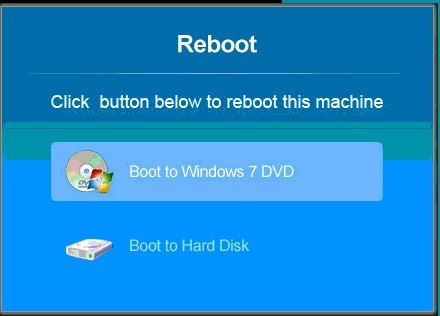 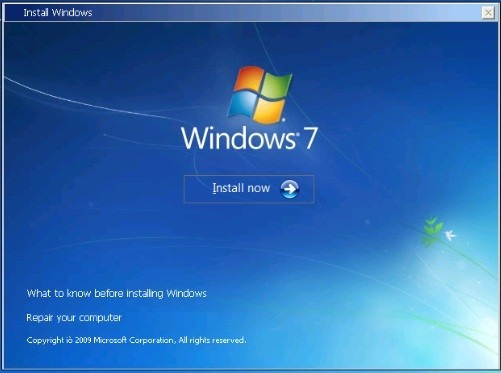 2. Select "Repair your computer" 3. Select recovery tools 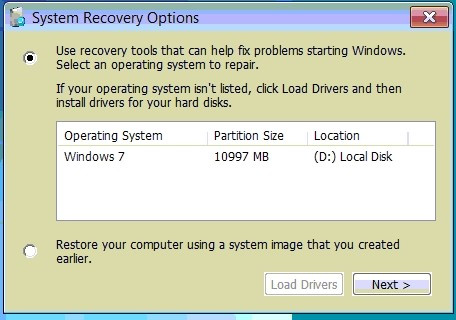 4. Chose command prompt 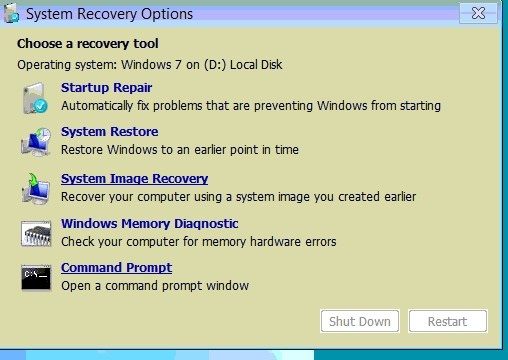 5. Use the command bootrec/fixboot 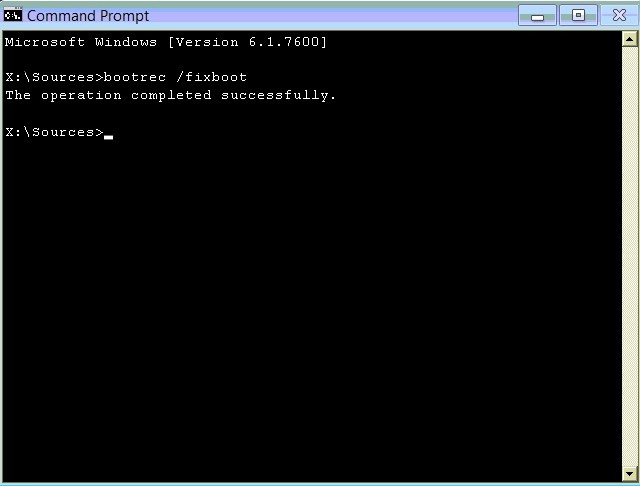
Question 99
Single choice
A user needs assistance changing the desktop wallpaper on a Windows 10 computer. Which of the following methods will enable the user to change the wallpaper using a Windows 10 Settings tool?
-
A
Open Settings, select Accounts, select, Your info, click Browse, and then locate and open the image the user wants to use as the wallpaper
-
B
Open Settings, select Personalization, click Browse, and then locate and open the image the user wants to use as the wallpaper
-
C
Open Settings, select System, select Display, click Browse, and then locate and open the image the user wants to use as the wallpaper
-
D
Open Settings, select Apps, select Apps & features, click Browse, and then locate and open the image the user wants to use as the wallpaper.
Reveal answer details
Close answer details
Correct answerB
ExplanationTo change the desktop wallpaper on a Windows 10 computer using a Windows 10 Settings tool, the user should open Settings, select Personalization, click Browse, and then locate and open the image the user wants to use as the wallpaper
https://www.lifewire.com/change-desktop-background-windows-11-5190733
Question 100
Single choice
A change advisory board just approved a change request. Which of the following is the MOST likely next step in the change process?
-
A
-
B
-
C
Communicate to stakeholders
-
D
Reveal answer details
Close answer details
Correct answerD
ExplanationThe risk analysis should be performed before it's taken to the board. The step after the board approves the change is End User Agreenment Reference:
https://www.youtube.com/watch?v=Ru77iZxuElA&list=PLG49S3nxzAnna96gzhJrzkii4hH_mgW4b&index=59
|