Review the zonestat command zonestat -q -r physical-memory -R high -z dbzone -p -p "zones" 10 24h 60m Select the option that correctly describes the information that is displayed by this command
-
A
It is a sample of dbzone's physical memory usage taken every hour over a 24-hour period Only the top 10 samplings of peak memory usage are displayed. All other utilization data is eliminated
-
B
It is a sample of dbzone's CPU, virtual memory, and networking utilization Physical memory is excluded from the report The sampling is taken every 10 minutes over a 24 hour period and peak utilization is displayed each hour.
-
C
ft is a sample of dbzone's CPU, virtual memory, and networking utilization Physical memory is excluded from the report. The sampling is taken every 10 seconds over a 24- hour period and displayed each hour.
-
D
It is a sample of dbzone's memory and CPU utilization every 10 seconds over a 24-hour period Only peak virtual memory usage and CPU utilization are displayed each hour All other utilization data is eliminated.
-
E
it is a sample of dbzone's physical memory usage taken every 10 seconds over a 24- hour period. Only peak memory usage is displayed each hour All other utilization data is eliminated.
Reveal answer details
Close answer details
You have a Solaris 10 system with a host name of sysA and it uses LDAP as a naming service. You have created a flash archive of sysA and you want to migrate this system to an Oracle Solaris 11 server as a solarislO branded zone The zone status on the Oracle Solaris 11 server is: -zonel 0incomplete/zone/zone1solaris10 excl Select the option that will force the non-global zone to prompt you for a host name and name service the first time it is booted.
-
A
Use zonecfg to change the zonename before booting the system for the first time.
-
B
Use the -u option with the zoneadm -z zonel 0 attach command.
-
C
Use the -u option with the zoneadm -z zonel 0 install command.
-
D
Remove the sysidcfg file from the <zonepath>/root directory before booting the non-global zone.
Reveal answer details
Close answer details
Question 3
Multiple choice
Which three are true of a solansl 0 branded zone running on an Oracle Solaris 11 system? (Choose three.)
-
A
if there are any native non-global zones on the system that you want to migrate, these zones will be migrated into non-global zones on the Solaris 11 system
-
B
The non-global zone must reside on its own ZFS dataset; only ZFS is supported
-
C
The non-global zone can reside on a ZFS dataset or a UFS file system
-
D
The solarisl 0 branded zone can be either a sparse or a whole root non-global zone model.
-
E
The default is the exclusive-IP type.
-
F
When migrated from a stand-alone Solaris system to a solarisl 0 branded zone, the host ID changes to the host ID of the new machine The zone cannot be configured to use the host ID of the original system
-
G
A sparse root zone cannot be converted into a solarislO branded zone.
-
H
The solarisl0 branded zone cannot be an NFS server
Reveal answer details
Close answer details
When setting up Automated Installer (AI) clients, an interactive tool can be used to generate a custom system configuration profile. The profile will specify the time zone, data and time, user and root accounts, and name services used for an AI client installation. This interactive tool will prompt you to enter the client information and an SC profile (XML) will be created. Which interactive tool can be used to generate this question configuration?
-
A
-
B
-
C
-
D
installadm create-profile
Reveal answer details
Close answer details
Correct answerB
ExplanationExplanation: Use the installadm set-criteria command to update the client criteria associated with an AI manifest that you already added to a service using installadm add-manifest. Use the installadm add-manifest command to add a custom AI manifest to an install service. The value of manifest is a full path and file name with .xml extension. The manifest file contains an AI manifest (installation instructions). The manifest file can also reference or embed an SC manifest (system configuration instructions).
Question 5
Multiple choice
The ZFS configuration on your server is: Pool1 6.67G31K/pool Pool1/data31K31K/data 1. Create,
2. List, and
3. Delete a snapshot of the /data file system.
-
A
zfs snapshot pool1/data@now
-
B
zfs create snapshot pool1/data@now
-
C
-
D
zfs list -t snapshot pool1/data
-
E
zfs destroy pool1/data@now
-
F
zfs destroy snapshot pool1/data@now
Reveal answer details
Close answer details
Correct answersA, D, E
ExplanationExplanation: A: Snapshots are created by using the zfs snapshot command, which takes as its only argument the name of the snapshot to create.
D: You can list snapshots as follows:
# zfs list -t snapshot
E: Snapshots are destroyed by using the zfs destroy command. For example:
# zfs destroy tank/home/ahrens@now
Question 6
Multiple choice
Select two statements that correctly describe the capabilities of the Distribution Constructor.
-
A
ISO images for use with the Automated Installer (AI) can be created.
-
B
Bootable USB images can be created for SPARC and x86 architectures.
-
C
A single installation server can be used to create ISO images for SPARC and x86 architectures.
-
D
Checkpoints can be used to pause the build, allowing scripts to run that modify the resulting ISO Image.
-
E
A single Installation server can be used to create ISO images for Solaris 10 and Solaris11 operating systems.
Reveal answer details
Close answer details
Correct answersA, D
ExplanationExplanation: A: You can use the distribution constructor to create the following types of Oracle Solaris
images:
* (A) x86 or SPARC ISO Image for Automated Installations
* Oracle Solaris x86 live CD image
* x86 or SPARC Oracle Solaris text installer image
* x86 Oracle Solaris Virtual Machine Note: You can use the distribution constructor to build custom Oracle Solaris images. Then, you can use the images to install the Oracle Solaris software on individual systems or multiple systems. You can, also, use the distribution constructor to create Virtual Machine (VM) images that run the Oracle Solaris operating system. D: Checkpointing Options
You can use the options provided in the distro_const command to stop and restart the build process at various stages in the image-generation process, in order to check and debug the image that is being built.
This process of stopping and restarting during the build process is called checkpointing. References:
Oracle Solaris 11 Express Distribution Constructor Guide, What are the Components in the
Distribution Constructor?
You are going to use the-Automated installer (AI) to install a non global zone named zone1. You have created a custom manifest for the non-global zone and named it zone1manifest Which command will you use to add this custom manifest to the s11-sparc install service and associate this custom manifest with the non-global zone?
-
A
installadm create-profile -n s11-sparc -f /tmp/zone1manifest.xml - c
-
B
installadm create-manifest -n s11-sparc -f /tmp/zone1manifest.xml -m
-
C
installadm create-client -n s11-sparc -f /tmp/zone1manifest.xml -m zone1manifest -c zonename=
"zone1"
-
D
installadm create-service - n s11-sparc -f /tmp/zone1manifest.xml -m zone1manifest - c
zonename="zone1"
Reveal answer details
Close answer details
Correct answerB
ExplanationExplanation: installadm add-manifest Associates manifests with a specific install service, thus making the manifests available on the network, independently from creating a service. When publishing a non-default manifest, it is required to associate criteria either via criteria entered on the command line (-c) or via a criteria XML file (-C).
References:
installadm
You have Solaris 11 system with a host name of sysA and it uses LDAP as a naming service. You have created a flash archive of sysA and you want to migrate this system to an Oracle Solaris11
server, Solaris10 branded zone. The zone Status on the Oracle Solaris 11 server is: - zone10 incomplete/zone/zone1solaris10exc1 Select the option that will force the non-global zone to prompt you for a host name and name service the first time it is booted.
-
A
Use zonecfg to change the zonename before booting the system for the first time
-
B
Use the - u option with the zoneadm - z zone10 attach command.
-
C
Use the -u option with the zoneadn -z zone10 install command.
-
D
Remove the sysidcfg file from the <zonepath>/root directory before booting the non-global zone.
Reveal answer details
Close answer details
Correct answerC
ExplanationExplanation: Oracle Solaris 10 branded zones ?Oracle Solaris 10 Zones provide an Oracle Solaris 10 environment on Oracle Solaris 11. You can migrate an Oracle Solaris 10 system or zone to a solaris10 zone on an Oracle Solaris 11 system in the following ways: * Create a zone archive and use the archive to create an s10zone on the Oracle Solaris 11 system.
This option applies in the current scenario.
Example of command to Install the Oracle Solaris 10 non-global zone. s11sysB# zoneadm -z s10zone install -u -a /pond/s10archive/s10.flar * Detach the zone from the Oracle Solaris 10 system and attach the zone on the Oracle Solaris 11 zone.
The zone is halted and detached from its current host. The zonepath is moved to the target host, where it is attached. Note:
install [-x nodataset] [brand-specific options]
A subcommand of the zoneadm. Install the specified zone on the system. This subcommand automatically attempts to verify first. It refuses to install if the verify step fails. -u uuid-match
Unique identifier for a zone, as assigned by libuuid(3LIB). If this option is present and the argument is a non-empty string, then the zone matching the UUID is selected instead of the one named by the -z option, if such a zone is present. References:
Oracle Solaris 11 Information Library, Transitioning an Oracle Solaris 10 Instance to an Oracle
Solaris 11 System
Question 9
Multiple choice
Identify the two security features incorporated in the Oracle Solaris 11 Cryptographic Framework.
-
A
Layer 5 IP address encryptions
-
B
Internet protocol security
-
C
Diffie-Kerberos coaxial key encryption
-
D
Signed cryptographic plugins (providers)
-
E
Kernel support for signed antivirus plugins
Reveal answer details
Close answer details
Correct answersD, E
ExplanationExplanation: The framework enables providers of cryptographic services to have their services used by many consumers in the Oracle Solaris operating system. Another name for providers is plugins. The framework allows three types of plugins: * User-level plugins - Shared objects that provide services by using PKCS #11 libraries, such as
pkcs11_softtoken.so.1.
* Kernel-level plugins - Kernel modules that provide implementations of cryptographic algorithms in software, such as AES. Many of the algorithms in the framework are optimized for x86 with the SSE2 instruction set and for SPARC hardware. * Hardware plugins - Device drivers and their associated hardware accelerators. The Niagara chips, the ncp and n2cp device drivers, are one example. A hardware accelerator offloads expensive cryptographic functions from the operating system. The Sun Crypto Accelerator 6000 board is one example. References:
Oracle Solaris Cryptographic Framework (http://docs.oracle.com/cd/E19963-01/html/821-1456/scf-10.html)
Question 10
Multiple choice
Identify two correct statements about the Distribution Constructor. (Choose two.)
-
A
Customs scripts can be used to modify the resulting ISO image created.
-
B
An Image Packaging System (IPS) software repository server is required during installation from an
ISO image.
-
C
Manifest files contain the specifications for the contents and parameters of the ISO images to be created.
-
D
ISO images can be created that dual boot, supporting both x86 and SPARC architectures with a single image
E ISO images for installation of a variety of Oracle Solaris versions and hardware architectures can be created by a single installation server.
Reveal answer details
Close answer details
Question 11
Multiple choice
You need to set up an Oracle Solaris 11 host as an iSCSI target so that the host's disk can be accessed over a storage network. The disk device is c3t4d0. Which six options describe the steps that need to be taken on this host to enable an iSCSI target?
-
A
Create a ZFS file system named iscsi/target.
-
B
Create a zpool named iscsi with disk device c3t4d0
-
C
Create zfs volume named iscsi/target.
-
D
Use the stmfadm command to create a LUN using /dev/zvol/rdsk/iscsi/target.
-
E
Use the stmfadm command to create a LUN using iscsi/target.
-
F
Use the stmfadm command to make the LUN viewable.
-
G
Use the stmfadm command to make the volume viewable.
-
H
Enable the svc:/network/iscsi/target:default Service.
-
I
Use the itadm command to create the iSCSI target.
Reveal answer details
Close answer details
Correct answersB, C, D, F, H, I
ExplanationExplanation: How to Create an iSCSI LUN
The following steps are completed on the system that is providing the storage device.
1. Create a ZFS storage pool.
Example: target# zpool create sanpool mirror c2t3d0 c2t4d0 (C)2. Create a ZFS volume to be used as a SCSI LUN. (D)3. Create a LUN for the ZFS volume.
Example:
target# stmfadm create-lu /dev/zvol/rdsk/sanpool/vol1 Logical unit created:
600144F0B5418B0000004DDAC7C10001 4. Confirm that the LUN has been created.
Example
target# stmfadm list-lu
LU Name: 600144F0B5418B0000004DDAC7C10001 (F) 5. Add the LUN view.
This command makes the LUN accessible to all systems. target# stmfadm add-view 600144F0B5418B0000004DDAC7C10001 How to Create the iSCSI Target This procedure assumes that you are logged in to the local system will contains the iSCSI target.
Note: The stmfadm command manages SCSI LUNs. Rather than setting a special iSCSI property on the ZFS volume, create the volume and use stmfadm to create the LUN. (H) 1. Enable the iSCSI target service.
target# svcadm enable -r svc:/network/iscsi/target:default (I) 2. Create the iSCSI target.
target# itadm create-target References:
Oracle Solaris Administration: Devices and File Systems, Configuring iSCSI Devices With
COMSTAR
Question 12
Multiple choice
New features wore added to ZFS in Oracle Solaris11. Your justification to upgrade from Solaris10 to oracle Solaris11 is that it will be possible to take advantage of the enhancements that were made to ZFS. Identify the three ZFS functions and features that are included in Oracle Solaris 11, but not in Solaris 10.
-
A
-
B
Ability for ZFS to detect and remove redundant data from the tile system
-
C
-
D
Ability to split a mirrored ZFS storage pool
-
E
Ability to use ZFS on the boot drive and boot to a ZFS root file system.
-
F
elimination of the swap file system when using ZFS on the root disk
Reveal answer details
Close answer details
Correct answersA, B, E
ExplanationExplanation: A: ZFS encryption was introduced in ZFS Pool Version Number 30, Solaris Nevada b149. Filesystem encryption since Solaris 11 Express
B: Deduplication was introduced in ZFS Pool Version Number 21, Solaris Nevada b128.
E: Booting From a ZFS Root File System Both SPARC based and x86 based systems use the new style of booting with a boot archive, which is a file system image that contains the files required for booting. When a system is booted from a ZFS root file system, the path names of both the boot archive and the kernel file are resolved in the root file system that is selected for booting. References:
Oracle Solaris ZFS Administration Guide, Booting From a ZFS Root File System
Question 13
Single choice
Review the zonestat command:
zonestate - q physical - memory -R high -z -p -p "zones" 10 24h 60m Select the option that correctly describes the information that is displayed by this command.
-
A
It is a sample of dbzone's physical memory usage taken every hour over a 24-hour period.
Only the top 10 samplings of peak memory usage are displayed.
All other utilization data is eliminated.
-
B
It is a sample of dbzone's CPU, virtual memory, and networking utilization.
Physical memory is executed from the report.
The sampling is taken every 10 minutes over a 24-hour period and peak utilization id displayed each hour.
-
C
It is a sample of dbzone's CPU, virtual memory, and networking utilization.
Physical memory is executed from the report.
The sampling is taken every 10 minutes over a 24-hour period and displayed each hour.
-
D
It is a sample of dbzone's physical memory usage taken every 10 seconds and 24-hour period.
Only peak virtual memory usage and CPU utilization are displayed each hour.
All other Utilization data is eliminated.
-
E
It is a sample of dbzone's physical memory usage taken every 10 seconds and 24-hour period.
Only peak memory usage is displayed each hour.
All other utilization data is eliminated.
Reveal answer details
Close answer details
Correct answerD
ExplanationExplanation: * (Not A, B, C): interval (here 10 seconds): Specifies the length in seconds to pause between
each interval report.
* duration (here 24 h) * -R report[,report] (here high)
Print a summary report. high Print a summary report detailing the highest usage of each resource and zone during any interval of the zonestat utility invocation. Note: The zonestat utility reports on the cpu, memory, and resource control utilization of the currently running zones. Each zone's utilization is reported both as a percentage of system resources and the
zone's configured limits. The zonestat utility prints a series of interval reports at the specified interval. It optionally also prints one or more summary reports at a specified interval. The default output is a summary of cpu, physical, and virtual memory utilization. The -r option can be used to choose detailed output for specific resources.
Question 14
Single choice
you are 10 create a l\-z> me system witn ine roiiowing specmcaiions: Izjb compression enabled cannot consume more than 2 GB from the storage pool redundant data at the block level eliminated mounted as /data Which command creates the desired file system?
-
A
zfs create -o
mountpoint=/data,compression=on,algorithm=lzjb,deduplication=on,quota=2g/pool1/data
-
B
zfs create -o mountpomt=/data compression=on algonthm=lzjb deduphcation=on quota=2g pool!/data
-
C
zfs create -o mountpoint=/data -o compression=on -o dedup=on -o quota=2g pooll/data
-
D
zfs create -o mountpomt=/data -o compression=on -o algorithm=lzjb -o deduplication=on -o quota=2g pool 1/data
-
E
zfs create pool 1 /data zfs set mountpoint=/data,quota=2g.dedup=on,compression=on /pooM/data
Reveal answer details
Close answer details
Question 15
Multiple choice
You are troubleshooting the failure of an Automated Installation (Al). Identify two activities that may lead to the solution. (Choose two.)
-
A
Examine the file /system/volatile/installjog
-
B
Ensure that the dtlogin daemon is running on the Al server
-
C
Check that the X 509 v3 certificate of the DHCP server is valid
-
D
Run the command pka list -q htto://Dkqmvdomain com/solaris/ entire
-
E
Run the dfshares command to be sure that the boot_archive is mounted on the IPS software package repository.
Reveal answer details
Close answer details
Question 16
Multiple choice
View the Exhibit to inspect the file system configuration on your server. 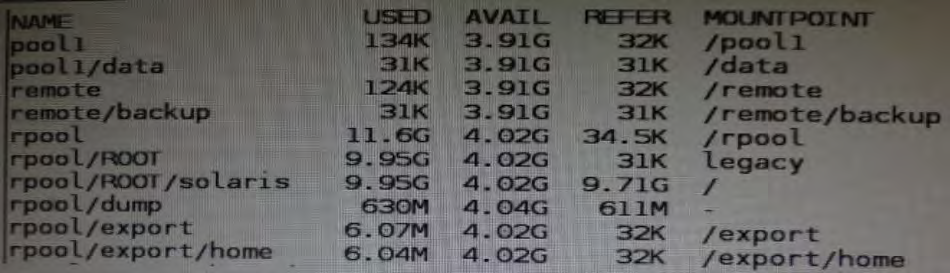 Your department's backup policy is to perform a full backup to remote system disk on Saturday. On each weekday, you are to perform an incremental backup to the same remote system disk.
Each incremental backup will contain only data that has been modified since the previous Saturday backup. The server file systems must remain available at all times and can never be taken offline. The backup must not only provide for the recovery of the most recent version of a file, but must also allow recovery of previous versions of a file. Following your company policy, which two describe the correct procedure to be performed on Saturday for backing tip the /data file system to a remote disk named /remote/backup?
-
A
On Saturday:
zfs snapshot pool1/data@sat
zfs send pool1/data@sat > /remote/backup/full
-
B
On Saturday:
zfs create snapshotpool1/data@sat
zfs send pool1/data@sat | zfs recv remote/backup/ `date' `+%m%d%y'
-
C
On Saturday:
zfs create snapshotpool1/data@sat
zfs send pool1/data@sat > /remote/backup/full
-
D
On Saturday:
zfs create snapshotpool1/data@sat
zfs send pool1/data@sat | zfsrecv remote/backup
Reveal answer details
Close answer details
Correct answersB, C
ExplanationExplanation: You can use the zfs send command to send a copy of a snapshot stream and receive the snapshot stream in another pool on the same system or in another pool on a different system that is used to store backup data. You can send incremental data by using the zfs send -i option. For example: host1# zfs send -i tank/dana@snap1 tank/dana@snap2 | zfs recv newtank/dana Note that the first argument (snap1) is the earlier snapshot and the second argument (snap2) is the later snapshot. In this case, the newtank/dana file system must already exist for the incremental receive to be successful. The incremental snap1 source can be specified as the last component of the snapshot name. This shortcut means you only have to specify the name after the @ sign for snap1, which is assumed to be from the same file system as snap 2. For example: host1# zfs send -i snap1 tank/dana@snap2 > zfs recv newtank/dana This shortcut syntax is equivalent to the incremental syntax in the preceding example. References:
Oracle Solaris ZFS Administration Guide, Sending and Receiving ZFS Data
Question 17
Multiple choice
Which three statements are true for the Oracle Solans 111mage Packaging System (IPS)? (Choose three.)
-
A
a local repository should be stored on a 2FS file system.
-
B
Network access to an IPS repository is provided to client systems using NFS.
-
C
Network access to an IPS repository is provided to client systems using NFS and HTTP.
-
D
The distribution constructor can get packages from a local IPS to build an installation image.
-
E
A mirror repository contains all of the metadata and content for software packages.
-
F
Clients access a mirror repository to obtain a publisher's catalog and software packages.
Reveal answer details
Close answer details
Question 18
Single choice
Your are troubleshooting network throughput on your server. To confirm that the load balancing among aggregated links is functioning properly, you want to examine the traffic statistics on the links comprising the aggregation. The correct command is ___________.
-
A
-
B
-
C
-
D
-
E
Reveal answer details
Close answer details
Correct answerB
ExplanationExplanation: dlstat show-aggr [-r | -t] [-i interval] [-p] [ -o field[,...]] [-u R|K|M|G|T|P] [link] Display per-port statistics for an aggregation.
Question 19
Single choice
You are setting up a local IPS package repository on your Oracle Solaris 11 server; solans example.com You want to point the existing local IPS publisher to the new local IPS repository located in /repo. These are the steps that you have followed: 1 Download and rsync the contents of the Oracle Solaris 11 repository ISO image to the /repo directory. 2. Configure the repository server service properties. The svcprop command displays the IPS-related properties: pkg/inst_root astnng /repo pkg/readonly boolean true The Is command displays the contents of the /repo directory: #ls /repo pkg5 repository publisher The svcs command shows the svc:/application/pkg/server:default service is online.
The pkg publisher command still displays: PUBLISHERTYPESTATUSURI solarisoriQinonlinehttp://DkQ.Qracle.conVsolaris/release/ Which step needs to be performed to set the local IPS publisher to the local IPS repository /repo?
-
A
issue the pkgrepo refresh -s command to refresh the repository.
-
B
Restart the svc:/application/pkg/server:default service.
-
C
issue the pkg set-publisher command to set the new repository location.
-
D
issue the pkgrepo rebuild command to rebuild the repository.
-
E
issue the pkgrepo set command to set the new repository location-
Reveal answer details
Close answer details
Question 20
Multiple choice
Which three options are valid methods of installing a Solaris 10 branded zone on a system running Oracle Solaris 11?
-
A
Use the V2V process to migrate an existing Solaris 8 or 9 non-global zone from a Solaris 10 system to a solaris10 branded zone.
-
B
Use the V2V process to migrate an existing Solaris 10 non global whole root zone from a Solaris 10 system to a solaris10 branded whole root zone.
-
C
Install a solaris10 branded zone directly from the Oracle Solaris 10 media.
-
D
Migrate an existing 64-bit Solaris 10 system to a solaris10 branded non-global zone using the P2V process.
-
E
Migrate an existing 32 bit Solaris10 system to a solaris10 branded non-global zone using the P2V process.
-
F
Use the V2V process to migrate an existing Solaris 10 non-global sparse root zone from a Solaris 10 system to a solaris10 branded sparse root zone.
Reveal answer details
Close answer details
Correct answersB, D, E
ExplanationExplanation: B: Due to change in package system (SRV4 to IPS) there is no direct upgrade from S10 to S11 one can use
* P2Vconverting s10 physical system to solaris10 branded zone in s11 (32-bit or 64-bit)
* V2V converting s10 native full root zone to solaris10 branded zone in s11 (B)
|