You are an application administrator that has been asked to create a portfolio for an executive. You create the portfolio and have the user test to see whether it meets requirements. However there are a couple of projects that are missing. You look for the portfolio, but it is no longer visible to you. What is the cause of this problem?
-
A
The global filters for the portfolio must be refreshed.
-
B
You do not have read/write access to the portfolio.
-
C
You created it for one user, and you are not that user.
-
D
The projects were deleted in error.
Reveal answer details
Close answer details
When is "Store Period Performance" usually performed?
-
A
-
B
After the schedule is updated
-
C
After Job Services validation
-
D
After working hours to enhance performance
Reveal answer details
Close answer details
Correct answerA
ExplanationExplanation:
Storing of Period Performance When billing in Excel (AIA form) or in the P6 schedule the current billing period amounts must be "rolled" or moved to the Previously Billed or Actual Cost categories before starting a new billing period.
When the billing has been approved and finalized in the AIA form it can be copied to a new file for use in the next billing period. To "roll" or clear out the This Period amounts in Excel, the current period amounts will have to be added into the Previous Application column cells. This creates a starting point for the new billing period. Note:
In P6, by default, actuals will be distributed evenly across time periods. For example, we set up an activity to start the first day of May, and we have actuals for the month of May of 15 hours. We have actuals for the month of June of 25 hours. P6 will display this as 20 hours for May and 20 hours for June. To get the exact amount of hours for each month, you have to store period performance. To do this, take the following steps: 1.) Set up your financial periods: Select Admin, Financial Periods from the Menu Bar
You can either add your financial periods manually, or set up a batch run by entering the start date and end date and how often the period should be created.
2.) Enter your actuals for the resource into the column, Actuals This Period. It will also put the same amount in the Actual Units Column; at the end of May, Actuals
This Period would have 15 hours, as would Actual Units. 3.) When you are done with the update, do Tools, Store Period Performance. This will move the Actuals this Period to the appropriate financial period and zero out the Actuals This Period column. At the end of June, enter 25 hours in Actual This Period. Actuals This Period will have 25 hours and Actual Units will have 40 hours. 4.) To view the financial periods, do the following: Click Edit, User Preferences
Click on the Application Tab Enter the Financial Periods that you would like to view. In the Activity Window, add the financial period columns (they will start with the financial period).
A Physical % complete activity has an original duration of 10, and a remaining duration of 10. The actual start is assigned to the activity. Physical % is updated to equal 80%. What is the remaining duration for this activity?
-
A
-
B
-
C
-
D
Reveal answer details
Close answer details
Question 4
Multiple choice
Identify two ways of quickly creating templates.
-
A
Create a template from an existing project.
-
B
Copy/paste existing project into templates node.
-
C
User Project Architect to modify templates.
-
D
Create complexity formulas to modify templates.
-
E
Base a new template on an existing template.
Reveal answer details
Close answer details
Correct answersA, E
ExplanationExplanation:
You can create a template from an existing project, create it from scratch, or create it from another template. Note: Creating a new project template
As mentioned, you can either create a template from an existing project. From the main menu, choose the Projects tab and click on the Add Project Template icon.
You get the following page: 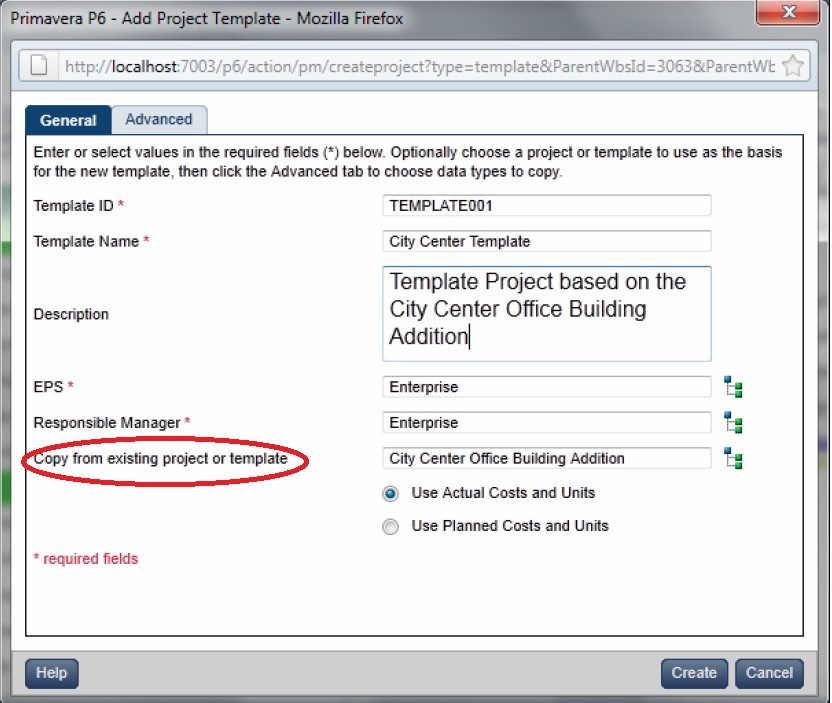 Where, Copy from existing project or template: Allows you to create a template based on an existing project or template.
Select the true statement regarding live or summarized data.
-
A
Live data is used for resource management.
-
B
Live data is used for portfolio management.
-
C
Summarized data is used for resource management.
-
D
Summarized data is used for project management.
Reveal answer details
Close answer details
Correct answerD
ExplanationExplanation:
The Project Baseline is a single metric for comparison that enables all members of a team to have a shared and consistent set of data against which to evaluate project progress. There is only one Project Baseline at any time. All pages that display summarized data compare and display data against the Project Baseline. Reference; P6 EPPM User's Guide, About Baselines
Question 6
Multiple choice
Identify the two types of resource calendars in P6 R8.
-
A
-
B
-
C
-
D
-
E
Reveal answer details
Close answer details
Correct answersA, E
ExplanationExplanation:
A: Personal calendars are specific to one resource.
E: Shared calendars are often more useful when many resources are working the same schedule.
Identify the true statement regarding administrative functions in P6 R8.
-
A
Administrative functions can be performed in the client, or in the web interface.
-
B
Administrative functions can only be performed in the client.
-
C
Administrative functions can only be performed in the web interface.
-
D
Administrative functions are determined at point of Installation.
Reveal answer details
Close answer details
Correct answerC
ExplanationExplanation:
For P6 Enterprise, all administrative functions are accessed via the web interface.
Identify this window. 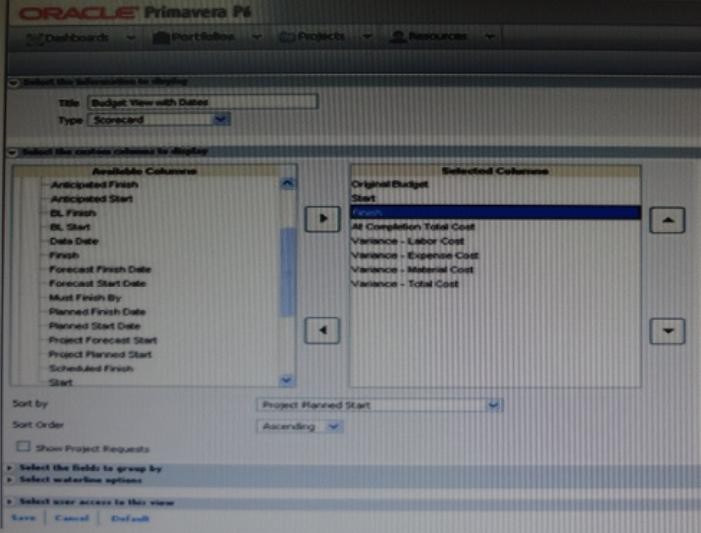
-
A
-
B
-
C
-
D
Reveal answer details
Close answer details
Correct answerC
ExplanationExplanation:
One idea behind Portfolio Analysis in P6 is that it gives you the ability to quickly make ad-hoc reports. You can quickly change the view and alter what data is displayed and in what form. There are two main kinds of views -- scorecards and graphs. Note: In the context of creating a scorecard: Choosing data to display There are three areas that you can customize on a scorecard: Columns, Group, and Waterline.
Screenshot (compare to screenshot in the question): 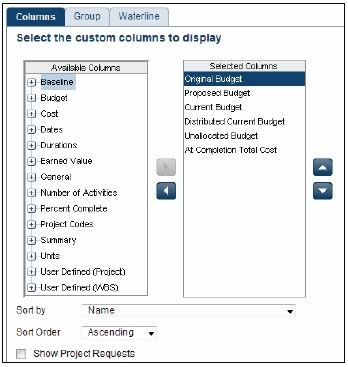 Columns
The columns available are a mixture of Project-level data as well as WBS-level data. You can choose any of these columns on the left-hand side and press the right-arrow to move them to the Selected Columns. On the right-hand side you may re-order the columns by selecting them and using the up and down arrows.
You can choose the default sorting of the data as well. Once on the scorecard screen, you can change the order by simply clicking on the column headers. The option Show Project Requests determines whether potential projects should also be included in the scorecard.
What does Schedule Preview do?
-
A
Provides print preview functionality
-
B
Calculates the new forecast dates
-
C
Reschedules but does not finalize until Save
-
D
Reports on multiple projects without opening them
Reveal answer details
Close answer details
Correct answerC
ExplanationExplanation:
About Schedule Preview
After modifying activity, relationship, and assignment data, but before deciding to formally schedule a project, use the optional Schedule Preview feature to estimate schedule changes without actually committing them to the project. Schedule Preview automatically recalculates the schedule for activities that have changed or were affected by a change to a relationship, resource assignment, or another activity. You can then decide to commit these changes to the schedule or, if the preview produces unwanted results, discard them. If Schedule Preview is disabled, changes to activities are not reflected in the schedule until you manually calculate the schedule again.
Question 10
Single choice
Select the true statement regarding project security profiles.
-
A
Project security profiles define the weight of project codes.
-
B
To receive a project security profile, a user must be defined as a resource.
-
C
Project security profiles override global security profiles.
-
D
To access projects, a user must be assigned a project security profile.
Reveal answer details
Close answer details
Correct answerD
ExplanationExplanation:
Project profiles
Define a user's access to project-specific information. The Project Management module does not require that each user be assigned a project profile; however, users cannot access projects unless they
are assigned a project profile or the global profile, Admin Superuser. Note:
To ensure security at various levels of data, the Project Management module provides two sets of security profiles:
* Global profiles
Define a user's access to application-wide information and settings, such as the enterprise project structure (EPS), resources, roles, and cost accounts. Each user must be assigned a global profile. (B)
* Note 1: The following diagram illustrates the relationships between a user, the OBS, EPS, and WBS. 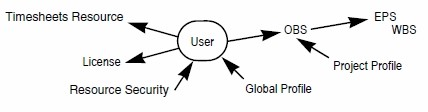 Note 2: Users in Primavera P6 require two different profiles to control what they can do in the system; a Global Security Profile and a Project Security Profile.
Question 11
Single choice
What is the significance of setting "Summarize project based on high-level resource planning"?
-
A
Summarized project data will reflect top-down plans.
-
B
Summarized project data will reflect bottoms-up plans.
-
C
Summarized project data will reflect actuals pushed from another application.
-
D
Summarized project data will be monetized.
Reveal answer details
Close answer details
Correct answerA
ExplanationExplanation:
Typically, use the High Level Resource Planning option for future projects that are currently planning only high-level resource allocation requirements, or for projects that are underway, but for which you do not want to assign resources at a detailed activity-level. Note: `Summarize Project Based on' determines whether the Summarizer calculates and displays rolled-up data based on resource assignments at the activity or project level. Note 2: You can summarize project data to a specific WBS level when calculating and maintaining summary data. 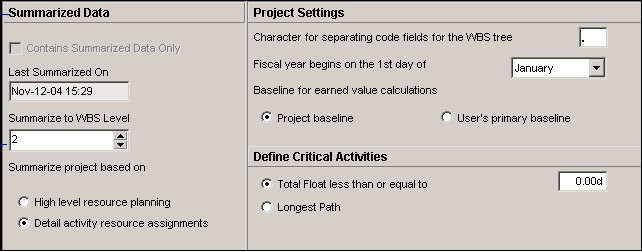
Question 12
Single choice
You are an executive that wants to review portfolio data for a high-risk/high-priority group of projects. You go to Portfolios in Primavera P6 Web. However, the data shown is not the correct portfolio. What should you do to correct this problem?
-
A
Manage the desired portfolio.
-
B
Open the desired portfolio.
-
C
Filter the portfolio in a dashboard.
-
D
Create a user portfolio view.
Reveal answer details
Close answer details
Question 13
Multiple choice
Yon are working with a customer that has had a legacy Primavera release installed and running in their environment for four years, the CIO tells you that the current EPS does not show the data the way he would like to view it, and, therefore, he would like to restructure the entire EPS. Before proceeding, what four options would you present to the CIO so that organizational Impacts are eliminated?
-
A
-
B
Identify the reporting requirements.
-
C
-
D
-
E
-
F
Create user-specific filters.
-
G
Reveal answer details
Close answer details
Correct answersA, B, D, E
ExplanationExplanation:
E: Global filters are made available to anyone working in the database,
|