Which setting of :SYSTEM.MESSAGE_LEVEL suppresses all system messages?
-
A
-
B
-
C
-
D
-
E
You cannot use :SYSTEM.MESSAGE_LEVEL to suppress all system messages
Reveal answer details
Close answer details
Correct answerE
ExplanationControlling System Messages
You can prevent system messages from being issued, based on their severity level. FormsBuilder classifies every message with a severity level that indicates how critical or trivial the information is; the
higher the numbers, the more critical the message. There are six levels that you can affect. 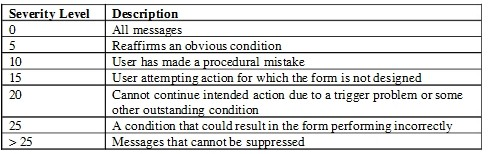 Note: Suppressing Messages According to Their Severity
In a trigger, you can specify that only messages above a specified severity level are to be issuedby the form. You do this by assigning a value to the MESSAGE_LEVEL system variable. Formsthen issues only those messages that are above the severity level defined in this variable.The default value for MESSAGE_LEVEL (at form startup) is 0. This means that messages of all severities are displayed.
View the Exhibits. 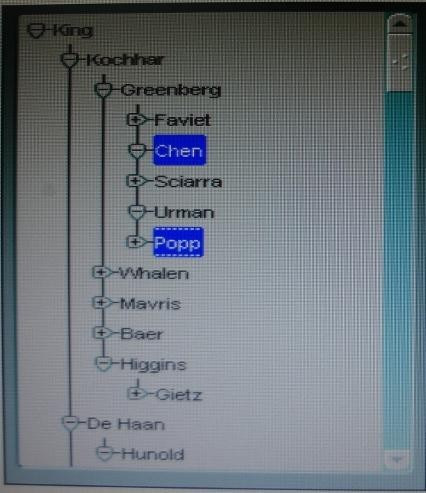 The hierarchical tree shown at run time in Exhibit 1 is populated programmatically.
Default hierarchical tree properties are shown in Exhibit? 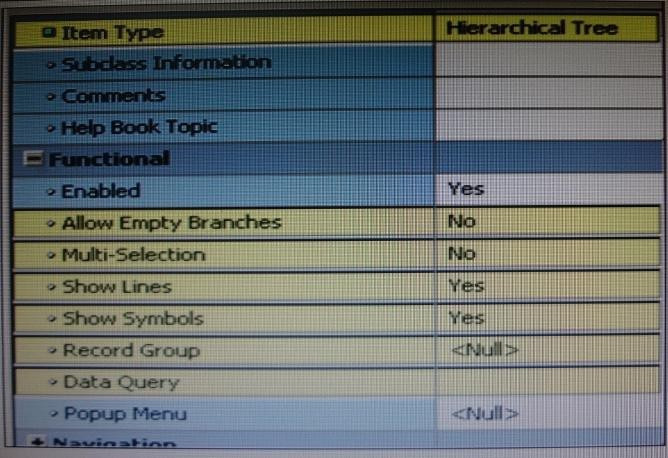 Which properties of the hierarchical tree shown in Exhibit 1 have been changed from the default?
-
A
Allow Empty Branches and Multi Selection only
-
B
Allow Empty Branches and Show Symbols only
-
C
Multi Selection and Show Symbols only
-
D
Allow Empty Branches, Multi Selection, and Show Symbols
Reveal answer details
Close answer details
Correct answerA
ExplanationBoth Chen and Popp are selected, so Multi-selection is set to Yes (not B). + and symbols are displayed, so Show Symbols is yes (not B, C, D). Allow Empty Branches is set to Yes (so A is ok), see note below. Note: Setting Hierarchical Tree Item Properties
Hierarchical Tree properties include the following:
* Item Type: Must be set to Hierarchical Tree
* Allow Empty Branches:
Yes / No. No is the default. If set to Yes, all leaf nodes will initially display in the tree with the plus sign (+) next to it, indicating that expansion is possible, even when there is nothing to expand. If set to Yes, the Show Symbols property must also be set to Yes. If set to No, leaf nodes will not have an expand/collapse symbol * Multi Selection: Whether multiple nodes may be selected at one time No is the default.
* Show Lines: Whether a hierarchical tree displays lines leading up to each node Yes is the default.
* Show Symbols: Whether a hierarchical tree should display + or - symbols in front of each branch node
* Record Group: Name of the record group from which the hierarchical tree derives its values
* Data Query: Specifies the query-based data source
You want to display fields of a form module on multiple layouts that are visible simultaneously, what can enable you to achieve this?
-
A
multiple content canvases that display in the same window
-
B
one content canvas that displays in multiple windows
-
C
multiple content canvases that display in multiple windows
-
D
multiple forms, because you cannot have multiple content canvases in the same form that are visible simultaneously
Reveal answer details
Close answer details
Correct answerA
ExplanationThere is a basic difference between canvas & windows is that a canvas is placeholder for several controls.
A window may contain several canvases.
You are coding a When-Checkbox-Changed trigger. Which statements are available for use in your code?
-
A
unrestricted built-ins only
-
B
restricted and unrestricted built-ins only
-
C
PL/SQL statements and unrestricted built-ins only
-
D
PL/SQL statement-, and any built-ins
Reveal answer details
Close answer details
Correct answerD
ExplanationWhen-Checkbox-Changed trigger Description Fires when an operator changes the state of a check box, either by clicking with the mouse, or using thekeyboard.
Definition Level: form, block, or item Legal Commands: SELECT statements, unrestricted built-ins, restricted built-ins References:
Oracle Forms Developer, When-Checkbox-Changed trigger
You add a display item named Quantity to the Order items block of your Orders form to display the quantity on hand for each product. Quantity is a non-base table item that should reflect the count of an ordered product from the inventories table. What is the best way to populate the Order_Iterns.Quantity item?
-
A
-
B
-
C
When-New-Form-instance trigger
-
D
When New-Item-instance trigger
-
E
You need to define a master-detail relation so that the item is populated automatically.
Reveal answer details
Close answer details
Correct answerE
ExplanationThis should be implemented as a master-detail form.
Question 6
Multiple choice
View the Exhibit. 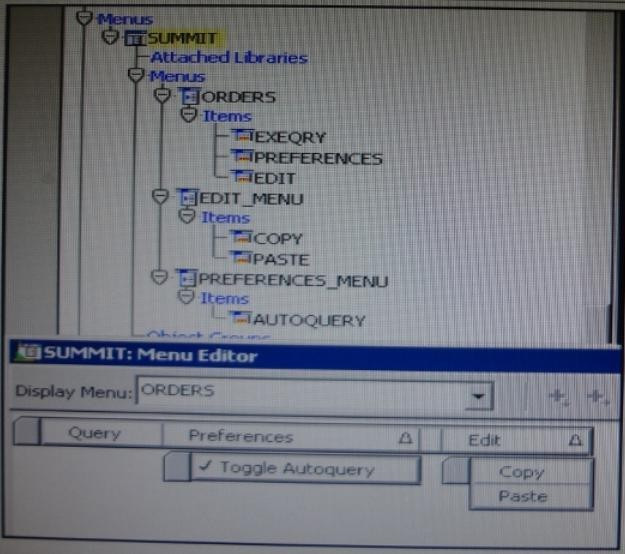 The Summit menu is attached to the Orders form. The Toggle Autoquery menu item is a check box that toggles whether a query is automatically performed when the Orders form is first invoked. If the check box is deselected, users must manually query. In addition to using the menu, users want to be able to toggle the autoquery preference directly from the form. You add a button named Toggle Autoquery with the following.
When-Button-Pressed trigger: DECLARE
mi_id MENUITEMS;
BEGIN
mi_id ;=FIND_ITEM ('Preferences.AutoQuery')
/* Determine the current checked static of the AutoCommit menu checkbox item And toggle the checked state*/
IF GET_ITEM_PROPERTY (mi_id, CHECKED) = 'TRUE' THEN
SET_ITEM_PROPERTY (mi_id, CHECKED, PROPERTY_FALSE);
ELSE
SET_ITEM_PROPERTY (mi_id, CHECKED, PROPERTY_TRUE);
END IF;
END;
However, the trigger does not compile. What three changes must you make so that the trigger compiles successfully?
-
A
Change FIND_ITEM to FIND_MENU_ITEM.
-
B
Change 'preferences.AutoQuery' to 'orders.preferences.AutoQuery'.
-
C
Change 'preferences.AutoQuery' to 'AutoQuery'.
-
D
Change 'preferences.AutoQuery' to 'ORDERS.PREFERENCES>AUTOQUERY'.
-
E
Change 'preferences.AutoQuery' to 'AUTOQUERY'.
-
F
Change GET_ITEM_PROPERTY to GET_MENU_ITEM_PROPERTY
-
G
Change SET_ITEM_PROPERTY to SET_MENU_ITEM_PROPERTY
-
H
Change PROPERTY_FALSE to 'FALSE'.
-
I
Change PROPERTY_TRUE to 'TRUE'.
Reveal answer details
Close answer details
Correct answersA, F, G
ExplanationA: Note: FIND_MENU_ITEM built-in
Description
Searches the list of menu items and returns a menu item ID when it finds a valid menu item with the given name. You must define an appropriately typed variable to accept the return value.
Define the variable with a type of MenuItem. Note 2:
FIND_ITEM built-in
Description
Searches the list of items in a given block and returns an item ID when it finds a valid item with the given name. You must define an appropriately typed variable to accept the return value. Define the variable with a type of Item. Example (with FIND_MENU_ITEM, GET_MENU_ITEM_PROPERTY,
SET_MENU_ITEM_PROPERTY)
FIND_MENU_ITEM examples
/*
** Built-in: FIND_MENU_ITEM
** Example: Find the id of a menu item before setting
** multiple properties
*/ PROCEDURE Toggle_AutoCommit_Mode IS
mi_id MenuItem;
val VARCHAR2(10);
BEGIN mi_id := Find_Menu_Item('Preferences.AutoCommit');
/*
** Determine the current checked state of the AutoCommit ** menu checkbox item
*/ val := Get_Menu_Item_Property(mi_id,CHECKED);
/*
** Toggle the checked state
*/
IF val = 'TRUE' THEN
Set_Menu_Item_Property(mi_id,CHECKED,PROPERTY_FALSE);
ELSE
Set_Menu_Item_Property(mi_id,CHECKED,PROPERTY_TRUE);
END IF;
END;
Question 7
Multiple choice
Which three are valid ways to populate a display item?
-
A
-
B
-
C
When-Button-Pressed trigger
-
D
-
E
Reveal answer details
Close answer details
Correct answersA, C, D
ExplanationC: You can use the attachable PL/SQL libraries to implement a flexible message function formessages that are displayed programmatically by the built-in routines MESSAGE orCHANGE_ALERT_MESSAGE, or by assigning a message to a display item from a triggeror procedure.
D: Creating Calculated Items
Change the Item Type to Display Item.
Set the Calculation Mode property to Formula.
Set the Formula property to the required formula. Incorrect answers:
B: Display items and text items are fairly similar and share many of the same properties. The biggest difference between the two is that a user can navigate to a text item and change its value. This is not possible with a display item. As its name implies, it merely displays information. Note: Display items do not allow any user interaction - they merely display data and never accept cursor focus. Use a display item for the following situations:
* Null-canvas fields
* Context fields
* Fields that act as titles or prompts
You have coded the following.
When Button Pressed trigger: EXECUTE_QUERY;
MESSAGE ('Query executed on block');
MESSAGE ('click next to navigate the next record'); When the user clicks the button, how is the message "Query executed on block" displayed?
-
A
as a system message on the status line
-
B
as a system message in a system alert
-
C
as a system message in an application alert
-
D
as an application message on the status line
-
E
as an application message in a system alert
-
F
as an application message in an application alert
Reveal answer details
Close answer details
Correct answerD
ExplanationThis is a customized application message. You can also build messages and alerts into your application:
* Application message: These are messages that you build into your application by using the MESSAGE built-in. The default display is on the message line. *Application alert: These are alerts that you design as part of your application, and issue to the operator for a response by using the SHOW_ALERT built-in.
Question 9
Multiple choice
Iin an Order Entry form, the Order_Items block has a text item called Shipping Date, which is of the Date data type. The Lowest Allowed Value and the Highest Allowed Value properties are not defined for this item. Assuming that the following are defined, which three are valid settings for the initial Value = property of the Shipping_Date Item?
-
A
-
B
-
C
-
D
-
E
-
F
Reveal answer details
Close answer details
Correct answersA, C, D
ExplanationA: Use $$DATE$$, $$DATETIME$$, and $$TIME$$ to obtain the local system date/time; use
$$DBDATE$$, $$DBDATETIME$$, and $$DBTIME$$ to obtain the database date/time, which may differ from the local system date/time when, for example, connecting to a remote database in a different time zone. ,, Use these variables only to set the value of the Initial Value, Highest Allowed Value or Lowest Allowed Value property. Incorrect answers:
B: This would work within a trigger.
Question 10
Single choice
You have installed WebLogic and Forms with a default configuration, which has been tested and determined to be correct. After creating a basic form in the Forms Builder, you click Run Form to test it. Forms Builder displays an error dialog box with the following message: FRM-10142: The HTTP Listener is not running on <host> at port 9001. Please start the listener or check
your runtime preferences. What is one action that you can take to resolve this error?
-
A
Start the Web Logic Administration server.
-
B
Start the WLS_FORMS managed server.
-
C
Change the serverURL parameter in formsweb.cfg
-
D
Start the Oracle HTTP server.
-
E
Reveal answer details
Close answer details
Correct answerB
ExplanationThe WLS managed server WLS_FORMS must be started.
Question 11
Single choice
When users enter address information, you want them to be able to select the state from a static list of values. You have not used a list of states before, and there is no database table that contains state information. What is the first step in creating such a list of values as quickly as possible?
-
A
-
B
Create a new record group that is based on a SQL query.
-
C
Create a new static record group.
-
D
Create a list item instead; a list of values is not appropriate for a static list.
Reveal answer details
Close answer details
Correct answerA
Explanationow to create LOV in Oracle forms? List of Values(LOV) are used either when a selected list is too long and hence would not be appropriate for a drop down, but needs a search form to select the value. Steps to create LOV functionality: * Click on the LOV icon in the object navigator and choose a manual/automatic wizard. This will create a
record group. * Open a search form in the Dialog Page
* Select values inside this form. * Return selected values to the original page.
Question 12
Multiple choice
In Forms Builder, the iconic buttons on the form are blank, but when you click Run Form the form appears in the browser with Images in the iconic buttons. What are two things that you can check to track the source of this problem?
-
A
forms Builder runtime preferences
-
B
the UI_ICON setting in the operating system
-
C
the iconpath setting in the Forms registry file
-
D
the UI_ICOM_EXTENSION setting in the operating system
-
E
the iconextension setting in the Forms registry file
-
F
the FORMS_PATH setting in the Forms environment file
-
G
the classpath setting in the operating system
Reveal answer details
Close answer details
Correct answersB, C
ExplanationC: assume you put your gif in a directory /icon under your /forms on server, then in the registry.dat file, find the section containing sth below xxx.xxx.iconpath= xxx.xxx.iconextension =, set above iconpath=/icon iconextension =gif
Question 13
Single choice
When tabbing through items in the Employees form, users should not be able to navigate to the Salary text item. If they need to update the item, they will have to explicitly navigate to it by using the mouse. Which property setting accomplishes this requirement?
-
A
Enabled = Yes; Keyboard Navigable = No
-
B
Enabled = No; Keyboard Navigable = Yes
-
C
Enabled = Yes; Keyboard Navigable = Yes
-
D
Enabled = No; Keyboard Navigable = No
-
E
Reveal answer details
Close answer details
Correct answerC
Explanation* Keyboard Navigable property
Description
Determines whether the end user or the application can place the input focus in the item during default navigation. When set to Yes for an item, the item is navigable. When set to No, Form Builder skips over the item and enters the next navigable item in the default navigation sequence. The default navigation sequence for items is defined by the order of items in the Object Navigator.
Applies to all items except chart items and display items * Default
Yes
Usage Notes
If Enabled or Visible is set to No (PROPERTY_FALSE for runtime), then the items' or item instance's
Keyboard navigable property is effectively false. At runtime, when the Enabled property is set to PROPERTY_FALSE, the Keyboard_Navigable property is also set to PROPERTY_FALSE. However, if the Enabled property is subsequently set back to PROPERTY_TRUE, the keyboard Navigable property is NOT set to PROPERTY_TRUE, and must be changed explicitly.
Question 14
Single choice
Which symbol when used in an object's Property Palette, indicates an inherited property that has been changed? 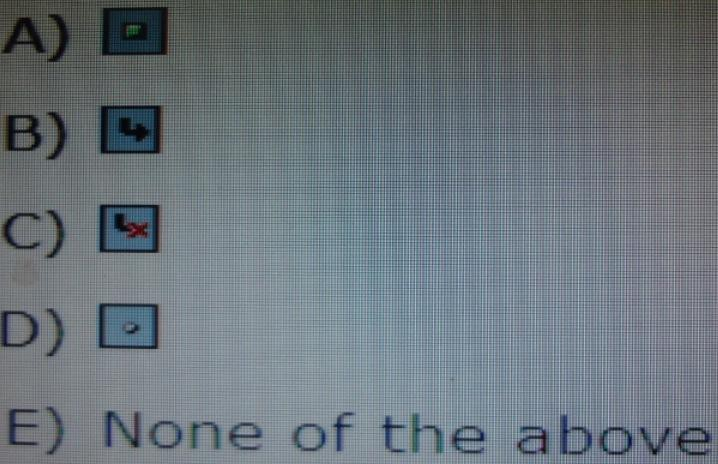
-
A
-
B
-
C
-
D
Reveal answer details
Close answer details
|