You need to migrate database from oracle Database 10g to 11g. You want the SQL workload to start the 10g plans in the 11g database instance and evolve better plans. Examine the following steps:
1. Capture the pre-Oracle Database 11g plans in a SQL Tuning Set (STS)
2. Export the STS from the 10g system.
3. Import the STS into Oracle Database 11g.
4. Set the OPTIMIZER_FEATURES_ENABLE parameter to 10.2.0.
5. Run SQL Performance Analyzer for the STS.
6. Set the OPTIMIZER_FEATURES_ENABLE parameter to 11.2.0.
7. Rerun the SQL Performance Analyzer for the STS.
8. Set OPTIMIZER_CAPTURE_SQL_PLAN_BASELINE to TRUE.
9. Use DBMS_SPM.EVOLVE_SQL_BASELINE function to evolve the plans.
10. Set the OPTIMIZER_USE_SQL_PLAN_BASELINE to TRUE. Identify the required steps in the correct order.
-
A
-
B
-
C
-
D
-
E
Reveal answer details
Close answer details
Correct answerC
ExplanationStep 1: (1)
Step 2: (2)
Step 3: (3)
Step 4: (4)
By setting the parameter OPTIMIZER_FEATURES_ENABLE to the 10g version used before the upgrade, you should be able to revert back to the same execution plans you had prior to the upgrade.
Step 5: (8)
OPTIMIZER_CAPTURE_SQL_PLAN_BASELINES
In Oracle Database 11g a new feature called SQL Plan Management (SPM) has been introduced to guarantees any plan changes that do occur lead to better performance. When OPTIMIZER_CAPTURE_SQL_PLAN_BASELINES is set to TRUE (default FALSE) Oracle will
automatically capture a SQL plan baseline for every repeatable SQL statement on the system. The execution plan found at parse time will be added to the SQL plan baseline as an accepted plan. Step 6: (10)
OPTIMIZER_USE_SQL_PLAN_BASELINES enables or disables the use of SQL plan baselines stored in SQL Management Base. When enabled, the optimizer looks for a SQL plan baseline for the SQL statement being compiled. If one is found in SQL Management Base, then the optimizer will cost each of the baseline plans and pick one with the lowest cost.
Question 2
Multiple choice
Examine the parallelism parameters for you instance. 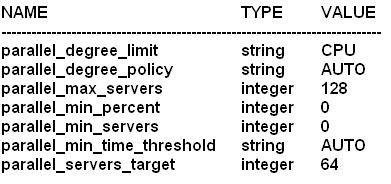 Now examine the DSS_PLAN with parallel statement directives: 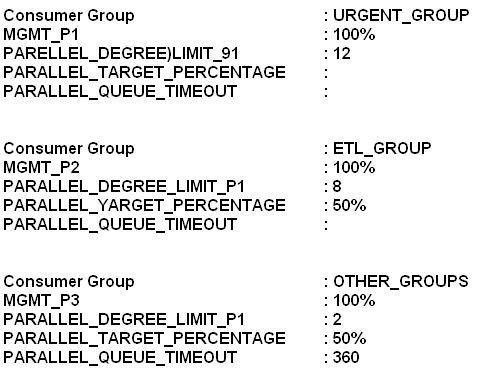 Which two are true about the DSS_PLAN resource manager plan?
-
A
URGENT_GROUPS sessions will always be dequeued before sessions from other groups.
-
B
OTHER_GROUPS sessions are queued for maximum of six minutes.
-
C
ETL_GROUP sessions can collectively consume 64 parallel execution servers before queuing starts for this consumer group.
-
D
An ETL_GRP sessions will be switched to URGENT_GROUPS if the session requests more than eight parallel executions servers.
-
E
URGENT_GROUP sessions will not be queued if 64 parallel execution servers are busy because their PARALLEL_TARGET_PERCENTAGE is not specified.
Reveal answer details
Close answer details
Correct answersA, B
ExplanationB: PARALLEL_QUEUE_TIMEOUT
Parallel Queue Timeout When you use parallel statement queuing, if the database does not have sufficient resources to execute a parallel statement, the statement is queued until the required resources become available. However, there is a chance that a parallel statement may be waiting in the parallel statement queue for longer than is desired. You can prevent such scenarios by specifying the maximum time a parallel statement can wait in the parallel statement queue. The PARALLEL_QUEUE_TIMEOUT directive attribute enables you to specify the maximum time, in seconds, that a parallel statement can wait in the parallel statement queue before it is timed out. The PARALLEL_QUEUE_TIMEOUT attribute can be set for each consumer group.
Incorrect:
Not C: ETL_GROUP PARALLEL_TARGET_PERCENTAGE is 50%. So ETL_GROUP can only consume 32 servers. Note:
* If you want more per-workload management, you must use the following directive attributes: / MGMT_Pn Management attributes control how a parallel statement is selected from the parallel statement queue for execution. You can prioritize the parallel statements of one consumer group over another by setting a higher value for the management attributes of that group. / PARALLEL_TARGET_PERCENTAGE / PARALLEL_QUEUE_TIMEOUT / PARALLEL_DEGREE_LIMIT_P1 * PARALLEL_DEGREE_LIMIT_P1
Degree of Parallelism Limit You can limit the maximum degree of parallelism for any operation within a consumer group. The degree of parallelism is the number of parallel execution servers that are associated with a single operation. Use the PARALLEL_DEGREE_LIMIT_P1 directive attribute to specify the degree of parallelism for a consumer group. The degree of parallelism limit applies to one operation within a consumer group; it does not limit the total degree of parallelism across all operations within the consumer group. However, you can combine both the PARALLEL_DEGREE_LIMIT_P1 and the PARALLEL_TARGET_PERCENTAGE directive attributes to achieve the desired control. * PARALLEL_TARGET_PERCENTAGE
Parallel Target Percentage It is possible for a single consumer group to launch enough parallel statements to use all the available parallel servers. If this happens, when a high-priority parallel statement from a different consumer group is run, no parallel servers are available to allocate to this group. You can avoid such a scenario by limiting the number of parallel servers that can be used by a particular consumer group. Use the PARALLEL_TARGET_PERCENTAGE directive attribute to specify the maximum percentage of the parallel server pool that a particular consumer group can use. The number of parallel servers used by a particular consumer group is counted as the sum of the parallel servers used by all sessions in that consumer group.
Question 3
Multiple choice
Examine the Exhibit to view the structure of and indexes for the EMPLOYEES and DEPARTMENTS tables: 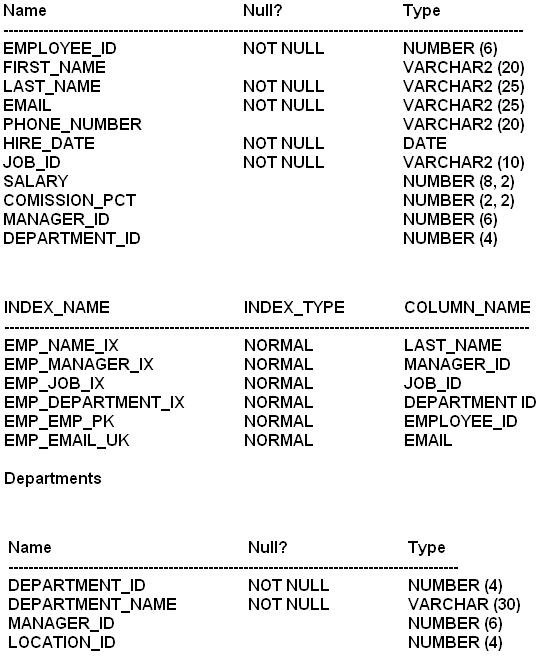 EXAMINE the SQL statement and its execution plan: 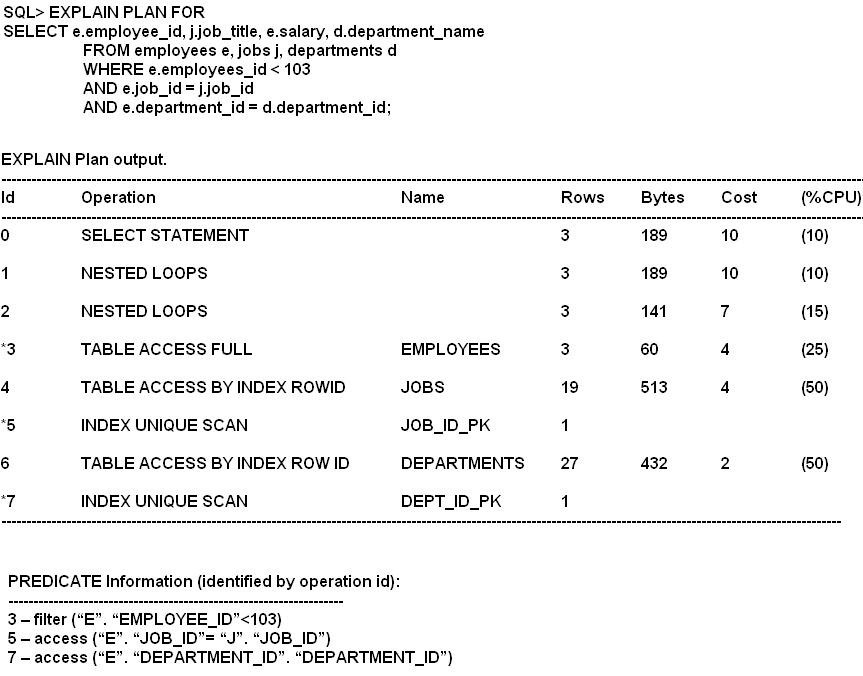 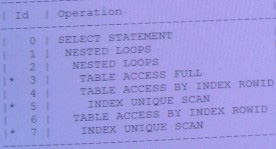 Which two statements are correct regarding the execution plan?
-
A
Step 2 is performing nested operation on JOB_ID column of the JOBS table, which is the driven table and the EMPLOYEES table is the driven table.
-
B
In step 2 for every row returned by the JOBS table matching rows from the EMPLOYEES table are accessed.
-
C
Step 1 is performing nested loop operation on the DEPARTMENT_ID column of the DEPARTMENTS table, which is the driven table and results returned by step 2 in the driving resultset.
-
D
The performance of the query can be improved by creating bitmap index on the JOB_ID column of the EMPLOYEES table.
-
E
The performance of the query can be improved by creating bitmapped index on the DEPARTMENT_ID column of the EMPLOYEES table.
Reveal answer details
Close answer details
Correct answersB, E
ExplanationAs per exhibit:
B, not A, Not C: First is line 5 executed, followed by line 4, followed by line 3.
Step 2 is line 4. E: The Department_ID column has lower cardinality compared to the JOB_ID column, so it is better suited for a bitmapped index. Note:
* Oracle bitmap indexes are very different from standard b-tree indexes. In bitmap structures, a two-dimensional array is created with one column for every row in the table being indexed. Each column represents a distinct value within the bitmapped index. This two-dimensional array represents each value within the index multiplied by the number of rows in the table. At row retrieval time, Oracle decompresses the bitmap into the RAM data buffers so it can be rapidly scanned for matching values. These matching values are delivered to Oracle in the form of a Row-ID list, and these Row-ID values may directly access the required information. * The real benefit of bitmapped indexing occurs when one table includes multiple bitmapped indexes. Each individual column may have low cardinality. The creation of multiple bitmapped indexes provides a very powerful method for rapidly answering difficult SQL queries. * Oracle bitmap indexes are very different from standard b-tree indexes. In bitmap structures, a two-dimensional array is created with one column for every row in the table being indexed. Each column represents a distinct value within the bitmapped index. This two-dimensional array represents each value within the index multiplied by the number of rows in the table. At row retrieval time, Oracle decompresses the bitmap into the RAM data buffers so it can be rapidly scanned for matching values. These matching values are delivered to Oracle in the form of a Row-ID list, and these Row-ID values may directly access the required information.
A database instance is configured in the shared server mode and it supports multiple applications running on a middle tier. These applications connect to the database by using different services and tracing is enabled for the services. You want to view the detailed tracing setting for particular service. What would you use to view the tracing information?
-
A
-
B
-
C
-
D
Reveal answer details
Close answer details
Correct answerC
Explanationdisplays information about enabled SQL traces.
DBA_ENABLED_TRACES Incorrect:
A: The DBMS_SERVICE package lets you create, delete, activate, and deactivate services for a single instance.
B: The DBMS_MONITOR package let you use PL/SQL for controlling additional tracing and statistics gathering. References:
Oracle Database Reference, DBA_ENABLED_TRACES
Question 5
Multiple choice
Which three factors does the estimator depend on for overall cost estimation of a given execution plan?
-
A
-
B
-
C
OPTIMIZER_FEATURE_ENABLE parameter
-
D
NOT NULL_FEATURE_ENABLE parameter
-
E
NOT NULL constraint on a unique key column
-
F
-
G
The units of work such as disk input/output, CPU usage, and memory used in an operation
Reveal answer details
Close answer details
Correct answersA, C, G
ExplanationC: OPTIMIZER_FEATURES_ENABLE acts as an umbrella parameter for enabling a series of optimizer features based on an Oracle release number. Note: The estimator determines the overall cost of a given execution plan. The estimator generates three different types of measures to achieve this goal: * Selectivity This measure represents a fraction of rows from a row set. The selectivity is tied to a query predicate, such as last_name='Smith', or a combination of predicates.
* Cardinality This measure represents the number of rows in a row set.
1,
* Cost This measure represents units of work or resource used. The query optimizer uses disk I/O, CPU usage, and memory usage as units of work. If statistics are available, then the estimator uses them to compute the measures. The statistics improve the degree of accuracy of the measures.
Question 6
Multiple choice
Tracing has been enabled for the HR user. You execute the following command to check the contents of the orcl_25052.trc trace file, which was generated during tracing:  Which two statements are correct about the execution of the command?
-
A
SCRIPT.SQL stores the statistics for all traced SWL statements.
-
B
Execution plans for SQL statements are stored in TEMP_PLAN_TABLE and can be queried by the user.
-
C
SQL statements in the output files are stored in the order of elapsed time.
-
D
TKPROF use TEMP_PLAN_TABLE in the HR schema as a temporary plan table.
-
E
Recursive SQL statements are included in the output file.
Reveal answer details
Close answer details
Correct answersA, D
ExplanationINSERT
Creates a SQL script that stores the trace file statistics in the database. TKPROF creates this script with the name filename 3. This script creates a table and inserts a row of statistics for each traced SQL statement into the table.
Question 7
Multiple choice
Which two tasks are performed during the optimization stage of a SQL statement?
-
A
Evaluating the expressions and conditions in the query
-
B
Checking the syntax and analyzing the semantics of the statement
-
C
Separating the clauses of the SQL statement into structures that can be processed
-
D
Inspecting the integrity constraints and optimizing the query based on this metadata
-
E
Gathering the statistics before creating the execution plan for the statement
Reveal answer details
Close answer details
Correct answersD, E
ExplanationNote: Oracle SQL is parsed before execution, and a hard parse includes these steps:
* 1. Loading into shared pool - The SQL source code is loaded into RAM for parsing. (the "hard" parse step) 2. Syntax parse - Oracle parses the syntax to check for misspelled SQL keywords. 3. Semantic parse - Oracle verifies all table & column names from the dictionary and checks to see if you are authorized to see the data. 4. Query Transformation - If enabled (query_rewrite=true), Oracle will transform complex SQL into simpler, equivalent forms and replace aggregations with materialized views, as appropriate. 5. Optimization - Oracle then creates an execution plan, based on your schema statistics (or maybe with statistics from dynamic sampling in 10g). 6. Create executable - Oracle builds an executable file with native file calls to service the SQL query. *
The parsing process performs two main functions: o Syntax Check: is the statement a valid one. Does it make sense given the SQL grammar documented in the SQL Reference Manual. Does it follow all of the rules for SQL. o Semantic Analysis: Going beyond the syntax ? is the statement valid in light of the objects in the database (do the tables and columns referenced exist). Do you have access to the objects ? are the proper privileges in place? Are there ambiguities in the statement ? for example if there are two tables T1 and T2 and both have a column X, the query ?select X from T1, T2 where ?? is ambiguous, we don?t know which table to get X from. And so on.
So, you can think of parsing as basically a two step process, that of a syntax check to check the validity of the statement and that of a semantic check ? to ensure the statement can execute properly. References:
Oracle hard-parse vs. soft parse
Question 8
Multiple choice
See the table below: 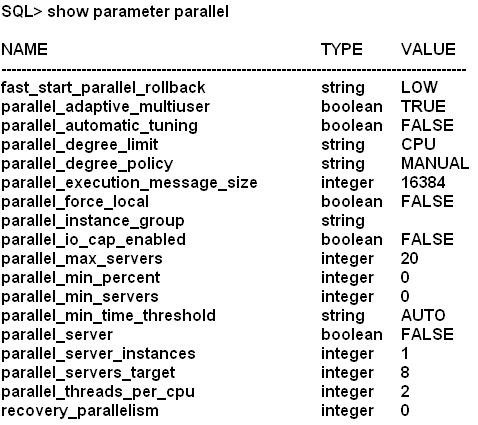 All execution servers are currently available and the sessions use defaults for all parallel settings. In which two cases will statements execute in parallel?
-
A
When parallel hints are used but only if estimated serial execution takes more than 10 seconds.
-
B
When parallelism is defined at the statement level.
-
C
When the degree of parallelism is explicitly defined in the data dictionary for tables and indexes accessed by a query.
-
D
Parallel DDL statements but only if estimated serial DDL execution time is greater than 10 seconds.
-
E
When the degree of parallelism is explicitly defined for tables and indexes but only if estimated serial execution takes more than 10 seconds.
Reveal answer details
Close answer details
Correct answersB, C
ExplanationIncorrect:
A, D, E: When PARALLEL_MIN_TIME_THRESHOLD is set to AUTO the PARALLEL_MIN_TIME_THRESHOLD is set to 30, not to 10. See note below. Note:
* parallel_min_time_threshold PARALLEL_MIN_TIME_THRESHOLD specifies the minimum execution time a statement should have before the statement is considered for automatic degree of parallelism. By default, this is set to 30 seconds. Automatic degree of parallelism is only enabled if PARALLEL_DEGREE_POLICY is set to AUTO or LIMITED.
View the Exhibit1 and examine the structure and indexes for the MYSALES table. 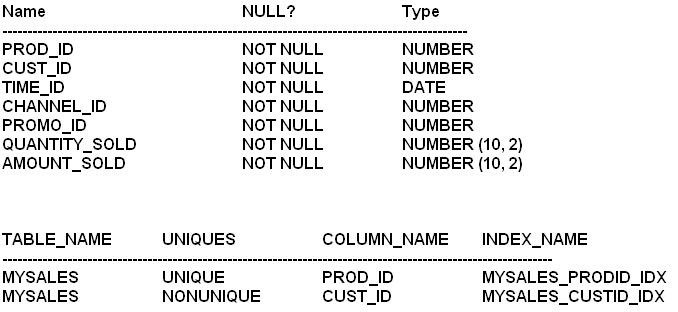 The application uses the MYSALES table to insert sales record. But this table is also extensively used for generating sales reports. The PROD_ID and CUST_ID columns are frequently used in the WHERE clause of the queries. These columns are frequently used in WHERE clause of the queries. These columns have few distinct values relative to the total number of rows in the table. View exhibit 2 and examine one of the queries and its auto trace output. What should you do to improve the performance of the query?
-
A
Use the INDEX_COMBINE hint in the query.
-
B
Create composite index involving the CUST_ID and PROD_ID columns.
-
C
Gather histograms statistics for the CUST_ID and PROD_ID columns.
-
D
Gather index statistics for the MYSALES_PRODID_IDX and MYSALES_CUSTID_IDX indexes.
Reveal answer details
Close answer details
Correct answerD
ExplanationNote:
* Statistics quantify the data distribution and storage characteristics of tables, columns, indexes, and partitions.
* INDEX_COMBINE
Forces a bitmap index access path on tab.
Primarily this hint just tells Oracle to use the bitmap indexes on table tab. Otherwise Oracle will choose the best combination of indexes it can think of based on the statistics. If it is ignoring a bitmap index that you think would be helpful, you may specify that index plus all of the others taht you want to be used. Note that this does not force the use of those indexes, Oracle will still make cost based choices.
* Histograms Opportunities
Any column used in a where clause with skewed data Histograms are NOT just for indexed columns.
Adding a histogram to an un-indexed column that is used in
Question 10
Multiple choice
See the code fragment: 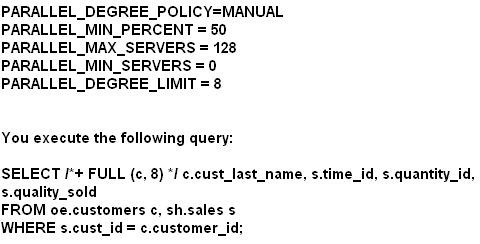 You receive the following error message: ORA-12827: insufficient parallel query slaves available Which three parameter settings could you change to avoid this error?
-
A
Decrease the value of PARALLEL_MIN_PERCENT
-
B
Increase the value of PARALLEL_MAX_SERVERS
-
C
Increase the value of PARALLEL_MIN_SERVERS
-
D
Reduce the value of PARALLEL_MIN_TIME_THRESHOLF
-
E
Increase the value of PARALLEL_DEGREE_LIMIT
-
F
Set the PARALLEL_DEGREE_POLICY = AUTO
-
G
Set the PARALLEL_DEGREE_POLICY = LIMITED
Reveal answer details
Close answer details
Correct answersA, B, G
ExplanationA: ORA-12827:
insufficient parallel query slaves available
Cause: PARALLEL_MIN_PERCENT parameter was specified and fewer than minimum slaves were acquired Action: either re-execute query with lower PARALLEL_MIN_PERCENT or wait until some running queries are completed, thus freeing up slaves B: Your query doesn't run because you've told Oracle not to run it unless at least 5% of the parallel execution processes are available for your query. Set PARALLEL_MIN_PERCENT=0 or increase the number of parallel execution processes by increasing the PARALLEL_MAX_SERVERS parameter.
G: PARALLEL_DEGREE_POLICY
PARALLEL_DEGREE_POLICY specifies whether or not automatic degree of Parallelism, statement queuing, and in-memory parallel execution will be enabled. LIMITED Enables automatic degree of parallelism for some statements but statement queuing and in-memory Parallel Execution are disabled. Automatic degree of parallelism is only applied to those statements that access tables or indexes decorated explicitly with the PARALLEL clause. Tables and indexes that have a degree of parallelism specified will use that degree of parallelism. Note:
PARALLEL_MIN_PERCENT operates in conjunction with PARALLEL_MAX_SERVERS and PARALLEL_MIN_SERVERS. It lets you specify the minimum percentage of parallel execution processes (of the value of PARALLEL_MAX_SERVERS) required for parallel execution. Setting this parameter ensures that parallel operations will not execute sequentially unless adequate resources are available. The default value of 0 means that no minimum percentage of processes has been set. Consider the following settings: PARALLEL_MIN_PERCENT = 50
PARALLEL_MIN_SERVERS = 5
PARALLEL_MAX_SERVERS = 10 If 8 of the 10 parallel execution processes are busy, only 2 processes are available. If you then request a query with a degree of parallelism of 8, the minimum 50% will not be met. You can use this parameter in conjunction with PARALLEL_ADAPTIVE_MULTI_USER. In a multi-user environment, an individual user or application can set PARALLEL_MIN_PERCENT to a minimum value until sufficient resources are available on the system and an acceptable degree of parallelism is returned.
Question 11
Single choice
You notice some performance degradation for a high-load SQL statement in your database. After investigations, you run the SQL Tuning Advisor, which recommends a SQL Profile. You accept the profile recommendation resulting in a new, tuned execution plan for the statement. Your database uses SQL plan management and a SQL plan baseline exists for this SQL statement. Which statement is true?
-
A
The database adds the tuned plan to the SQL plan baseline as a nonfixed plan.
-
B
The database adds the tuned plan to the SQL plan baseline as a fixed plan.
-
C
The optimizer uses the new tuned plan only when a reproducible fixed plan is present.
-
D
The created SQL profile will continuously adapt to all changes made to the database, the object, and to the system statistics over an extended length of time.
Reveal answer details
Close answer details
Correct answerA
ExplanationNote:
* When the SQL Tuning Advisor recommends that a SQL Profile be used, you should accept the SQL Profile that is recommended. In cases where the SQL
Tuning Advisor recommends that an index and a SQL Profile be used, both should be used. You can use the DBMS_SQLTUNE.ACCEPT_SQL_PROFILE procedure to accept a SQL Profile recommended by the SQL Tuning Advisor. This creates and stores a SQL Profile in the database. * When tuning SQL statements with the SQL Tuning Advisor, if the advisor finds a tuned plan and verifies its performance to be better than a plan chosen from the corresponding SQL plan baseline, it makes a recommendation to accept a SQL profile. When the SQL profile is accepted, the tuned plan is added to the
corresponding SQL plan baseline. * If SQL plan management is used and there is already an existing plan baseline for the SQL statement, a new plan baseline will be added when a SQL profile is
created.
* SQL plan management is a preventative mechanism that records and evaluates the execution plans of SQL statements over time, and builds SQL plan baselines composed of a set of existing plans known to be efficient. The SQL plan baselines are then used to preserve performance of corresponding SQL statements, regardless of changes occurring in the system. * SQL plan baseline is fixed if it contains at least one enabled plan whose FIXED attribute is set to YES. * ACCEPT_SQL_PROFILE Procedure and Function This procedure creates a SQL Profile recommended by the SQL Tuning Advisor. The SQL text is normalized for matching purposes though it is stored in the data dictionary in de-normalized form for readability.
Question 12
Single choice
A database supports three applications: CRM, ERP, and ACC. These applications connect to the database by using three different services: CRM_SRV for the
CRM application, ERP_SRV for the ERP application, and ACC_SRV for the ACC application. You enable tracing for the ACC_SRV service by issuing the following command: SQL> EXECUTE DBMS for the ACC_SRV service by issuing the following command:
SQL> EXECUITIVE DBMS_MONITOR. SERV_MOD_ACT_TRACE_ENABLE
(service_name => `ACC_SRV', waits => TRUE, binds = > FALSE, instance_name = > `inst1'); Which statement is true?
-
A
All trace information for the service connection to inst1 will be stored in a single trace file.
-
B
A trace file is not created because the module name is not specified.
-
C
A single trace file is created for each session that uses the ACC_SRV service.
-
D
Only those SQL statements that are identified with the ACC_SRV service executed on the inst1 instance are recorded in trace files.
-
E
All trace information for the ACC_SRV service connected to inst1 is stored in multiple trace files, which can be consolidated by using the tkprof utility.
Reveal answer details
Close answer details
Correct answerC
ExplanationSERV_MOD_ACT_TRACE_ENABLE serv_mod_act_trace_enable and serv_mod_act_trace_disable, which enables and disables trace for given service_name, module and action.
For example for a given service name you can trace all session started from SQL*Plus. Module and action in your own created application can be set using dbms_application_info set_module and set_action procedures. serv_mod_act_trace_enable fills sys table wri$_tracing_enabled and view dba_enabled_traces on top of this table as follows: SQL> exec dbms_monitor.serv_mod_act_trace_enable(service_name=>'orcl', module_name=>'SQL*Plus') PL/SQL procedure successfully completed. SQL> select * from sys.wri$_tracing_enabled; TRACE_TYPE PRIMARY_ID QUALIFIER_ID1 QUALIFIER_ID2 INSTANCE_NAME
FLAGS
---------- ---------- ------------- ------------- ------------- ----- 4 orcl SQL*Plus 8 SQL> select * from dba_enabled_traces; TRACE_TYPE PRIMARY_ID QUALIFIER_ID1 QUALIFIER_ID2 WAITS BINDS
INSTANCE_NAME
-------------- ---------- ------------- ------------- ----- ----- ------------- SERVICE_MODULE orcl SQL*Plus TRUE FALSE
Question 13
Multiple choice
Examine the execution plan: 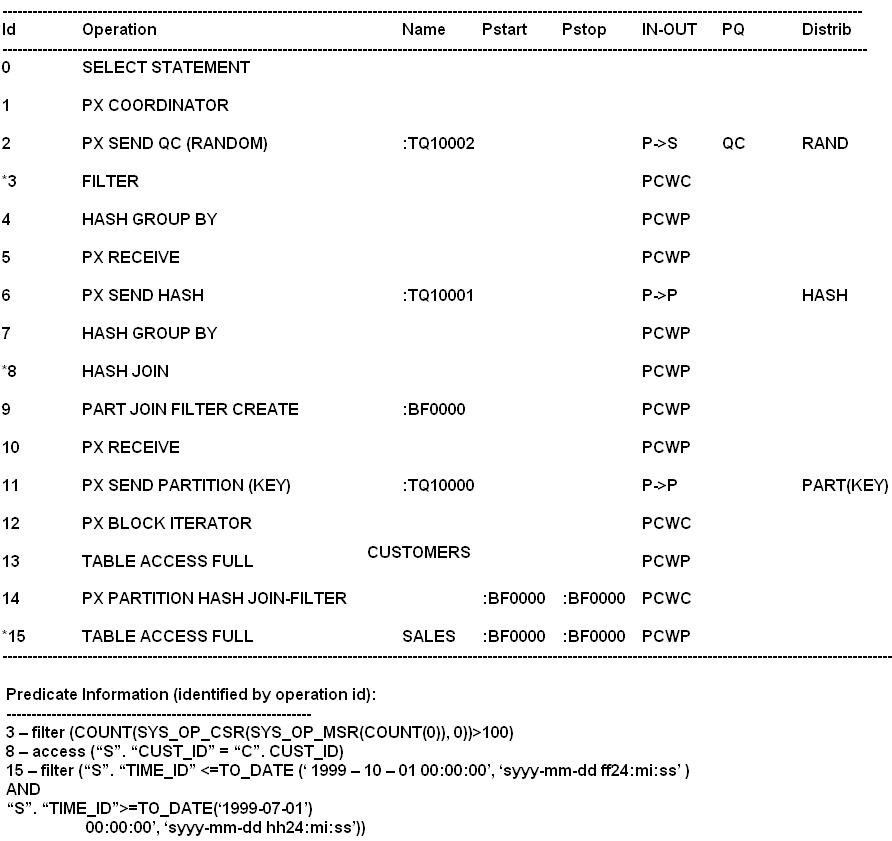  Which two are true regarding the execution plan?
-
A
The CUSTOMERS table is hash partitioned.
-
B
The SALES table is hash partitioned.
-
C
The CUSTOMERS table is scanned first and selected partitions from the SALES table are scanned based on the BLOOM Filter created during the scan of the CUSTOMERS table.
-
D
The SALES table is scanned first and selected partitions from the CUSTOMERS table are scanned based on the Bloom Filter created during the scan of the SALES table.
-
E
Both the CUSTOMERS and SALES tables are scanned simultaneously and rows from the CUSTOMERS table are joined to row of the SALES table.
-
F
The CUSTOMERS table is range partitioned.
Reveal answer details
Close answer details
Correct answersB, C
ExplanationB: As per line 14 and 15. C: As per exhibit line 13 is execute before line 15. Incorrect:
Not E: As per line 13 and 15 they are not executed simultaneously.
Question 14
Multiple choice
Your database supports a workload consisting of three categories of SQL statements: Statements that should execute in less than one minute Statement that may execute for up to 15 minutes Statements that may be executed for more than 15 minutes  You set PARALLEL_DEGREE_POLICY to Auto. You plan to prioritize queued statements by using the Database Resource manager. Which two are true about parallelism prioritization by a consumer group?
-
A
PARALLEL_TARGET_PERCENTAGE is used to prioritize a consumer group's use of the overall PARALLEL_SERVER_TARGET.
-
B
Queuing is done for a consumer group exceeding its percentage, even if the number of busy PX servers in the instance has not reached PARALLEL_SERVERS_TARGET.
-
C
PARALLEL_TARGET_PERCENTAGE us used to prioritize a consumer group's use of the overall SPAN CLASS = `OracleCode'>
PARALLEL_MAX_SERVERS.
-
D
Having separate queues for consumer groups requires the use of management attributes (MGMT_P1, MGMT_P2 etc. . . )
-
E
Separate queue timeout using PARALLEL_QUEUE_TIMEOUT require the use of management attributes (MGMT_P1, MGMT_P2 etc . . . groups)
Reveal answer details
Close answer details
Correct answersA, D
ExplanationA: Parallel Target Percentage It is possible for a single consumer group to launch enough parallel statements to use all the available parallel servers. If this happens, when a high-priority parallel statement from a different consumer group is run, no parallel servers are available to allocate to this group. You can avoid such a scenario by limiting the number of parallel servers that can be used by a particular consumer group. Use the PARALLEL_TARGET_PERCENTAGE directive attribute to specify the maximum percentage of the parallel server pool that a particular consumer group can use. The number of parallel servers used by a particular consumer group is counted as the sum of the parallel servers used by all sessions in that consumer group. Incorrect: Not B: PARALLEL_SERVERS_TARGET specifies the number of parallel server processes allowed to run parallel statements before statement queuing will be used. When the parameter PARALLEL_DEGREE_POLICY is set to AUTO, Oracle will queue SQL statements that require parallel execution, if the necessary parallel server processes are not available. Statement queuing will begin once the number of parallel server processes active on the system is equal to or greater
than PARALLEL_SERVER_TARGET.
Not C: Would be true if we replace PARALLEL_MAX_SERVERS with PARALLEL_SERVER_TARGET.
Not E: The PARALLEL_QUEUE_TIMEOUT directive attribute enables you to specify the maximum time, in seconds, that a parallel statement can wait in the parallel statement queue before it is timed out. The PARALLEL_QUEUE_TIMEOUT attribute can be set for each consumer group. This attribute is applicable even if you do not specify other management attributes (mgmt_p1, mgmt_p2, and so on) in your resource plan.
Note:
* PARALLEL_DEGREE_POLICY
AUTO
Enables automatic degree of parallelism, statement queuing, and in-memory parallel execution. * The PARALLEL_TARGET_PERCENTAGE attribute enables you to specify when parallel statements from a consumer group can be queued. Oracle Database maintains a separate parallel statement queue for each consumer group. * PARALLEL_SERVERS_TARGET specifies the number of parallel server processes allowed to run parallel statements before statement queuing will be used.
When the parameter PARALLEL_DEGREE_POLICY is set to AUTO, Oracle will queue SQL statements that require parallel execution, if the necessary parallel server processes are not available. Statement queuing will begin once the number of parallel server processes active on the system is equal to or greater than PARALLEL_SERVER_TARGET. By default, PARALLEL_SERVER_TARGET is set lower than the maximum number of parallel server processes allowed on the system (PARALLEL_MAX_SERVERS) to ensure each parallel statement will get all of the parallel server resources required and to prevent overloading the system with parallel server processes. Note that all serial (non-parallel) statements will execute immediately even if statement queuing has been activated. * Oracle Database Resource Manager (the Resource Manager) enables you to optimize resource allocation among the many concurrent database sessions. The elements of the Resource Manager are: / Resource consumer group A group of sessions that are grouped together based on resource requirements. The Resource Manager allocates resources to resource consumer groups, not to individual sessions. / Resource plan A container for directives that specify how resources are allocated to resource consumer groups. You specify how the database allocates resources by activating a specific resource plan. / Resource plan directive Associates a resource consumer group with a particular plan and specifies how resources are to be allocated to that resource consumer group.
Question 15
Multiple choice
Which two are the fastest methods for fetching a single row from a table based on an equality predicate?
-
A
Fast full index scan on an index created for a column with unique key
-
B
Index unique scan on an created for a column with unique key
-
C
Row fetch from a single table hash cluster
-
D
Index range scan on an index created from a column with primary key
-
E
Row fetch from a table using rowid
Reveal answer details
Close answer details
Correct answersC, E
ExplanationA scan is slower than a row fetch (from hash value or rowid).
Question 16
Multiple choice
Which two statements are true about the trcsess utility?
-
A
It merges multiple trace files and produces a formatted output file.
-
B
It merges multiple trace files from a particular session into one single trace file.
-
C
It produces multiple files only for DBA sessions, which can be consolidated into one formatted file using the tkprof utility.
-
D
It produces multiple files for a service, which can be consolidated into one formatted file using the tkprof utility.
-
E
It merges files pertaining to a user session scattered across different processes in a shared server configuration.
Reveal answer details
Close answer details
Correct answersA, B
ExplanationThe trcsess utility consolidates trace output from selected trace files based on several criteria: Session ID
Client ID
Service name
Action name
Module name
After trcsess merges the trace information into a single output file, the output file could be processed by TKPROF. Note:
* trcsess is useful for consolidating the tracing of a particular session for performance or debugging purposes. Tracing a specific session is usually not a problem in the dedicated server model as a single dedicated process serves a session during its lifetime. You can see the trace information for the session from the trace file belonging to the dedicated server serving it. However, in a shared server configuration a user session is serviced by different processes from time to time. The trace pertaining to the user session is scattered across different trace files belonging to different processes. This makes it difficult to get a complete picture of the life cycle of a session. References:
Oracle Database Performance Tuning Guide 11g , Using the trcsess Utility
* Now there is a new tool, a command line utility called trcsess to help read the trace files. The trcsess command-line utility consolidates trace information from
selected trace files, based on specified criteria. The criteria include session id, client id, service name, action name and module name.
Question 17
Single choice
View the exhibit and examine the plans in the SQL baseline for a given statement. Which interpretation is correct?
-
A
A new plan cannot be evolved because SYS_SQL_bbedc41f554c408 is accepted.
-
B
Plan SYS_SQL_PLAN_bbdc741f554c408 will always be used by the optimizer for the query.
-
C
A new plan must be evolved using the DBMS_SPM.EVOLVE_SQL_PLAN_BASELINE function before it can be used.
-
D
Plan SYS_SQL_bbedc741a57b5fc2 can be used by the optimizer if the cost of the query is less than plan SYS_SQL_PLAN_bbedc741f554c408.
-
E
Plan SYS_SQL_PLAN_bbedc741f554c408 will not be used until it is fixed by using the DBMS_SPM.EVOLVE_SQL_PLAN_BASELINE function.
Reveal answer details
Close answer details
Correct answerC
ExplanationNote:
* Evolving a SQL plan baseline is the process by which the optimizer determines if non-accepted plans in the baseline should be accepted. As mentioned previously, manually loaded plans are automatically marked as accepted, so manual loading forces the evolving process. When plans are loaded automatically, the baselines are evolved using the EVOLVE_SQL_PLAN_BASELINE function, which returns a CLOB reporting its results. SET LONG 10000 SELECT DBMS_SPM.evolve_sql_plan_baseline(sql_handle =>
'SYS_SQL_7b76323ad90440b9')
FROM dual; * Manual plan loading can be used in conjunction with, or as an alternative to automatic plan capture. The load operations are performed using the DBMS_SPM package, which allows SQL plan baselines to be loaded from SQL tuning sets or from specific SQL statements in the cursor cache. Manually loaded statements are flagged as accepted by default. If a SQL plan baseline is present for a SQL statement, the plan is added to the baseline, otherwise a new baseline is created. * fixed (YES/NO) : If YES, the SQL plan baseline will not evolve over time. Fixed plans are used in preference to non-fixed plans.
Question 18
Multiple choice
You created a SQL Tuning Set (STS) containing resource-intensive SQL statements. You plan to run the SQL Tuning Advisor. Which two types of recommendations can be provided by the SQL Tuning Advisor?
-
A
Semantic restructuring for each SQL statement
-
B
Gathering missing or stale statistics at the schema level for the entire workload
-
C
Creating a materialized view to benefit from query rewrite for the entire workload
-
D
Gathering missing or stale statistics for objects used by the statements.
-
E
Creating a partition table to benefit from partition pruning for each statement
Reveal answer details
Close answer details
Correct answersA, D
ExplanationThe output of the SQL Tuning Advisor is in the form of an advice or recommendations, along with a rationale for each recommendation and its expected benefit.
The recommendation relates to collection of statistics on objects ( D), creation of new indexes, restructuring of the SQL statement (A), or creation of a SQL profile.
You can choose to accept the recommendation to complete the tuning of the SQL statements. Note:
* A SQL Tuning Set can be used as input to the SQL Tuning Advisor, which performs automatic tuning of the SQL statements based on other input parameters specified by the user.
* A SQL Tuning Set (STS) is a database object that includes one or more SQL statements along with their execution statistics and execution context, and could include a user priority ranking. The SQL statements can be loaded into a SQL Tuning Set from different SQL sources, such as the Automatic Workload Repository, the cursor cache, or custom SQL provided by the user. References:
Oracle Database Performance Tuning Guide 11g , SQL Tuning Advisor
Question 19
Single choice
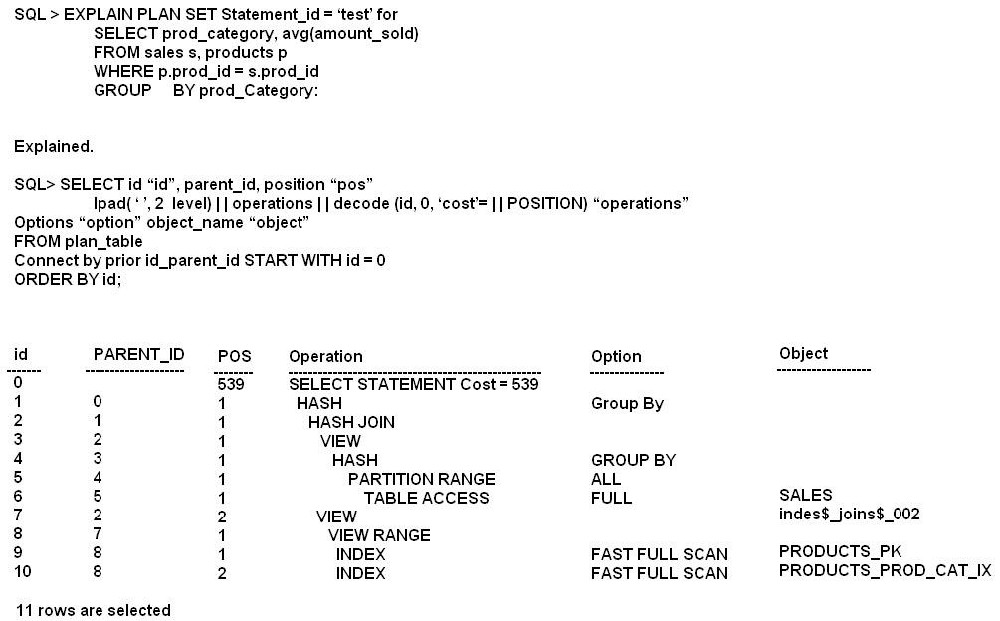 View the exhibit and examine the query and its execution plan from the PLAN_TABLE. Which statement is true about the execution?
-
A
The row with the ID column having the value 0 is the first step execution plan.
-
B
Rows are fetched from the indexes on the PRODUCTS table and from the SALES table using full table scan simultaneously, and then hashed into memory.
-
C
Rows are fetched from the SALES table, and then a hash join operator joins with rows fetched from indexes on the PRODUCTS table.
-
D
All the partitions of the SALES table are read in parallel.
Reveal answer details
Close answer details
|