During a Procurement Contract implementation, a customer would like to set up approvals for procurement contract documents. The customer has four departments and any contract needs to be approved by all the four department users.
Identify the configuration to fulfill this requirement.
-
A
Set up one approval group and include the four department users with voting regime as first responder wins.
-
B
Set up one approval group and include the four department users with voting regime as consensus.
-
C
Set up employee supervisor hierarchy for all four department users and add them to an approval group.
-
D
Set up user group for the four departments and set up individual rules for the four department users.
Reveal answer details
Close answer details
Correct answerB
ExplanationPreapproval Header Consensus
Approvals are routed in parallel for this participant. This participant is more commonly used in conjunction with approval groups. This participant requires approval from all approvers.
References:
https://docs.oracle.com/cloud/latest/procurementcs_gs/OAPRO/OAPRO1061036.htm#OAPRO10610
Question 2
Lab simulation
Simulation Challenge 6 Manage Supplier Questions Scenario Your procurement organization needs to create a Qualification Question that will be communicated to potential suppliers as part of an onboarding process. Task Create an active Qualification Question, where: Name of the question is PRCXX Q1 (Replace xx with 01, which is your allocated User ID.)
Question level and responder type is Supplier Question type is multiple choice with single selection Question text contains, "How many years you have been in business?"
Acceptable response text has three options: 0, 3, and 10 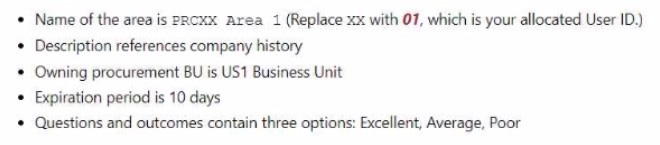 A. Answer: See below in Explanation for each Step.
Reveal model answer
Close model answer
Task 6: Create a Qualification Question for Suppliers Following the scenario, we need to create a new Qualification Question in Oracle Procurement Cloud named "PRCXX Q1" (replace xx with 01) to assess potential suppliers' years in business.
Here are the steps to create the Qualification Question: Navigate to Manage Supplier Qualification Questions: Create the Qualification Question: Enter the Qualification Question Information: Define Acceptable Responses: Save the Qualification Question: Verification: The Qualification Question "PRCXX Q1" (replace xx with 01) should now be listed in the Manage Supplier Qualification Questions page. You can verify the question details and acceptable responses by clicking on it. The question level, responder type, question type, text, required status, and active status should be displayed as specified above.
The acceptable responses should include 0, 3, and 10 years.
Additional Notes:
Make sure to replace "xx" with your allocated User ID (01) in the question name for consistent naming convention.
Selecting "Multiple Choice - Single Select" limits suppliers to choosing one answer. You can add additional acceptable responses if needed. Activating the question makes it visible to suppliers during the qualification process.
Question 3
Multiple choice
You are using the Responsive Self Service Procurement application and you want to review the list of current approvers of a requisition pending approval, but these are not displayed. Which two could be reasons for the approvals not being displayed?
-
A
The requisition is currently under edit by an approver.
-
B
The approvals task flow has been initiated.
-
C
There are errors in retrieving approval details, or there could be any other infrastructure issues.
-
D
Only the approvers can view the list of approvers.
Reveal answer details
Close answer details
Correct answersB, C
ExplanationThe Responsive Self Service Procurement application allows you to view the list of current approvers of a requisition that's pending approval. However, there are some scenarios where the approvals are not displayed. One scenario is when the approvals task flow has been initiated, but not yet completed. In this case, the approvals are still being processed and the list of approvers is not yet available. Another scenario is when there are errors in retrieving approval details, or there could be any other infrastructure issues that prevent the display of approvals. In this case, you may see a message that says "Unable to retrieve approval details" or "Approval details are not available".
References:
View Current Approvers of a Requisition in the Responsive Self Service Procurement Application, Section 1: "View Current Approvers of a Requisition in the Responsive Self Service Procurement Application" Get Started with the Responsive Self Service Procurement Application, Section 2:
"Review Requisitions"
Your customer organization is headquartered in Toronto, and has three manufacturing facilities in Mexico, Taiwan and Austria. The raw material requirements for these three manufacturing units are consolidates and procured from Mexico through the Mexico procurement division. Identify an appropriate way to model this scenario in Oracle Procurement Cloud.
-
A
Requisitioning BU: Toronto and Procurement BU: Mexico
-
B
Requisitioning BU: Toronto and Procurement BU: Toronto
-
C
Requisitioning BU: Mexico, Taiwan, Austria and Procurement BU: Mexico
-
D
Requisitioning BU: Toronto, Taiwan, Austria and Procurement BU: Mexico
-
E
Requisitioning BU: Mexico, Taiwan, Austria and Procurement BU: Toronto
Reveal answer details
Close answer details
Question 5
Multiple choice
You created a sourcing two-stage sealed RFQ and invited five suppliers to participate. The Technical stage is completed and the Commercial stage is unlocked. At this time in the award negotiation section, in the Award Line you are able to see only three supplier's responses as active responses. You are not able to see the other two suppliers' data in the active responses. Which two reasons are causing this? (Choose two.)
-
A
Supplier responses are closed.
-
B
Suppliers have entered the responses. Because the RQF is sealed, you are not able to view these two supplier's data.
-
C
Suppliers were already awarded.
-
D
Suppliers were not shortlisted in the Technical stage.
-
E
You have entered these two suppliers' responses as surrogate responses by a buyer. In the Commercial stage, the buyer has not yet entered surrogate responses.
Reveal answer details
Close answer details
In Sourcing, on which option is the ranking based when you set Overall Ranking Method to "Composite scoring"?
-
A
Assess suppliers on both pricing and external cost factors.
-
B
Assess suppliers on both pricing and internal cost factors.
-
C
Assess suppliers on both pricing and supplier eligibility.
-
D
Assess suppliers on both pricing and qualitative aspects.
Reveal answer details
Close answer details
Correct answerD
ExplanationWhen you set the Overall Ranking Method to Composite scoring, you can assess suppliers on both pricing and qualitative aspects. Qualitative aspects include requirements such as technical capabilities, other commercial considerations, or risk. You can assign weights to requirement sections, including pricing, and calculate a composite score for each supplier based on their response amount and requirement scores.
The composite score is a combination of the relative score for pricing and the weighted requirement score.
The higher the composite score, the higher the overall rank. This way, you can rank suppliers not just based on the best pricing offered, but also on how well they meet your requirements.
References:
Rank Suppliers Based on Composite Score of Pricing and Requirements1 Oracle Supplier Negotiations2
You want to send your purchasing documents from a specific organization-wide email address. What task would you use to set this up?
-
A
Manage Purchasing Application Core Messages
-
B
Manage Purchasing Profile Messaging Options
-
C
Manage Purchasing Value Sets
-
D
Manage Purchasing Profile Options
-
E
Manage Purchasing Messages
Reveal answer details
Close answer details
Correct answerD
ExplanationTo send your purchasing documents from a specific organization-wide email address, you need to use the task Manage Purchasing Profile Options. This task allows you to configure various profile options that control the behavior and functionality of the Purchasing application. One of these profile options is PO: Email Sender Address, which specifies the email address that appears in the From field of the email notifications sent to suppliers and internal users. You can set this profile option at the site level to apply it to all business units, or at the product level to apply it to a specific business unit.
References:
Implement Procurement - docs.oracle.com
PRC:PO: Supplier Communication from Email Address ... - My Oracle Support PRC:PO: Sending Purchase Order (PO) Email ... - My Oracle Support
Question 8
Lab simulation
Simulation Challenge 3 Manage Purchasing Line Types Scenario:
Your business unit requires a new line type for purchasing transactions. Task3: Create a new Purchasing Line Type, where: Name of the line type is PRCXX Computer Goods (Replace xx with 01, which is your allocated User ID.)
Code is PRCXXCOMP
Purchase basis is quantity-based for the Goods product type Line type is linked to the Computer Supplies category Unit is Ea  A. Answer: See below in Explanation for each Step.
Reveal model answer
Close model answer
To create a new Purchasing Line Type, you can follow these steps: Navigate to the Setup and Maintenance work area and search for the Manage Purchasing Line Types task.
Click on the Go to Task icon to open the Manage Purchasing Line Types page. Click on the Create icon to create a new line type. Enter the following information in the Create Line Type dialog box: Click on the Save and Close button to save the line type. You have successfully created a new Purchasing Line Type. You can verify the line type details by searching for it in the Manage Purchasing Line Types page. For more information on how to define and use line types, you can refer to the Defining Line Types
(Oracle Purchasing Help) document. Or use the following: Following the scenario, we need to create a new Purchasing Line Type in Oracle Procurement Cloud named "PRCXX Computer Goods" (replace xx with 01) for purchasing computer supplies.
Here are the steps to create the Purchasing Line Type: Navigate to Manage Purchasing Line Types: Create the Purchasing Line Type: Enter the Purchasing Line Type Information:
Map Accounts:
Save the Purchasing Line Type: Verification: The Purchasing Line Type "PRCXX Computer Goods" (replace xx with 01) should now be listed in the Manage Purchasing Line Types page. You can verify the details of the line type by clicking on it. The purchase basis, product type, category, unit, and mapped accounts should be displayed as specified above.
Additional Notes:
Make sure to replace "xx" with your allocated User ID (01) in both the Purchasing Line Type name and code for consistent naming convention. Mapped accounts define where the financial transactions associated with this line type will be posted in the General Ledger.
Carefully review the mapped accounts to ensure they are aligned with your organization's accounting practices.
You need to set up a Procurement business unit to serve the procurement needs of various Requisitioning business units. What must you set up in Oracle Fusion Cloud Procurement to meet this requirement?
-
A
Spend Authorized relationship between a Supplier and a Requisitioning business unit
-
B
Default Requisitioning business unit relationship in the Procurement Agent setup
-
C
Default Procurement BU relationship in the Requisitioning business function setup
-
D
Service Provider relationship in the Requisitioning business unit setup
Reveal answer details
Close answer details
Correct answerD
ExplanationTo set up a Procurement business unit to serve the procurement needs of various Requisitioning business units, you must set up a Service Provider relationship in the Requisitioning business unit setup. This relationship defines the Procurement business unit as the service provider of the procurement business function, and the Requisitioning business units as its clients. This way, the Procurement business unit can take care of supplier negotiations, supplier site maintenance, and purchase order processing on behalf of the Requisitioning business units. The other options are not relevant for this requirement.
References:
1: Service Provider Models - Oracle
2: Implement Procurement - docs.oracle.com
[3]: Setup Steps in Oracle Fusion Cloud Procurement
Question 10
Multiple choice
Identify three application standard sequence for the in the Setup and Maintenance task list `Define
Supplier Configuration'. (Choose three.)
-
A
Manage Requirement Section Lookup
-
B
Business Classification Lookup
-
C
-
D
Tax Organization Type Lookup
-
E
-
F
Manage Freight Terms Lookup
Reveal answer details
Close answer details
Question 11
Multiple choice
When you are creating your purchase orders, you want to be able to apply discounts to all purchase order lines with a single action and have opted in to the feature. Which are the two conditions when the base price CANNOT be changed?
-
A
The purchase order tine is created from a punchout marketplace that does not allow the price to be changed.
-
B
The purchase order line is for catalog items.
-
C
The purchase order line is received or billed, and the procurement business unit configuration does not
allow manual price updates.
-
D
The purchase order line is included on a Procurement Contract.
Reveal answer details
Close answer details
Correct answersA, D
ExplanationThe base price of a purchase order line cannot be changed if the line is created from a punchout marketplace that does not allow the price to be changed, or if the line is included on a procurement contract. These are the two conditions that prevent the application of discounts to all purchase order lines with a single action.
References:
Oracle Fusion Applications Procurement Implementation Guide, section "Purchase Order Pricing",
subsection "Price Change Conditions". PRC:PO: Purchase Order Price Is Not Updated After A Change Order ..., section "Cause", subsection "Solution".
Question 12
Single choice
During Cloud procurement implementation, your customer has a requirement to ensure that all purchasing documents must go through budgetary control and the purchasing transaction must be stopped from processing if the funds are unavailable. Identify the configuration required to achieve this requirement.
-
A
Select the "enforce budget" check box under the Configure Procurement Business Function
-
B
The budget must be set up with control level as Advisory.
-
C
The budget must be set up with control level as Track.
-
D
The budget must be set up with control level as Absolute.
Reveal answer details
Close answer details
Correct answerD
ExplanationThe budget track level Absolute stops transactions when there are insufficient funds.
Question 13
Single choice
Your organization has multiple procurement business units. A Qualification manager wants to launch an initiative for assessment of suppliers. However, the manager is unable to select the qualification model that he or she defined earlier.
Identify the cause for this behavior.
-
A
The qualification model is not yet approved.
-
B
The Qualification manager is not defined as procurement agent.
-
C
The Qualification manager does not have the "Manage Suppliers" action enabled in procurement agent definition.
-
D
The Qualification manager has not selected the correct procurement BU.
Reveal answer details
Close answer details
Correct answerC
ExplanationSupplier Managers are derived from the users defined in procurement agents. All procurement agents with Manage Suppliers function for the BU that theregistration was created will receive the approval notification.
References:
https://docs.oracle.com/cloud/latest/procurementcs_gs/OAPRC/OAPRC1007476.htm
Question 14
Single choice
When creating a negotiation, the category manager wants to send it to all supplier contacts for a supplier. Which is the most efficient way to achieve this?
-
A
Create the negotiation by using a negotiation style with the appropriate supplier control selected.
-
B
Create a negotiation and send it to the supplier bidder contact for forward distribution.
-
C
Create a negotiation and add each supplier contact to it.
-
D
Create a negotiation by using a negotiation template with each supplier contact added.
Reveal answer details
Close answer details
Correct answerA
ExplanationThe most efficient way to send a negotiation to all supplier contacts for a supplier is to use a negotiation style that has the supplier control option of "All supplier contacts" enabled. This option allows you to automatically include all the contacts associated with a supplier when you add the supplier to the negotiation. You do not need to manually add each contact or rely on the supplier bidder contact to forward the negotiation. You can also create a negotiation template with this option enabled and use it to create a negotiation.
References:
Examples of Negotiation Controls, Section 1: "Examples of Negotiation Controls", Subsection: "Supplier Controls"
Create Supplier Negotiations from Template, Section 1: "Create Supplier Negotiations from Template"
|