Question 1
Lab simulation
Simulation Challenge 7 Manage Qualification Areas Scenario Your procurement organization needs to group and organize qualification questions into a hierarchical structure. Task Create an active Qualification Area to hold the qualification question created previously, where: Name of the area is PRCXX Area 1 (Replace xx with 01, which is your allocated User ID.)
Description references company history
Owning procurement BU is US1 Business Unit Expiration period is 10 days Questions and outcomes contain three options: Excellent, Average, Poor  A. Answer: See below in Explanation for each Step.
Reveal model answer
Close model answer
Task 7: Create a Qualification Area for Supplier Questions Following the scenario, we need to create a new Qualification Area in Oracle Procurement Cloud named "PRCXX Area 1" (replace xx with 01) to organize the previously created supplier question.
Here are the steps to create the Qualification Area: Navigate to Manage Qualification Areas: Create the Qualification Area: Enter the Qualification Area Information:
Add Qualification Questions:
Define Outcomes:
Save the Qualification Area: Verification: The Qualification Area "PRCXX Area 1" (replace xx with 01) should now be listed in the Manage Qualification Areas page.
You can verify the area details, description, and associated supplier question by clicking on it.
The owning procurement BU, expiration period, default owner, active status, and defined outcomes should be displayed as specified above.
Additional Notes:
Make sure to replace "xx" with your allocated User ID (01) in the area name for consistent naming convention.
The expiration period determines how often suppliers need to update their information for this area.
Adding a default qualification owner simplifies the assignment process for new qualifications.
Defining outcomes allows you to evaluate the responses to the qualification questions and assign scores or weights based on their performance.
Question 2
Multiple choice
Which three business users can submit a new supplier request? (Choose three.)
-
A
-
B
-
C
-
D
-
E
Self-Service Procurement user
Reveal answer details
Close answer details
During a Procurement Contract implementation, a customer would like to set up approvals for procurement contract documents. The customer has four departments and any contract needs to be approved by all the four department users.
Identify the configuration to fulfill this requirement.
-
A
Set up one approval group and include the four department users with voting regime as first responder wins.
-
B
Set up one approval group and include the four department users with voting regime as consensus.
-
C
Set up employee supervisor hierarchy for all four department users and add them to an approval group.
-
D
Set up user group for the four departments and set up individual rules for the four department users.
Reveal answer details
Close answer details
Correct answerB
ExplanationPreapproval Header Consensus
Approvals are routed in parallel for this participant. This participant is more commonly used in conjunction with approval groups. This participant requires approval from all approvers.
References:
https://docs.oracle.com/cloud/latest/procurementcs_gs/OAPRO/OAPRO1061036.htm#OAPRO10610
Identify the Duty role that you need to associate with the Job role to enable the "new supplier request" functionality.
-
A
-
B
Supplier Self Service administrator duty
-
C
Supplier sales representative duty
-
D
Supplier Self Service clerk duty
-
E
Submit supplier registration duty
Reveal answer details
Close answer details
Correct answerE
ExplanationOnly registration requests in pending approval status can be edited. The user must be the current approver and have Supplier Registration Management Duty (Edit Supplier Registration Request privilege), or Supplier Profile Management Duty (Access Supplier Workarea Overview privilege) to edit the registration.
Question 5
Multiple choice
While creating a Contract Purchase Agreement, a buyer tries to add a Contract Template to it, but the List of Values (VOL) is empty.
Identify three applicable reasons for this issue.
-
A
The Contract Template is in `Approved' status.
-
B
The document type associated with the Contract Template is `Purchase Order'.
-
C
The document type associated with the Contract Template is `Contract Purchase Agreement'.
-
D
The Contract Template is not `Approved'.
-
E
The document type associated with the Contract Template is `Blanket Purchase Agreement'.
Reveal answer details
Close answer details
Correct answersA, B, C
ExplanationReferences:
http://docs.oracle.com/cd/E37017_01/doc.1115/e22658/F424214AN124DD.htm
Question 6
Multiple choice
You want to process negotiations with hundreds of lines. Which two options in Sourcing enable you to process large negotiations?
-
A
-
B
Integration with Purchasing to generate purchasing documents
-
C
file-based data import (FBDI)
-
D
-
E
Invite additional suppliers post publish
Reveal answer details
Close answer details
Correct answersA, C
ExplanationExplanation: To process negotiations with hundreds of lines, you can use the file-based data import (FBDI) and the award lines spreadsheet options in Sourcing. The FBDI option allows you to import a large number of negotiation lines using a MS Excel template and a background process. You can also update or delete existing lines using the same option. The award lines spreadsheet option allows you to export the negotiation lines to a MS Excel file, where you can enter the award decisions and amounts. You can then import the file back to the application using a background process to complete the award.
References:
How You Create Large Negotiations, Section 1: "How You Create Large Negotiations"
Award Negotiations Using Spreadsheet, Section 1: "Award Negotiations Using Spreadsheet"
Your organization has multiple procurement business units. A Qualification manager wants to launch an initiative for assessment of suppliers. However, the manager is unable to select the qualification model that he or she defined earlier.
Identify the cause for this behavior.
-
A
The qualification model is not yet approved.
-
B
The Qualification manager is not defined as procurement agent.
-
C
The Qualification manager does not have the "Manage Suppliers" action enabled in procurement agent definition.
-
D
The Qualification manager has not selected the correct procurement BU.
Reveal answer details
Close answer details
Correct answerC
ExplanationSupplier Managers are derived from the users defined in procurement agents. All procurement agents with Manage Suppliers function for the BU that theregistration was created will receive the approval notification.
References:
https://docs.oracle.com/cloud/latest/procurementcs_gs/OAPRC/OAPRC1007476.htm
Question 8
Multiple choice
Identify two fields whose tolerance levels are ignored when data is entered while creating receipts using Enforce Blind Receiving. (Choose two.)
-
A
-
B
-
C
-
D
-
E
Reveal answer details
Close answer details
Correct answersC, E
ExplanationReferences:
https://docs.oracle.com/cd/E18727_01/doc.121/e13409/T207713T208957.htm
Name the Oracle Transactional Business Intelligence (OTBI) KPI that indicates the count of approved requisitions where at least one of the requisition lines is assigned to the buyer who has logged in and that requisition line is not implemented into an order, bucketed by the number of days elapsed since the requisition was approved.
-
A
Requisition Lines in Process Count
-
B
-
C
Requisition Lines Volume Count
-
D
Requisition Lines Cycle Time
-
E
Reveal answer details
Close answer details
Question 10
Multiple choice
Identify two tasks that can be performed in the Functional Setup Manager by a customer when configuring
setup data. (Choose two.)
-
A
setting up and maintaining data by means of the Manage Admin menu
-
B
importing and exporting data between instances
-
C
configuring Oracle CloudApplications to match business needs
-
D
collecting data to populate the order orchestration and planning data repository
Reveal answer details
Close answer details
Correct answersB, C
ExplanationConfigure Oracle Fusion applications to match your business needs. Export and import data from one instance toanother for rapid setup.
Question 11
Lab simulation
Simulation Challenge 4 Manage Inventory Organizations Scenario: Your procurement organization requires you to create an inventory organization, which will be used for issuing and receiving procurement transactions. Task: Create an Inventory Organization to receive procurement transactions, where: Name of the organization is PRCXX Organization (Replace xx with 01, which is your allocated User ID.)
Organization code is PRCXXORG (Replace xx with 01, which is your allocated User ID.)
Organization is linked to US1 Business Unit, US1 Legal Entity, and Redwood City - CA location Item Master Organization is linked to Operations Item Grouping Behavior is set to Definition Organization Schedule is set to Operations 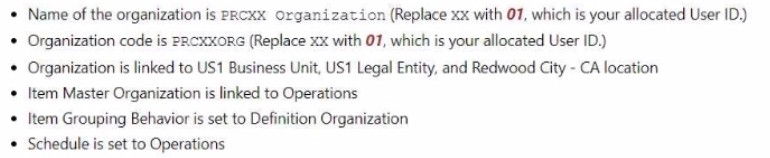 A. Answer: See below in Explanation for each Step.
Reveal model answer
Close model answer
To create an Inventory Organization to receive procurement transactions, you can follow these steps: Navigate to the Setup and Maintenance work area and search for the Manage Inventory Organizations task.
Click on the Go to Task icon to open the Manage Inventory Organizations page. Click on the Create icon to create a new inventory organization. Enter the following information in the Create Inventory Organization dialog box: Click on the Save and Close button to save the inventory organization. You have successfully created an inventory organization to receive procurement transactions. You can verify the inventory organization details by searching for it in the Manage Inventory Organizations page. For more information on how to create and manage inventory organizations, you can refer to the Inventory Organizations document. Or use the following steps:Following the scenario, we need to create a new Inventory Organization in Oracle Procurement Cloud named "PRCXX Organization" (replace xx with
01) to receive procurement transactions.
Here are the steps to create the Inventory Organization: Navigate to Manage Inventory Organizations: Create the Inventory Organization: Enter the Inventory Organization Information: Define Item Sourcing Details: Save the Inventory Organization: Verification: The Inventory Organization "PRCXX Organization" (replace xx with 01) should now be listed in the Manage Inventory Organizations page. You can verify the details of the organization by clicking on it. The linked Business Unit, Legal Entity, Location, Item Master Organization, Item Grouping Behavior, and Schedule should be displayed as specified above. Additionally, the Item Sourcing Details should reflect the defined values for picking, lead time, subinventory, and shipping rules.
Additional Notes:
Make sure to replace "xx" with your allocated User ID (01) in both the Inventory Organization name and code for consistent naming convention. The Item Master Organization defines the organization responsible for managing item information.
The Item Grouping Behavior determines how items are grouped for inventory purposes.
The Schedule defines the calendar used for scheduling inventory transactions. Carefully review and configure the Item Sourcing Details to ensure proper receipt and fulfillment of procurement transactions
within your organization.
Question 12
Single choice
In the Supplier Portal, which job role must you allocate to a supplier contact to enable them to provision user accounts to their own employees?
-
A
-
B
-
C
Supplier Self Service Clerk
-
D
Supplier Self Service Administrator
Reveal answer details
Close answer details
Correct answerA
ExplanationExplanation: The Supplier Administrator job role is the only one that can provision user accounts to their own employees in the Supplier Portal. This role allows the supplier contact to manage supplier profile and user provisioning, as well as perform other tasks related to supplier master data, supplier qualification, and supplier registration. The other job roles do not have the privilege to create or modify supplier user accounts.
References:
Oracle Fusion Supplier Portal Important Roles
Supplier Administrator (Abstract Role)
Supplier Portal Job Roles and Tasks
|