Question 1
Multiple choice
A customer has BOM Mapping configured on their site using a simple Table-Based BOM Mapping rule.
However, they want to modify their BOM Mapping to also map an additional Configuration attribute to a Transaction Line level attribute. Which two methods can the customer use to achieve this? (Choose two.)
-
A
Add a new entry in the BOM Attribute Mapping table for the BOM item.
-
B
Add a new entry in the BOM Item Mapping Definition table for the BOM item.
-
C
Add a new entry in the BOM Attribute Definition table for the BOM item.
-
D
Define an Advanced BML-Based BOM Mapping rule that populates the "attributes" node of the BOM item.
-
E
Define an Advanced BML-Based BOM Mapping rule that populates the "definition" node of the BOM item.
-
F
Define an Advanced BML-Based BOM Mapping rule that populates the "fields" node of the BOM item.
Reveal answer details
Close answer details
Question 2
Multiple choice
Identify four types of attributes that can be set by formulas. (Choose four.)
-
A
-
B
Single Select Menu Attributes
-
C
-
D
-
E
-
F
Reveal answer details
Close answer details
Correct answersA, C, E, F
When a user clicks Save within Commerce of CPQ, the user gets the following error: "insufficient access on cross reference id." Why?
-
A
The user does not have CPQ access.
-
B
The user does not have the ability to see and edit any object in Salesforce that the user is trying to edit.
-
C
Upon installing Salesforce Managed Package, the flag "Allow Quote Creation" is not checked.
-
D
The user does not exist in Salesforce Managed Package.
Reveal answer details
Close answer details
Given the following JSON:  Which option gets the reference of a JSON object with a specific Document Number `40'? 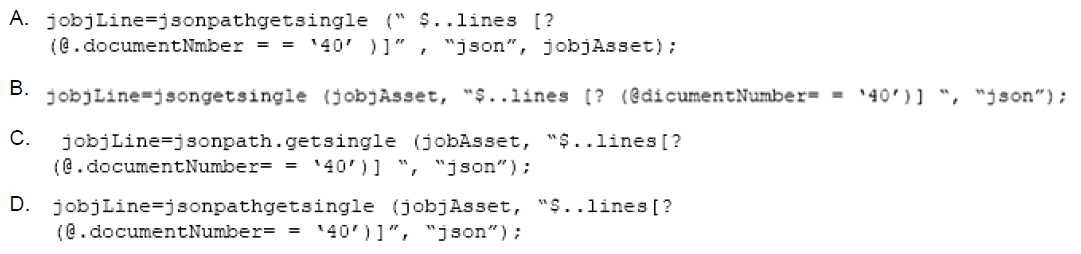
-
A
-
B
-
C
-
D
Reveal answer details
Close answer details
Question 5
Multiple choice
Identify three types of activities that are captured in Administration logs. (Choose three.)
-
A
migrations with the site as target
-
B
deployment of configuration product families
-
C
-
D
modification of Commerce process objects
-
E
creation of configuration objects
-
F
uploading of files in File Manager
Reveal answer details
Close answer details
You want to create a Document Designer template that contains text in multiple columns. How do you add multiple columns to the template?
-
A
Set the number of columns to be used in the Text Element Properties panel.
-
B
Drag a Column Text Element to the appropriate section of the template.
-
C
Set the number of columns to be used in the Section Properties panel.
-
D
Select the appropriate options for the number of columns you want in the Text Element Properties panel.
-
E
Click the Column Section icon in the floating Layout Item palette.
Reveal answer details
Close answer details
Question 7
Multiple choice
The following BML code in Config encountered an HTTP 404 error from someurl.com.  Which two statements are true? (Choose two.)
-
A
An unhandled exception will be displayed in red text at the top of the configuration screen.
-
B
The HTTP error will be captured in the CPQ Cloud Error Logs: bm.log.
-
C
An HTTP error will be displayed in red text with the message "HTTP 404 Not Found" at the top of the configuration screen.
-
D
The call will return "call failed."
-
E
The call will return "HTTP 404 Not Found."
Reveal answer details
Close answer details
Question 8
Multiple choice
Identify three values that you can find in the Usage Metrics Report for the last month. (Choose three.)
-
A
The number of configurations completed for different product families by internal users and partner organization users.
-
B
The number of transactions for different Commerce processes created by internal users and partner organization users.
-
C
A list of active partner organization users with the most recent login date and time and the number of logins.
-
D
The number of logins by internal users in the last 30 days and the percentage of active users logged in.
-
E
The total data size of the CPQ site occupied on the server.
-
F
The total number of partner organizations and the number of active partner organizations.
Reveal answer details
Close answer details
Your customer wants to create a user that has complete access to the site and has the ability to add and edit new users. Which procedure should you follow to accomplish this?
-
A
Click the Add button on the User Administration List page; enter values for the required fields (Login,
Password, Email, First Name, Last Name, and Phone Number); set the Type field to Admin; click the
Add button to add the user to the system; click the new user's name on the User Administration List
page to edit the user; select the Add New Users check box; and click the Add button to save the
changes.
-
B
Click the Add button on the User Administration List page; enter values for the required fields (Login,
Email, and First Name); click the Add button to add the user to the system; click the new user's name
on the User Administration List page to edit the user; select the Create/Modify Users check box; and
click the Update button to save the changes.
-
C
Click the Add button on the User Administration List page; enter values for the required fields (Login,
Email, and First Name); set the Type field to FullAccess; select the Create/Modify Users check box,
and click the Add button to add the user to the system.
-
D
Click the Add button on the User Administration List page, set the Type field to Admin, click the Add button to add the user to the system, click the new user's name on the User Administration List page to edit the user, select the Create/Modify Users check box, and click the Update button to save the changes.
-
E
Click the Add button on the User Administration List page; enter values for the required fields (Login,
Email, and First Name); set the Type field to FullAccess; click the Add button to add the user to the
system; click the new user's name on the User Administration List page to edit the user, select the
Create/Modify Users check box; and click the Update button to save the changes.
Reveal answer details
Close answer details
Question 10
Single choice
There are two single-select attributes in an array set. The first single-select attribute shows a list of countries and the second attribute shows a list of states. Which is the most efficient way to show relevant states based on chosen country?
-
A
Use the Hiding rule, which is the only possible option, because arrays do not do not support Constraint rules.
-
B
Create Hiding rules for each country with Simple Conditions, and then select valid states for the Action attribute. In this case, the number of Hiding rules will be equal to the number of countries.
-
C
Create a Constraint rule for each country in the drop-down list by using Simple Conditions and select valid states for the Action attribute of the rule. In this case, number of rules will be equal to the number of countries in the list.
-
D
Load all country and state combinations in a data table and write a Constraint rule to lookup the data table.
Reveal answer details
Close answer details
Question 11
Multiple choice
Identify three types of data written to different log files that you can find in the Error Logs menu. (Choose three.)
-
A
email sending and receiving
-
B
-
C
-
D
-
E
-
F
Reveal answer details
Close answer details
Question 12
Single choice
After saving content to the Content library, you check the Content library Tree and find that the new content is missing. What would be your immediate action?
-
A
Close, refresh dynamic sources, and re-open the Dynamic Data window.
-
B
Close and re-open the Content Library Tree.
-
C
-
D
Deploy Config and Commerce.
Reveal answer details
Close answer details
Question 13
Single choice
How do you modify a specific user's access (grant access or remove access) to Product Families, Supported Product Families, and Data Table folders?
-
A
For each Product Family or Data table folder affected, click the Modify tab for that item and then select or deselect the check boxes related to the users you want to grant access to or remove access from for this Product Family or Data Table folder.
-
B
Click the user's name on the User Administration List page to edit the user, click the Access Permission tab, select or deselect the check boxes related to the items you want to grant access to or remove access from for this user.
-
C
Click the Group name on the Group Administration List page that has this user as a member, click the Access Permissions tab, select or deselect the check boxes related to the items you want to grant access to or remove access from for this user.
-
D
Go to the Product Family definition or the Data Table folder properties for which you want to grant or remove access, click the Access Permissions tab, select or deselect the check boxes related to the users you want to grant access to or remove access from for this Product Family or Data Table folder.
-
E
Use the Navigation Menus item on the Administration home page to grant or remove access to specific Product Families or Data Table folders for the user.
Reveal answer details
Close answer details
Question 14
Multiple choice
For a multi-language Document Designer template, which of the following two activities are possible for the nondefault language view? (Choose two.)
-
A
Add new image element in a section.
-
B
Add or remove table element's rows and columns.
-
C
-
D
Move text elements between elements and layouts.
-
E
Modify date and currency formats.
Reveal answer details
Close answer details
Question 15
Multiple choice
Identify two ways in which you can display a message to a user while using simple table-based lookups for an attribute. (Choose two.)
-
A
defining an advanced BML (CPQ Cloud Language) function for that attribute
-
B
setting the message type as Static Entry when selecting an attribute to populate
-
C
setting the message type as Table Column when selecting an attribute to populate
-
D
defining a static text message for that attribute
Reveal answer details
Close answer details
|