What CLI utility runs connectivity tests from a Security Gateway to an AD domain controller?
-
A
test_connectivity_ad -d <domain>
-
B
test_ldap_connectivity -d <domain>
-
C
test_ad_connectivity -d <domain>
-
D
ad_connectivity_test -d <domain>
Reveal answer details
Close answer details
Correct answerC
ExplanationThe CLI utility that runs connectivity tests from a Security Gateway to an AD domain controller is test_ad_connectivity -d <domain>. This command tests the connectivity between the gateway and the
domain controller using LDAP, Kerberos, and WMI protocols. It also verifies the identity awareness configuration and shows the relevant logs. The other options are not valid commands for testing AD connectivity. References:
Check Point Software, Getting Started, Testing Active Directory Connectivity.
By default, which port does the WebUI listen on?
-
A
-
B
-
C
-
D
Reveal answer details
Close answer details
Correct answerC
ExplanationThe default port for the Gaia WebUI Portal is HTTPS 443. This is the standard port for secure web communication over SSL/TLS. Changing the port may cause inconsistency with the settings on the SmartConsole and is not recommended unless necessary. To change the port, you can use the CLISH command set web ssl-port <port number> and save the configuration.
Which Check Point software blades could be enforced under Threat Prevention profile using Check Point R81.
20 SmartConsole application?
-
A
IPS, Anti-Bot, URL Filtering, Application Control, Threat Emulation.
-
B
Firewall, IPS, Threat Emulation, Application Control.
-
C
IPS, Anti-Bot, Anti-Virus, Threat Emulation, Threat Extraction.
-
D
Firewall, IPS, Anti-Bot, Anti-Virus, Threat Emulation.
Reveal answer details
Close answer details
Correct answerC
ExplanationThe Threat Prevention profile in Check Point R81.20 SmartConsole application allows you to enforce the following software blades: IPS, Anti-Bot, Anti-Virus, Threat Emulation, and Threat Extraction. These software blades provide comprehensive protection against various types of threats, such as network attacks, malware, ransomware, phishing, and zero-day exploits. You can configure the profile settings for each software blade, such as the action to take, the protection scope, and the exceptions. References:
Check Point Security Expert R81 Course, Threat Prevention Administration Guide
Which application should you use to install a contract file?
-
A
-
B
-
C
-
D
Reveal answer details
Close answer details
Correct answerC
ExplanationAccording to the Check Point website, SmartUpdate is the application that should be used to install a contract file. A contract file contains information about the licenses and services that are purchased from Check Point. SmartUpdate can also be used to install software packages and patches on Security Gateways and Management Servers. The other applications are either not relevant or not capable of installing a contract file.
Access roles allow the firewall administrator to configure network access according to:
-
A
a combination of computer or computer groups and networks.
-
B
-
C
-
D
Reveal answer details
Close answer details
What is the correct description for the Dynamic Balancing / Split feature?
-
A
Dynamic Balancing / Split dynamically changes the number of SNDs and firewall instances based on the current load. It is only available on Quantum Appliances (not on Quantum Spark or Open Server)
-
B
Dynamic Balancing / Split dynamically distributes traffic from one network interface to multiple SNDs.
The interface must support Multi-Queue. It is only available on Quantum Appliances (not on Quantum Spark or Open Server)
-
C
Dynamic Balancing / Split dynamically changes the number of SNDs and firewall instances based on the current load. It is only available on Quantum Appliances and Open Server (not on Quantum Spark)
-
D
Dynamic Balancing / Split dynamically distributes traffic from one network interface to multiple SNDs.
The interface must support Multi-Queue. It is only available on Quantum Appliances and Open Server (not on Quantum Spark)
Reveal answer details
Close answer details
Correct answerA
ExplanationDynamic Balancing (also known as Dynamic Split) is a performance optimization feature in Check Point that distributes incoming traffic from a single network interface across multiple SND (Secure Network Dispatcher) instances. This feature relies on Multi-Queue NIC support, allowing different receive queues to be processed by different CPU cores, improving scalability and throughput. Dynamic Balancing does not change the number of SNDs or firewall instances dynamically; instead, it optimizes how traffic is distributed among existing resources. It is supported on Quantum Appliances and Open Servers (R80.40 and later), but not on Quantum Spark platforms.
When gathering information about a gateway using CPINFO, what information is included or excluded when using the "-x" parameter?
-
A
-
B
Gets information about the specified Virtual System
-
C
Does not resolve network addresses
-
D
Output excludes connection table
Reveal answer details
Close answer details
Correct answerB
ExplanationThe cpinfo command is a tool that collects diagnostic data from a Check Point gateway or management server. The data includes configuration files, logs, status reports, and more. The cpinfo output can be used for troubleshooting or sent to Check Point support for analysis. The -x parameter is used to get information about the specified Virtual System on a VSX gateway. A Virtual System is a virtualized firewall instance that runs on a VSX gateway and has its own security policy and objects. References:
Check Point Security Expert R81 Course, cpinfo Utility, VSX Administration Guide
Which directory below contains log files?
-
A
-
B
-
C
-
D
Reveal answer details
Close answer details
Correct answerC
ExplanationThe directory /opt/CPsuite-R81/fw1/log contains the log files for the Security Gateway, such as firewall, VPN, IPS, and anti-virus logs. These log files can be viewed and analyzed using SmartConsole or SmartView. The other directories are not correct because: Option A. The directory /opt/CPSmartlog-R81/log contains the log files for the SmartLog server, which is a separate component that indexes and searches logs from multiple Security Gateways.
Option B. The directory /opt/CPshrd-R81/log contains the log files for the shared components of the Check Point suite, such as cpwd, cpca, cpd, and cpwatchdog.
Option D. The directory /opt/CPsuite-R81/log does not exist by default and is not used for logging purposes. References:
Logging and Monitoring R81 Administration Guide, SmartConsole R81 Help, SmartLog R81 Help, Check Point Processes and Daemons
What should the admin do in case the Primary Management Server is temporary down?
-
A
Run the `promote_util' to activate the Secondary Management server.
-
B
The Secondary will take over automatically. Change the IP in SmartConsole to logon to the private IP of the Secondary Management Server.
-
C
Use the VIP in SmartConsole you always reach the active Management Server.
-
D
Logon with SmartConsole to the Secondary Management Server and choose `Make Active' under
Actions in the HA Management Menu.
Reveal answer details
Close answer details
Question 10
Single choice
Both ClusterXL and VRRP are fully supported by Gaia R81.20 and available to all Check Point appliances. Which the following command is NOT related to redundancy and functions?
-
A
-
B
-
C
-
D
Reveal answer details
Close answer details
Correct answerD
ExplanationThe command cphaprob all show stat is not related to redundancy and functions. This command does not exist in ClusterXL or VRRP. The other commands are valid commands for checking the status of cluster members, interfaces, and synchronization. ClusterXL and VRRP are both high availability solutions that provide redundancy and load balancing for Check Point gateways. References:
Check Point Security Expert R81 Course, ClusterXL Administration Guide, VRRP Administration Guide
Question 11
Single choice
In which scenario will an administrator need to manually define Proxy ARP?
-
A
When they configure an "Automatic Static NAT" which translates to an IP address that does not belong to one of the firewall's interfaces.
-
B
When they configure an "Automatic Hide NAT" which translates to an IP address that does not belong to one of the firewall's interfaces.
-
C
When they configure a "Manual Static NAT" which translates to an IP address that does not belong to one of the firewall's interfaces.
-
D
When they configure a "Manual Hide NAT" which translates to an IP address that belongs to one of the firewall's interfaces.
Reveal answer details
Close answer details
Correct answerC
ExplanationProxy ARP is a technique that allows a device to respond to ARP requests on behalf of another IP address. Proxy ARP is required for Manual Static NAT when the translated IP address does not belong to one of the firewall's interfaces. This is because the firewall needs to intercept the packets destined to the translated IP address and forward them to the original IP address after applying the NAT rule. Without Proxy ARP, the packets would not reach the firewall and the NAT would not work. Proxy ARP is not required for Automatic Static NAT or Automatic Hide NAT, because these types of NAT use IP addresses that belong to the firewall's interfaces. Proxy ARP is also not required for Manual Hide NAT, because this type of NAT does not change the destination IP address of the packets, only the source IP address. References:
Check Point R81 Security Management Administration Guide, page 115
Question 12
Single choice
Which feature dynamically assigns traffic to CPU cores?
-
A
-
B
-
C
-
D
Reveal answer details
Close answer details
Correct answerC
ExplanationDynamic Dispatcher dynamically distributes traffic across CPU cores based on load.
Question 13
Single choice
Alice was asked by Bob to implement the Check Point Mobile Access VPN blade - therefore are some basic configuration steps required - which statement about the configuration steps is true?
-
A
1. Add a rule in the Access Control Policy and install policy
2. Configure Mobile Access parameters in Security Gateway object
3. Enable Mobile Access blade on the Security Gateway object and complete the wizard
4. Connect to the Mobile Access Portal
-
B
1. Connect to the Mobile Access Portal
2. Enable Mobile Access blade on the Security Gateway object and complete the wizard
3. Configure Mobile Access parameters in Security Gateway object
4. Add a rule in the Access Control Policy and install policy
-
C
1. Configure Mobile Access parameters in Security Gateway object
2. Enable Mobile Access blade on the Security Gateway object and complete the wizard
3. Add a rule in the Access Control Policy and install policy
4. Connect to the Mobile Access Portal
-
D
1. Enable Mobile Access blade on the Security Gateway object and complete the wizard
2. Configure Mobile Access parameters in Security Gateway object
3. Add a rule in the Access Control Policy and install policy
4. Connect to the Mobile Access Portal
Reveal answer details
Close answer details
Question 14
Single choice
A user complains that some Internet resources are not available. The Administrator is having issues seeing if packets are being dropped at the firewall (not seeing drops in logs). What is the solution to troubleshoot the issue?
-
A
run "fw ctl zdebug drop" on the relevant gateway
-
B
run "cpstop" on the relevant gateway and check the ping again
-
C
run "fw unloadlocal" on the relevant gateway and check the ping again
-
D
run "fw log" on the relevant gateway
Reveal answer details
Close answer details
Question 15
Single choice
What is the responsibility of SOLR process on the management server?
-
A
Validating all data before it's written into the database
-
B
It generates indexes of data written to the database
-
C
Communication between SmartConsole applications and the Security Management Server
-
D
Writing all information into the database
Reveal answer details
Close answer details
Question 16
Single choice
When SecureXL is enabled, all packets should be accelerated, except packets that match the following conditions:
-
A
-
B
-
C
All packets that match a rule whose source or destination is the Outside Corporate Network
-
D
Reveal answer details
Close answer details
Correct answerD
ExplanationWhen SecureXL is enabled, all packets should be accelerated, except packets that match the following conditions: CIFS packets. SecureXL is a technology that accelerates network traffic processing by offloading intensive operations from the Firewall kernel to a dedicated SecureXL device. However, some packets cannot be accelerated by SecureXL due to various reasons, such as unsupported features, security policy settings, or protocol limitations. One example of packets that cannot be accelerated by SecureXL are CIFS packets, which are used for file sharing and access over SMB protocol. CIFS packets are not accelerated by SecureXL because they require stateful inspection by the Firewall kernel.
Question 17
Single choice
Check Point Management (cpm) is the main management process in that it provides the architecture for a consolidated management console. It empowers the migration from legacy Client-side logic to Server-side logic. The cpm process:
-
A
Allow GUI Client and management server to communicate via TCP Port 19001
-
B
Allow GUI Client and management server to communicate via TCP Port 18191
-
C
Performs database tasks such as creating, deleting, and modifying objects and compiling policy.
-
D
Performs database tasks such as creating, deleting, and modifying objects and compiling as well as policy code generation.
Reveal answer details
Close answer details
Question 18
Single choice
The fwd process on the Security Gateway sends logs to the fwd process on the Management Server via which 2 processes?
-
A
-
B
-
C
-
D
Reveal answer details
Close answer details
Correct answerA
ExplanationThe fwd process on the Security Gateway sends logs to the fwd process on the Management Server via the cpm process. The cpm process is the main management process that handles database operations, policy installation, and communication with GUI clients via TCP port 190093. The other options are either incorrect or irrelevant to the log flow. References:
Certified Security Expert (CCSE) R81.20 Course Overview, Check Point Ports Used for Communication by Various Check Point Modules
Question 19
Single choice
Check Point Management (cpm) is the main management process in that it provides the architecture for a consolidated management console. It empowers the migration from legacy Client-side logic to Server-side logic. The cpm process
-
A
Performs database tasks such as creating, deleting, and modifying objects and compiling policy.
-
B
Allows SmartConsole to communicate over TCP Port 19001
-
C
Performs database tasks such as creating, deleting, and modifying objects and indexing logs
-
D
Allows SmartConsole to communicate over TCP Port 18190
Reveal answer details
Close answer details
Question 20
Single choice
The system administrator of a company is trying to find out why acceleration is not working for the traffic. The traffic is allowed according to the rule base and checked for viruses. But it is not accelerated. What is the most likely reason that the traffic is not accelerated?
-
A
The packets are not multicast
-
B
The packet is the second in an established TCP connection
-
C
The connection is destined for a server within the network
-
D
The connection required a Security server
Reveal answer details
Close answer details
Question 21
Single choice
You have used the SmartEvent GUI to create a custom Event policy. What is the best way to display the correlated Events generated by SmartEvent Policies?
-
A
In the SmartConsole / Logs & Monitor -> open the Logs View and use type:Correlated as query filter.
-
B
Select the Events tab in the SmartEvent GUI or use the Events tab in the SmartView web interface.
-
C
Open SmartView Monitor and select the SmartEvent Window from the main menu.
-
D
In the SmartConsole / Logs & Monitor -> open a new Tab and select External Apps / SmartEvent.
Reveal answer details
Close answer details
Question 22
Single choice
Kofi, the administrator of the ALPHA Corp network wishes to change the default Gaia WebUI Portal port number currently set on the default HTTPS port. Which CLISH commands are required to be able to change this TCP port? 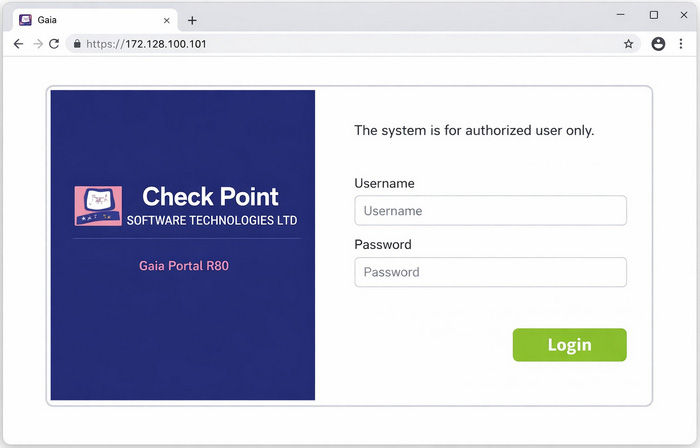
-
A
set web ssl-port <new port number>
-
B
set Gaia-portal port <new port number>
-
C
set Gaia-portal https-port <new port number>
-
D
set web https-port <new port number>
Reveal answer details
Close answer details
Correct answerA
ExplanationThe CLISH command to change the default Gaia WebUI Portal port number is set web ssl-port <new port number>. This command will change the port that the WebUI listens on for HTTPS connections. After
changing the port, you need to save the configuration with save config and verify that the change was applied with show web ssl-port. You also need to update the Main URL in the Platform Portal section of the gateway object in SmartConsole and install the policy.
Question 23
Single choice
What command is used to manually failover a cluster during a zero-downtime upgrade?
-
A
-
B
-
C
-
D
Reveal answer details
Close answer details
Question 24
Single choice
Which configuration file contains the structure of the Security Server showing the port numbers, corresponding protocol name, and status?
-
A
$FWDIR/database/fwauthd.conf
-
B
-
C
-
D
$FWDIR/state/fwauthd.conf
Reveal answer details
Close answer details
Correct answerC
ExplanationThe configuration file that contains the structure of the Security Server showing the port numbers, corresponding protocol name, and status is $FWDIR/conf/fwauthd.conf. This file is used for configuring authentication services in Check Point Security Servers. References:
Check Point documentation or training materials related to Security Server configuration.
Question 25
Single choice
Which protocol is used by LEA for log retrieval?
-
A
-
B
-
C
-
D
Reveal answer details
Close answer details
Correct answerA
ExplanationLEA (Log Export API) uses TCP for communication, typically on port 18184.
Question 26
Single choice
What order should be used when upgrading a Management High Availability Cluster?
-
A
Secondary Management, then Primary Management
-
B
Active Management, then Standby Management
-
C
Standby Management, then Active Management
-
D
Primary Management, then Secondary Management
Reveal answer details
Close answer details
Question 27
Single choice
What is the command used to activate Multi-Version Cluster mode?
-
A
-
B
set cluster member mvc on in Clish
-
C
set cluster mvc on in Expert Mode
-
D
set cluster MVC on in Expert Mode
Reveal answer details
Close answer details
Question 28
Single choice
What is the command to show SecureXL status?
-
A
-
B
-
C
-
D
Reveal answer details
Close answer details
Correct answerD
ExplanationThe command to show SecureXL status is fwaccel stat. This command displays information about SecureXL acceleration, such as the number of accelerated and non-accelerated connections, the reason for non-acceleration, and the SecureXL device name and mode. The other commands are either invalid or
show different statistics.
Question 29
Single choice
What is mandatory for ClusterXL to work properly?
-
A
The number of cores must be the same on every participating cluster node
-
B
The Magic MAC number must be unique per cluster node
-
C
The Sync interface must not have an IP address configured
-
D
If you have "Non-monitored Private" interfaces, the number of those interfaces must be the same on all cluster members
Reveal answer details
Close answer details
Correct answerB
ExplanationFor ClusterXL to work properly, one of the mandatory requirements is that the Magic MAC number must be unique per cluster node. The Magic MAC number is a MAC address that is used by ClusterXL to hide the physical MAC addresses of the cluster members from the network. This way, the cluster can present a single virtual MAC address to the network, and avoid ARP issues when a failover occurs. The Magic MAC number is derived from the Cluster Virtual IP address, which must also be unique per cluster.
Question 30
Single choice
Which one is not a valid upgrade method to R81.20?
-
A
-
B
-
C
-
D
Reveal answer details
Close answer details
Correct answerA
ExplanationRPM upgrade is not a valid upgrade method to R81.20. RPM upgrade is a method of upgrading from R80.20. M1 to R80.20.M2 or later, but it is not supported for upgrading to R81.20. The valid upgrade methods to R81. 20 are CPUSE upgrade, advanced upgrade, and upgrade with migration. [Check Point Security Expert R81 Installation and Upgrade Guide], page 12.
Question 31
Single choice
Which of the following is NOT a valid type of SecureXL template?
-
A
-
B
-
C
-
D
Reveal answer details
Close answer details
Correct answerB
ExplanationThe type of SecureXL template that is not valid among the options is Deny template. SecureXL templates are pre-allocated data structures that store information about connections that match certain criteria. They are used to accelerate the processing of packets that belong to those connections. The valid types of SecureXL templates are Accept, Drop, NAT, and Crypt. The Accept template is used for connections that are allowed by the Firewall policy. The Drop template is used for connections that are blocked by the Firewall policy. The NAT template is used for connections that require Network Address Translation. The Crypt template is used for connections that require encryption or decryption. References:
[SecureXL Templates]
Question 32
Single choice
Which of the following type of authentication on Mobile Access can NOT be used as the first authentication method?
-
A
-
B
-
C
-
D
Reveal answer details
Close answer details
Question 33
Single choice
Please choose the path to monitor the compliance status of the Check Point R81.20 based management.
-
A
Gateways & Servers --> Compliance View
-
B
Compliance blade not available under R81.20
-
C
Logs & Monitor --> New Tab --> Open compliance View
-
D
Security & Policies --> New Tab --> Compliance View
Reveal answer details
Close answer details
Correct answerC
ExplanationThe path to monitor the compliance status of the Check Point R81.20 based management is Logs &
Monitor > New Tab > Open compliance View. Compliance View is a feature that allows administrators to monitor and assess the compliance level of their Check Point products and security policies based on best practices and industry standards. Compliance View provides a dashboard that shows the overall compliance status, compliance score, compliance trends, compliance issues, compliance reports, and compliance blades for different security aspects, such as data protection, threat prevention, identity awareness, etc. To access Compliance View in R81.20 SmartConsole, administrators need to go to Logs
& Monitor > New Tab > Open compliance View. The other options are either incorrect or not available in
R81.20.
Question 34
Multiple choice
Which of the following is NOT a VPN routing option available in a star community?
-
A
To satellites through center only.
-
B
To center, or through the center to other satellites, to Internet and other VPN targets.
-
C
To center and to other satellites through center.
-
D
Reveal answer details
Close answer details
Correct answersA, D
ExplanationA star community is a VPN topology where one or more satellites connect to a center gateway. The center gateway can be a Security Gateway or a Security Management Server. The VPN routing option determines how the traffic is routed between the satellites and the center, and between the satellites themselves. There are three VPN routing options available in a star community: To center only: The satellites can only communicate with the center gateway, and not with each other or with any other VPN targets. This option is useful for remote access clients that only need to access resources on the center gateway. To center, or through the center to other satellites, to Internet and other VPN targets: The satellites can communicate with the center gateway, and also with other satellites, Internet hosts, and other VPN targets through the center gateway. This option is useful for branch offices that need to access resources on the center gateway, as well as on other branch offices, Internet hosts, and other VPN targets.
To center and to other satellites through center: The satellites can communicate with the center gateway, and also with other satellites through the center gateway. However, they cannot communicate with Internet hosts or other VPN targets. This option is useful for branch offices that need to access resources on the center gateway and on other branch offices, but not on Internet hosts or other VPN targets. Therefore, the options A (To satellites through center only) and D (To center only) are not valid VPN routing options in a star community. References:
1: Remote Access VPN R81.20 Administration Guide - Check Point Software, page 13
2: Gaia R81.20 Administration Guide - Check Point Software, page 1030
Question 35
Single choice
What are the main stages of a policy installation?
-
A
Initiation, Conversion and Save
-
B
Initiation, Conversion and FWD REXEC
-
C
Verification, Commit, Installation
-
D
Verification, Compilation, Transfer and Commit
Reveal answer details
Close answer details
Question 36
Single choice
You have successfully backed up your Management Server database without the OS information. What command would you use to restore this backup?
-
A
-
B
-
C
-
D
Reveal answer details
Close answer details
Question 37
Single choice
Security Checkup Summary can be easily conducted within:
-
A
-
B
-
C
-
D
Reveal answer details
Close answer details
Correct answerB
ExplanationSecurity Checkup Summary can be easily conducted within Views. Views is a feature in SmartConsole that allows you to create customized dashboards and reports based on various security data sources, such as logs, events, audit trails, and more. You can use Views to perform a Security Checkup Summary, which is a comprehensive analysis of your network security posture and potential risks. You can use predefined templates or create your own views to generate the summary. References:
Check Point Security Expert R81 Course, Views Administration Guide
Question 38
Single choice
Using mgmt_cli, what is the correct syntax to import a host object called Server_1 from the CLI?
-
A
mgmt_cli add-host "Server_1" ip_address "10.15.123.10" --format txt
-
B
mgmt_cli add host name "Server_1" ip-address "10.15.123.10" --format json
-
C
mgmt_cli add object-host "Server_1" ip-address "10.15.123.10" --format json
-
D
mgmt._cli add object "Server-1" ip-address "10.15.123.10" --format json
Reveal answer details
Close answer details
Correct answerB
ExplanationThe correct syntax to import a host object using mgmt_cli is mgmt_cli add host name <name> ip-address
<ip-address> --format <format>1. The name and ip-address parameters are mandatory, while the format parameter is optional and can be either json or txt. The other options are incorrect because they either use wrong parameters, wrong hyphens, or wrong object types. References:
1: Check Point Resource Library2
Question 39
Single choice
Which NAT rules are prioritized first?
-
A
Post-Automatic/Manual NAT rules
-
B
-
C
-
D
Reveal answer details
Close answer details
Correct answerB
ExplanationThe NAT rules that are prioritized first are Manual/Pre-Automatic NAT. NAT stands for Network Address Translation, and it is a feature that allows Security Gateways to modify the source or destination IP addresses or ports of packets that pass through them. NAT rules are the rules that define how NAT is applied to traffic that matches certain criteria. There are three types of NAT rules: Manual/Pre-Automatic NAT, Automatic NAT, and Manual/Post-Automatic NAT. Manual/Pre-Automatic NAT rules are the rules that are manually created by administrators and placed before the automatic NAT rules in the rulebase.
These rules have the highest priority and are processed first by the Security Gateway. Automatic NAT rules are the rules that are automatically generated by the Security Gateway based on the NAT properties of network objects. These rules have the second highest priority and are processed after the manual/pre-automatic NAT rules. Manual /Post-Automatic NAT rules are the rules that are manually created by administrators and placed after the automatic NAT rules in the rulebase. These rules have the lowest priority and are processed last by the Security Gateway.
Question 40
Single choice
Which of the following authentication methods are NOT used for Mobile Access?
-
A
-
B
-
C
-
D
Username and password (internal,LDAP)
Reveal answer details
Close answer details
Question 41
Single choice
Which is NOT an example of a Check Point API?
-
A
-
B
-
C
-
D
Reveal answer details
Close answer details
Correct answerA
ExplanationGateway API is NOT an example of a Check Point API. Check Point API is a general term that refers to various application programming interfaces (APIs) that allow external applications to interact with Check Point products and services using standard methods such as HTTP(S) requests and JSON objects. There are several types of Check Point APIs, such as Management API, Threat Prevention API, OPSEC SDK, etc. Management API is an API that allows external applications to configure, manage, and monitor Check Point management server using web services. Threat Prevention API is an API that allows external applications to send files or URLs to Check Point Threat Prevention products for scanning and analysis using web services. OPSEC SDK is an API that allows external applications to integrate with Check Point OPSEC products using C/C++ libraries and protocols. Gateway API is not a valid or existing type of Check Point API.
Question 42
Single choice
Identity Awareness lets an administrator easily configure network access and auditing based on three times. Choose the correct statement.
-
A
Network location, the identity of a user and the identity of a machine.
-
B
Geographical location, the identity of a user and the identity of a machine.
-
C
Network location, the identity of a user and the active directory membership.
-
D
Network location, the telephone number of a user and the UID of a machine.
Reveal answer details
Close answer details
Question 43
Single choice
Which command is used to disable SecureXL?
-
A
-
B
-
C
-
D
Reveal answer details
Close answer details
Correct answerA
ExplanationThe command fwaccel off disables SecureXL, which is often required for troubleshooting.
Question 44
Single choice
Where can you see and search records of action done by R80 SmartConsole administrators?
-
A
-
B
-
C
In the Logs & Monitor, logs, select "Audit Log View"
-
D
In SmartView Tracker, open active log
Reveal answer details
Close answer details
Question 45
Single choice
What kind of information would you expect to see using the sim affinity command?
-
A
The VMACs used in a Security Gateway cluster
-
B
The involved firewall kernel modules in inbound and outbound packet chain
-
C
Overview over SecureXL templated connections
-
D
Network interfaces and core distribution used for CoreXL
Reveal answer details
Close answer details
Correct answerD
ExplanationThe kind of information that you would expect to see using the sim affinity command is network interfaces and core distribution used for CoreXL. Sim affinity is a command that allows administrators to view and modify the CPU core affinity of network interfaces and SecureXL instances. CoreXL is a technology that improves the performance of the Security Gateway by using multiple cores to handle concurrent connections. The sim affinity command can show which network interfaces and SecureXL instances are bound to which CPU cores, and allow administrators to change the affinity settings.
Question 46
Single choice
Which of the following is NOT an alert option?
-
A
-
B
-
C
-
D
Reveal answer details
Close answer details
Correct answerB
ExplanationHigh alert is not an alert option in Check Point. Alert options are ways to notify the administrator or other parties when a security event occurs. The available alert options are SNMP, Mail, User defined alert, Log, Popup alert, and User alert. References:
Training & Certification | Check Point Software, Check Point Resource Library
Question 47
Single choice
While using the Gaia CLI, what is the correct command to publish changes to the management server?
-
A
-
B
-
C
-
D
Reveal answer details
Close answer details
Question 48
Single choice
Which of the completed statements is NOT true? The WebUI can be used to manage user accounts and:
-
A
assign privileges to users.
-
B
edit the home directory of the user.
-
C
add users to your Gaia system.
-
D
assign user rights to their home directory in the Security Management Server.
Reveal answer details
Close answer details
Correct answerD
ExplanationThe WebUI can be used to manage user accounts and assign privileges to users. It can also add users to your Gaia system and edit the home directory of the user. However, it cannot assign user rights to their home directory in the Security Management Server. References:
Check Point Resource Library, page 3.
Question 49
Single choice
What is the port used for SmartConsole to connect to the Security Management Server?
-
A
-
B
-
C
-
D
Reveal answer details
Close answer details
Correct answerA
ExplanationThe port used for SmartConsole to connect to the Security Management Server is CPMI port 18191/TCP.
CPMI stands for Check Point Management Interface, which is a proprietary protocol that enables secure communication between the SmartConsole and the Security Management Server. CPMI uses SSL encryption and authentication to protect the data exchange. References:
Check Point Security Expert R81 Course, SK52421 - Ports used by Check Point software
Question 50
Single choice
The WebUI offers several methods for downloading hotfixes via CPUSE except:
-
A
-
B
-
C
-
D
Reveal answer details
Close answer details
Correct answerB
ExplanationThe WebUI offers three methods for downloading hotfixes via CPUSE: Automatic, Manually, and Scheduled. Force override is not a valid method for downloading hotfixes. Force override is an option that can be used when installing a hotfix to override the compatibility check and force the installation of the hotfix. References:
CPUSE - Gaia Software Updates (including Gaia Software Updates Agent)
Question 51
Single choice
When synchronizing clusters, which of the following statements is FALSE?
-
A
The state of connections using resources is maintained in a Security Server, so their connections cannot be synchronized.
-
B
Only cluster members running on the same OS platform can be synchronized.
-
C
In the case of a failover, accounting information on the failed member may be lost despite a properly working synchronization.
-
D
Client Authentication or Session Authentication connections through a cluster member will be lost if the cluster member fails.
Reveal answer details
Close answer details
Correct answerB
ExplanationThe statement that only cluster members running on the same OS platform can be synchronized is false.
Cluster members can be synchronized even if they run on different OS platforms, as long as they have the same Check Point version and hotfixes installed. The other statements are true. The state of connections using resources is maintained in a Security Server, so their connections cannot be synchronized. In the case of a failover, accounting information on the failed member may be lost despite a properly working synchronization. Client Authentication or Session Authentication connections through a cluster member will be lost if the cluster member fails. References:
R81 ClusterXL Administration Guide, page 9-10 [R81 Security Gateway Architecture], page 23
Question 52
Single choice
When a packet arrives at the gateway, the gateway checks it against the rules in the hop Policy Layer, sequentially from top to bottom, and enforces the first rule that matches a packet. Which of the following statements about the order of rule enforcement is true?
-
A
If the Action is Accept, the gateway allows the packet to pass through the gateway.
-
B
If the Action is Drop, the gateway continues to check rules in the next Policy Layer down.
-
C
If the Action is Accept, the gateway continues to check rules in the next Policy Layer down.
-
D
If the Action is Drop, the gateway applies the Implicit Clean-up Rule for that Policy Layer.
Reveal answer details
Close answer details
Correct answerC
ExplanationWhen a packet arrives at the gateway, the gateway checks it against the rules in the top Policy Layer, sequentially from top to bottom, and enforces the first rule that matches the packet. The order of rule enforcement depends on the action of the matching rule. If the action is Accept, the gateway allows the packet to pass through the gateway, but also continues to check rules in the next Policy Layer down. If the action is Drop, Reject, or Encrypt, the gateway applies that action to the packet and stops checking rules in that Policy Layer and any subsequent Policy Layers. If there is no matching rule in a Policy Layer, the gateway applies the Implicit Clean-up Rule for that Policy Layer, which is usually Drop.
Question 53
Single choice
What is the benefit of "tw monitor" over "tcpdump"?
-
A
"fw monitor" reveals Layer 2 information, while "tcpdump" acts at Layer 3.
-
B
"fw monitor" is also available for 64-Bit operating systems.
-
C
With "fw monitor", you can see the inspection points, which cannot be seen in "tcpdump"
-
D
"fw monitor" can be used from the CLI of the Management Server to collect information from multiple gateways.
Reveal answer details
Close answer details
Correct answerC
ExplanationThe benefit of fw monitor over tcpdump is that with fw monitor, you can see the inspection points, which cannot be seen in tcpdump. Inspection points are the locations in the firewall kernel where packets are inspected by the security policy and other software blades. Fw monitor allows you to capture packets at different inspection points and see how they are processed by the firewall. Tcpdump, on the other hand, is a generic packet capture tool that only shows the packets as they enter or leave the network interface. References:
Check Point Security Expert R81 Course, fw monitor, tcpdump
Question 54
Single choice
What could NOT be a reason for synchronization issues in a Management HA environment?
-
A
Servers are in Collision Mode. Two servers, both in active state cannot be synchronized either automatically or manually.
-
B
Accidentally, you have configured unique IP addresses per Management Server which invalidates the
CA Certificate
-
C
There is a network connectivity failure between the servers
-
D
The products installed on the servers do not match: one device is a Standalone Server while the other is only a Security Management server.
Reveal answer details
Close answer details
Question 55
Single choice
SmartEvent Security Checkups can be run from the following Logs and Monitor activity:
-
A
-
B
-
C
-
D
Reveal answer details
Close answer details
Correct answerA
ExplanationSmartEvent Security Checkups can be run from the Reports activity in Logs and Monitor. A Security Checkup is a report that analyzes network traffic and security events and provides recommendations for improving security posture. To run a Security Checkup, go to Logs & Monitor > Reports > New Report >
Security Checkup. The other activities in Logs and Monitor do not have the option to run a Security Checkup.
Question 56
Single choice
After upgrading the primary security management server from R80.40 to R81.10 Bob wants to use the central deployment in SmartConsole R81.10 for the first time. How many installations (e.g. Jumbo Hotfix, Hotfixes or Upgrade Packages) can run of such at the same time:
-
A
-
B
-
C
-
D
Reveal answer details
Close answer details
Correct answerC
ExplanationAccording to the Check Point R81.20 documentation, the central deployment feature allows you to install up to 10 packages simultaneously on multiple gateways.
Question 57
Single choice
What statement best describes the Proxy ARP feature for Manual NAT in R81.20?
-
A
Automatic proxy ARP configuration can be enabled
-
B
Translate Destination on Client Side should be configured
-
C
fw ctl proxy should be configured
-
D
local.arp file must always be configured
Reveal answer details
Close answer details
Correct answerD
ExplanationAccording to the Check Point R81 training course, the Proxy ARP feature for Manual NAT in R81.20 requires the configuration of the local.arp file on the Security Gateway. This file contains the mapping of IP addresses to MAC addresses for NATed hosts. The other options are either incorrect or irrelevant. References:
Certified Security Expert (CCSE) R81.20 Course Overview
Question 58
Single choice
In the Check Point Security Management Architecture, which component(s) can store logs?
-
A
-
B
Security Management Server and Security Gateway
-
C
Security Management Server
-
D
SmartConsole and Security Management Server
Reveal answer details
Close answer details
Correct answerB
ExplanationIn the Check Point Security Management Architecture, both the Security Management Server and Security Gateway can store logs. The Security Management Server stores logs related to management activities, while the Security Gateway stores logs related to network traffic. References:
Check Point Resource Library, page 3.
Question 59
Single choice
SandBlast appliances can be deployed in the following modes:
-
A
using a SPAN port to receive a copy of the traffic only
-
B
-
C
-
D
as a Mail Transfer Agent and as part of the traffic flow only
Reveal answer details
Close answer details
Correct answerC
ExplanationSandBlast appliances can be deployed in the following modes: Option C: Inline/prevent or detect SandBlast appliances can be deployed in an inline mode where they actively inspect and prevent or detect malicious traffic. In this mode, the appliance sits in the network traffic path and can take actions to block or detect threats in real-time. References:
Check Point Certified Security Expert R81 Study Guide, Check Point documentation on SandBlast.
Question 60
Single choice
How long may verification of one file take for Sandblast Threat Emulation?
-
A
-
B
within seconds cleaned file will be provided
-
C
-
D
Reveal answer details
Close answer details
Correct answerD
ExplanationHow long may verification of one file take for SandBlast Threat Emulation? Verification of one file may take up to 3 minutes for SandBlast Threat Emulation. SandBlast Threat Emulation is a software blade that provides protection against malicious files by emulating them in a virtual sandbox and analyzing their behavior. The emulation time depends on various factors, such as file size, file type, emulation mode, etc.
The default emulation time limit is 180 seconds, but it can be changed in the Threat Prevention policy settings. References:
[R81 Threat Prevention Administration Guide], page 39.
Question 61
Single choice
You want to store the GAIA configuration in a file for later reference. What command should you use?
-
A
-
B
show config -f <filename>
-
C
save config -o <filename>
-
D
save configuration <filename>
Reveal answer details
Close answer details
Correct answerD
ExplanationThe correct command to store the GAIA configuration in a file is save configuration <filename>. This will create a file with the current system level configuration in the home directory of the current user. The other commands are incorrect because they either do not exist or do not save the configuration to a file. References:
1: Backing up Gaia system level configuration (https://supportcenter.checkpoint.com/supportcenter)
/portal?eventSubmit_doGoviewsolutiondetails=&solutionid=sk102234)
Question 62
Single choice
Which Check Point daemon monitors the other daemons?
-
A
-
B
-
C
-
D
Reveal answer details
Close answer details
Correct answerC
ExplanationThe Check Point daemon that monitors the other daemons is cpwd (Check Point Watchdog). It is responsible for monitoring the health and status of various Check Point daemons and processes running on the Security Gateway. If any daemon or process stops responding or encounters an issue, cpwd can restart it to ensure the continued operation of the Security Gateway. References:
Check Point Certified Security Expert (CCSE) R81 documentation and learning resources.
Question 63
Single choice
How many users can have read/write access in Gaia at one time?
-
A
-
B
-
C
-
D
Reveal answer details
Close answer details
Correct answerB
ExplanationHow many users can have read/write access in Gaia at one time? Only one user can have read/write access in Gaia at one time. This is to prevent conflicts and inconsistencies in the configuration changes made by different users. If another user tries to login with read/write access while a user is already logged in, they will receive a warning message and will be given the option to either login with read-only access or force the other user to logout.
Question 64
Single choice
Which two Identity Awareness daemons are used to support identity sharing?
-
A
Policy Activation Point (PAP) and Policy Decision Point (PDP)
-
B
Policy Manipulation Point (PMP) and Policy Activation Point (PAP)
-
C
Policy Enforcement Point (PEP) and Policy Manipulation Point (PMP)
-
D
Policy Decision Point (PDP) and Policy Enforcement Point (PEP)
Reveal answer details
Close answer details
Correct answerD
ExplanationThe two Identity Awareness daemons that are used to support identity sharing are Policy Decision Point (PDP) and Policy Enforcement Point (PEP). PDP is a daemon that runs on Security Gateways that acquire identities from various sources, such as AD Query, Identity Agent, Captive Portal, etc. PEP is a daemon that runs on Security Gateways that enforce the security policy based on identities received from PDPs. Identity sharing is a feature that allows PDPs to share identities with other PDPs or PEPs in different gateways or domains. [Check Point R81 Identity Awareness Administration Guide]
Question 65
Single choice
Which is NOT a SmartEvent component?
-
A
-
B
-
C
-
D
Reveal answer details
Close answer details
Correct answerC
ExplanationLog Consolidator is NOT a SmartEvent component. SmartEvent is a unified security event management solution that provides visibility, analysis, and reporting of security events across multiple Check Point products. SmartEvent consists of three main components: SmartEvent Server, Correlation Unit, and Log Server. SmartEvent Server is responsible for storing and displaying security events in SmartConsole and SmartEventWeb. Correlation Unit is responsible for collecting and correlating logs from various sources and generating security events based on predefined or custom scenarios. Log Server is responsible for receiving and indexing logs from Security Gateways and other Check Point modules. Log Consolidator is not a valid component or blade of SmartEvent.
Question 66
Single choice
What API command below creates a new host object with the name "My Host" and IP address of "192.168.0.10"?
-
A
set host name "My Host" ip-address "192.168.0.10"
-
B
create host name "My Host" ip-address "192.168.0.10"
-
C
new host name "My Host" ip-address "192.168.0.10"
-
D
mgmt_cli -m <mgmt ip> add host name "My Host" ip-address "192.168.0.10"
Reveal answer details
Close answer details
Question 67
Single choice
How can you make sure that the old logs will be available after updating the Management to version R81.20 using the Advanced Upgrade Method?
-
A
Use the WebUI -> Maintenance > System Backup and store the backup on a remote FTP server
-
B
The logs will be included running $FWDIR/scripts/migrate_server export-v R81.10
-
C
Use the WebUI to save a snapshot before updating the Management -> Maintenance > Snapshot
Management
-
D
Use the migrate_server tool with the option `-l' for the logs and `-x' for the index
Reveal answer details
Close answer details
Question 68
Single choice
Which component is NOT required to communicate with the Web Services API?
-
A
-
B
-
C
-
D
Reveal answer details
Close answer details
Correct answerA
ExplanationThe component that is not required to communicate with the Web Services API is the API key. The Web Services API uses a session ID token for authentication, which is obtained by sending a login request with a valid username and password. The other components are required for sending requests and receiving responses from the Web Services API. The content-type specifies the format of the data being sent or received, such as JSON or XML. The request payload contains the data and parameters for the API call, such as command name, object name, etc. References:
[Web Services API Reference Guide]
Question 69
Single choice
Choose the correct syntax to add a new host named "emailserver1" with IP address 10.50.23.90 using GAiA Management CLI?
-
A
mgmt_cli add host name "emailserver1" ip-address 10.50.23.90
-
B
mgmt_cli add host "emailserver1" address 10.50.23.90
-
C
mgmt_cli add host name "myHost12 ip" address 10.50.23.90
-
D
mgmt_cli add host name ip-address 10.50.23.90
Reveal answer details
Close answer details
Correct answerA
ExplanationThe correct syntax for adding a host object using GAiA Management CLI (mgmt_cli) is:
mgmt_cli add host name "emailserver1" ip-address 10.50.23.90 The mgmt_cli tool is the official Check Point CLI utility used to manage objects on the Security Management Server in R80 and later versions. The parameters must follow the exact structure: "name" specifies the object name "ip-address" specifies the IPv4 address The other options are incorrect due to invalid parameter names or missing required syntax (for example, "address" is not a valid parameter, and missing object name values).
Question 70
Single choice
What is the most ideal Synchronization Status for Security Management Server High Availability deployment?
-
A
-
B
-
C
-
D
Reveal answer details
Close answer details
Question 71
Single choice
Check Point Management (cpm) is the main management process in that it provides the architecture for a consolidated management console. CPM allows the GUI client and management server to communicate via web services using _______.
-
A
-
B
-
C
-
D
Reveal answer details
Close answer details
Question 72
Single choice
Which one of the following is true about Threat Extraction?
-
A
Always delivers a file to user
-
B
Works on all MS Office, Executables, and PDF files
-
C
Can take up to 3 minutes to complete
-
D
Delivers file only if no threats found
Reveal answer details
Close answer details
Correct answerA
ExplanationThreat Extraction is a software blade that always delivers a file to user. Threat Extraction removes or sanitizes the active content from the files and converts them to PDF format, which is safer and more compatible. Threat Extraction can also work together with Threat Emulation to provide both clean and original files to the users. Threat Extraction works on MS Office, PDF, and archive files, but not on executables. Threat Extraction can take up to 3 minutes to complete, depending on the file size and complexity. References:
Check Point Security Expert R81 Course, Threat Extraction Administration Guide
Question 73
Single choice
Can multiple administrators connect to a Security Management Server at the same time?
-
A
No, only one can be connected
-
B
Yes, all administrators can modify a network object at the same time
-
C
Yes, every administrator has their own username, and works in a session that is independent of other administrators.
-
D
Yes, but only one has the right to write.
Reveal answer details
Close answer details
Correct answerC
ExplanationMultiple administrators can connect to a Security Management Server at the same time. Each administrator has their own username and works in a session that is independent of other administrators.
This allows for collaboration and simultaneous management tasks by different administrators. References:
Check Point Certified Security Expert (CCSE) R81 documentation and learning resources.
Question 74
Single choice
To accelerate the rate of connection establishment, SecureXL groups all connection that match a particular service and whose sole differentiating element is the source port. The type of grouping enables even the very first packets of a TCP handshake to be accelerated. The first packets of the first connection on the same service will be forwarded to the Firewall kernel which will then create a template of the connection. Which of the these is NOT a SecureXL template?
-
A
-
B
-
C
-
D
Reveal answer details
Close answer details
Correct answerB
ExplanationSecureXL templates are a mechanism to accelerate the rate of connection establishment by grouping connections that match a particular service and whose sole differentiating element is the source port.
SecureXL templates enable even the very first packets of a TCP handshake to be accelerated, without waiting for the Firewall kernel to create a connection entry. The first packets of the first connection on the same service will be forwarded to the Firewall kernel, which will then create a template of the connection.
The template will contain all the relevant information for the connection, such as source and destination IP addresses, destination port, NAT information, policy decision, etc. The template will be used by SecureXL to handle subsequent connections on the same service, without involving the Firewall kernel. This reduces the CPU load and increases the throughput. There are three types of SecureXL templates: Accept, Drop, and NAT. Accept templates are used for connections that are allowed by the Firewall policy. Drop templates are used for connections that are blocked by the Firewall policy. NAT templates are used for connections that require NAT translation. Deny templates are not a valid type of SecureXL template. References:
SecureXL NAT Templates in R80.20 and lower, Part 3 - SecureXL, Security Gateway Performance
Optimization - Part 5 - SecureXL
Question 75
Single choice
Which pre-defined Permission Profile should be assigned to an administrator that requires full access to audit all configurations without modifying them?
-
A
-
B
-
C
-
D
Reveal answer details
Close answer details
Correct answerB
ExplanationThe pre-defined Permission Profile that should be assigned to an administrator that requires full access to audit all configurations without modifying them is Read Only All. This profile grants read-only access to all features and blades in SmartConsole, including logs and reports. This profile is suitable for auditors who need to review the security policy and settings, but not change them. References:
R81 Security Management Administration Guide, page 57.
Question 76
Single choice
View the rule below.  What does the lock-symbol in the left column mean? (Choose the BEST answer.)
-
A
The current administrator has read-only permissions to Threat Prevention Policy.
-
B
Another user has locked the rule for editing.
-
C
Configuration lock is present. Click the lock symbol to gain read-write access.
-
D
The current administrator is logged in as read-only because someone else is editing the policy.
Reveal answer details
Close answer details
Correct answerB
ExplanationThe lock symbol in the left column of the rule means that another user has locked the rule for editing. This is to prevent multiple users from editing the same rule at the same time and causing conflicts. https://sc1.checkpoint.com/documents/R81/WebAdminGuides/EN/CP_R81_ThreatPrevention_AdminGuide/Topics-TP-Policy/TP-Policy-Edit-Rules.htm
Question 77
Single choice
You are investigating issues with to gateway cluster members are not able to establish the first initial cluster synchronization. What service is used by the FWD daemon to do a Full Synchronization?
-
A
-
B
-
C
-
D
Reveal answer details
Close answer details
Correct answerC
ExplanationThe FWD daemon uses TCP port 256 to do a Full Synchronization between gateway cluster members.
This port is also used for other synchronization types, such as Delta Synchronization and Accelerated Synchronization. The FWD daemon is responsible for synchronizing the connections table, NAT table, and VPN keys between cluster members. ClusterXL Administration Guide, SK25977 - Ports Used by Check Point Software
Question 78
Single choice
What is the difference between an event and a log?
-
A
Events are generated at gateway according to Event Policy
-
B
A log entry becomes an event when it matches any rule defined in Event Policy
-
C
Events are collected with SmartWorkflow form Trouble Ticket systems
-
D
Log and Events are synonyms
Reveal answer details
Close answer details
Correct answerB
ExplanationThe difference between an event and a log is that a log entry becomes an event when it matches any rule defined in Event Policy. A log entry is a record of a network activity that is generated by a Security Gateway or a Management Server. An event is a log entry that meets certain criteria and triggers an action or a notification. The other options are either not true or not accurate definitions of events and logs. References:
Check Point R81 Logging and Monitoring Administration Guide
Question 79
Single choice
Your manager asked you to check the status of SecureXL, and its enabled templates and features. What command will you use to provide such information to manager?
-
A
-
B
-
C
-
D
Reveal answer details
Close answer details
Correct answerB
ExplanationThe fwaccel stat command displays the status of SecureXL, and its enabled templates and features. The other commands are either incorrect or incomplete. References:
[SecureXL Commands]
Question 80
Single choice
Bob is going to prepare the import of the exported R81.10 management database. Now he wants to verify that the installed tools on the new target security management machine are able to handle the R81.10 release. Which of the following Check Point command is true?
-
A
$FWDIR/scripts/migrate_server print_installed_tools -v R77.30
-
B
$CPDIR/scripts/migrate_server print_installed_tools -v R81.10
-
C
$FWDIR/scripts/migrate_server print_uninstalled_tools -v R81.10
-
D
$FWDIR/scripts/migrate_server print_installed_tools -v R81.10
Reveal answer details
Close answer details
Question 81
Single choice
Main Mode in IKEv1 uses how many packages for negotiation?
-
A
-
B
depends on the make of the peer gateway
-
C
-
D
Reveal answer details
Close answer details
Correct answerD
ExplanationMain Mode in IKEv1 uses six packets for negotiation. Main Mode is the default mode for IKE phase1, which establishes a secure channel between the peers. Main Mode performs the following steps: The peers exchange their security policies and agree on a common set of parameters. The peers generate a shared secret key using the Diffie-Hellman algorithm. The peers authenticate each other using pre-shared keys, digital signatures, or public key encryption. Main Mode is partially encrypted, from the point at which the shared DH key is known to both peers. Main Mode provides more security than Aggressive Mode, which uses only three packets for negotiation, but is faster and simpler. References:
Check Point gateways always send main IP address as IKE Main Mode ID - Check Point Software, IPsec and IKE - Check Point Software
Question 82
Single choice
True or False: In R81, more than one administrator can login to the Security Management Server with write permission at the same time.
-
A
False, this feature has to be enabled in the Global Properties.
-
B
True, every administrator works in a session that is independent of the other administrators.
-
C
True, every administrator works on a different database that is independent of the other administrators.
-
D
False, only one administrator can login with write permission.
Reveal answer details
Close answer details
Correct answerB
ExplanationIn R81, more than one administrator can login to the Security Management Server with write permission at the same time. This feature is enabled by default and allows concurrent administration of the security policy. Every administrator works in a session that is independent of the other administrators. Changes made by one administrator are not visible to others until they are published. Administrators can also lock objects to prevent others from editing them until they are unlocked. Security Management Administration Guide, page 43.
Question 83
Single choice
Fill in the blank: A ________ VPN deployment is used to provide remote users with secure access to internal corporate resources by authenticating the user through an internet browser.
-
A
-
B
-
C
Client-based remote access
-
D
Reveal answer details
Close answer details
Correct answerA
ExplanationA clientless remote access VPN deployment is used to provide remote users with secure access to internal corporate resources by authenticating the user through an internet browser. A clientless remote access VPN does not require any software installation or configuration on the user's device. Instead, it uses a web-based portal that acts as a proxy between the user and the corporate resources. The user can access web applications and services through the portal using a standard web browser that supports SSL/TLS encryption. The portal can also provide single sign-on (SSO) capabilities for SAML-enabled applications. A clientless remote access VPN is suitable for scenarios where users need to access mainly web-based resources from unmanaged devices or devices that cannot run VPN clients. The other options are incorrect because: A client-based remote access VPN deployment is used to provide remote users with secure access to internal corporate resources by installing VPN client software on the user's device. A client-based remote access VPN requires software installation and configuration on the user's device. It uses IPsec or SSL/TLS protocols to create a secure tunnel between the user's device and the VPN gateway. The user can access any type of resource through the tunnel using any application that supports TCP/IP protocols. A client-based remote access VPN is suitable for scenarios where users need to access various types of resources from managed devices or devices that can run VPN clients. A clientless direct access deployment is not a valid term for a VPN deployment. Direct Access is a feature of Windows Server that allows remote users to securely access internal corporate resources without using a VPN connection. Direct Access uses IPv6 transition technologies and IPsec protocols to create a secure connection between the user's device and the Direct Access server. The user can access any type of resource through the connection using any application that supports TCP/IP protocols. Direct Access requires software installation and configuration on both the user's device and the Direct Access server. Direct Access is not a term for a VPN deployment, but a feature of Windows Server that allows remote users to securely access internal corporate resources without using a VPN connection. Direct Access uses IPv6 transition technologies and IPsec protocols to create a secure connection between the user's device and the Direct Access server. The user can access any type of resource through the connection using any application that supports TCP/IP protocols. Direct Access requires software installation and configuration on both the user's device and the Direct Access server.
Question 84
Single choice
Fill in the blank: A new license should be generated and installed in all of the following situations EXCEPT when ________.
-
A
The license is attached to the wrong Security Gateway.
-
B
The existing license expires.
-
C
-
D
The IP address of the Security Management or Security Gateway has changed.
Reveal answer details
Close answer details
Correct answerD
ExplanationA new license should be generated and installed in all of the following situations except when the IP address of the Security Management or Security Gateway has changed. This is because Check Point licenses are not bound to IP addresses, but to other parameters such as MAC addresses, CPU IDs, or hostnames. Therefore, changing the IP address of a licensed machine does not affect the validity of the license. However, changing other parameters, such as replacing a network card or renaming a machine, may require a new license. Additionally, when the existing license expires or the license is upgraded to a higher level or a different package, a new license is needed.
Question 85
Single choice
Fill in the blank: The R81 feature __________ permits blocking specific IP addresses for a specified time period.
-
A
-
B
-
C
Suspicious Activity Monitoring
-
D
Adaptive Threat Prevention
Reveal answer details
Close answer details
Correct answerC
ExplanationSuspicious Activity Rules Solution Suspicious Activity Rules is a utility integrated into SmartView Monitor that is used to modify access privileges upon detection of any suspicious network activity (for example, several attempts to gain unauthorized access). The detection of suspicious activity is based on the creation of Suspicious Activity rules. Suspicious Activity rules are Firewall rules that enable the system administrator to instantly block suspicious connections that are not restricted by the currently enforced security policy. These rules, once set (usually with an expiration date), can be applied immediately without the need to perform an Install Policy operation.
Question 86
Single choice
What is the benefit of Manual NAT over Automatic NAT?
-
A
If you create a new Security Policy, the Manual NAT rules will be transferred to this new policy.
-
B
There is no benefit since Automatic NAT has in any case higher priority over Manual NAT
-
C
You have the full control about the priority of the NAT rules
-
D
On IPSO and GAIA Gateways, it is handled in a stateful manner
Reveal answer details
Close answer details
Correct answerC
ExplanationThe benefit of Manual NAT over Automatic NAT is that you have full control over the priority of the NAT rules. Manual NAT allows you to create NAT rules that are independent of the security policy and specify the order in which they are applied. Automatic NAT creates NAT rules based on the objects' NAT properties and places them according to predefined criteria. The other options are not benefits of Manual
NAT over Automatic NAT. References:
Check Point Software, Getting Started, NAT Rule Base.
Question 87
Single choice
In a Client to Server scenario, which inspection point is the first point immediately following the tables and rule base check of a packet coming from outside of the network?
-
A
-
B
-
C
-
D
Reveal answer details
Close answer details
Question 88
Single choice
Besides fw monitor, what is another command that can be used to capture packets?
-
A
-
B
-
C
-
D
Reveal answer details
Close answer details
Correct answerC
ExplanationTcpdump is a tool that captures and analyzes network traffic on a given interface. It can be used to troubleshoot connectivity or performance issues, or to inspect the content of the packets. To use tcpdump, you need to access the Security Gateway in expert mode and run tcpdump -i <interface> [options] [filter] .
You can specify various options and filters to customize the output, such as source or destination IP address, port number, protocol, packet size, etc. You can also save the captured packets to a file for later analysis by using the -w option. For more information about tcpdump, you can run man tcpdump or visit the official website.
Question 89
Single choice
How can you switch the active log file?
-
A
Run fw logswitch on the Management Server
-
B
Run fwm logswitch on the Management Server
-
C
Run fw logswitch on the gateway
-
D
Run fwm logswitch on the gateway
Reveal answer details
Close answer details
Question 90
Single choice
Which command is used to enable multicast mode for Cluster Control Protocol (CCP)?
-
A
cphaprob set_ccp multicast
-
B
cphaconf set_ccp multicast
-
C
-
D
Reveal answer details
Close answer details
Correct answerB
ExplanationThe command cphaconf set_ccp multicast configures CCP to use multicast communication between cluster members.
Question 91
Single choice
What solution is Multi-queue intended toprovide?
-
A
Reduce the confusion for traffic capturing in FW Monitor
-
B
Reduce the performance of network interfaces
-
C
Improve the efficiency of CoreXL Kernel Instances
-
D
Improve the efficiency of traffic handling by SecureXL SNDs
Reveal answer details
Close answer details
Question 92
Single choice
When an encrypted packet is decrypted, where does this happen?
-
A
-
B
-
C
-
D
Decryption is not supported
Reveal answer details
Close answer details
Correct answerA
ExplanationWhen an encrypted packet is received by a Check Point Security Gateway, it is decrypted according to the security policy. The security policy defines the rules and settings for encryption and decryption of traffic, such as the encryption algorithm, the encryption domain, the pre-shared secret or certificate, etc. The security policy is enforced by the Firewall kernel, which is responsible for decrypting the packets before passing them to the inbound chain for further inspection. The inbound chain consists of various inspection modules that apply security checks and actions on the decrypted packets. The outbound chain is the reverse process, where the packets are inspected and then encrypted according to the security policy before being sent out. References:
Check Point Firewall Security Solution, Check Point R81 Cyber Security Platform, Check Point VPN
Administration Guide R81
Question 93
Single choice
What is the command to check the status of Check Point processes?
-
A
-
B
-
C
-
D
Reveal answer details
Close answer details
Question 94
Single choice
Which process monitors and restarts failed Check Point daemons?
-
A
-
B
-
C
-
D
Reveal answer details
Close answer details
Correct answerC
ExplanationThe cpwd (Check Point WatchDog) process monitors other daemons and restarts them if they fail, ensuring system stability.
Question 95
Single choice
Which 3 types of tracking are available for Threat Prevention Policy?
-
A
-
B
-
C
SMS Alert, Log, SNMP alert
-
D
Syslog, None, User-defined scripts
Reveal answer details
Close answer details
Question 96
Single choice
There are two R77.30 Security Gateways in the Firewall Cluster. They are named FW_A and FW_B. The cluster is configured to work as HA (High availability) with default cluster configuration. FW_A is configured to have higher priority than FW_B. FW_A was active and processing the traffic in the morning. FW_B was standby. Around 1100 am, its interfaces went down and this caused a failover. FW_B became active. After an hour, FW_A's interface issues were resolved and it became operational. When it re-joins the cluster, will it become active automatically?
-
A
No, since 'maintain' current active cluster member' option on the cluster object properties is enabled by default.
-
B
No, since 'maintain' current active cluster member' option is enabled by default on the Global Properties.
-
C
Yes, since 'Switch to higher priority cluster member' option on the cluster object properties is enabled by default.
-
D
Yes, since 'Switch to higher priority cluster member' option is enabled by default on the Global Properties.
Reveal answer details
Close answer details
Correct answerA
ExplanationThere are two R77.30 Security Gateways in the Firewall Cluster. They are named FW_A and FW_B. The cluster is configured to work as HA (High availability) with default cluster configuration. FW_A is configured to have higher priority than FW_B. FW_A was active and processing the traffic in the morning. FW_B was standby. Around 1100 am, its interfaces went down and this caused a failover. FW_B became active. After an hour, FW_A's interface issues were resolved and it became operational. When it re-joins the cluster, it will not become active automatically, since 'maintain current active cluster member' option on the cluster object properties is enabled by default. This option prevents a failback to the original active member after a failover, unless the current active member fails or is manually switched over. This option provides stability and avoids unnecessary failovers. References:
R77 ClusterXL Administration Guide, page 23.
Question 97
Single choice
Identity Awareness allows easy configuration for network access and auditing based on what three items?
-
A
Client machine IP address.
-
B
Network location, the identity of a user and the identity of a machine
-
C
-
D
Gateway proxy IP address.
Reveal answer details
Close answer details
|