Check Point APIs allow system engineers and developers to make changes to their organization's security policy with CLI tools and Web Services for all the following except:
-
A
Create new dashboards to manage 3rd party task
-
B
Create products that use and enhance 3rd party solutions
-
C
Execute automated scripts to perform common tasks
-
D
Create products that use and enhance the Check Point Solution
Reveal answer details
Close answer details
Correct answerA
ExplanationCheck Point APIs let system administrators and developers make changes to the security policy with CLI tools and web-services. You can use an API to: ?Use an automated script to perform common tasks
?Integrate Check Point products with 3rd party solutions ?Create products that use and enhance the Check Point solution References:
In order to get info about assignment (FW, SND) of all CPUs in your SGW, what is the most accurate CLI command?
-
A
-
B
-
C
-
D
Reveal answer details
Close answer details
Correct answerB
ExplanationThe fw ctl affinity -l -a -r -v command is the most accurate CLI command to get info about assignment (FW, SND) of all CPUs in your SGW. This command displays the affinity settings of all interfaces and processes in a verbose mode, including the Firewall (FW) and Secure Network Distributor (SND) instances.
References:
CoreXL Administration Guide
Besides fw monitor, what is another command that can be used to capture packets?
-
A
-
B
-
C
-
D
Reveal answer details
Close answer details
Correct answerC
ExplanationTcpdump is a tool that captures and analyzes network traffic on a given interface 2. It can be used to troubleshoot connectivity or performance issues, or to inspect the content of the packets 2. To use tcpdump, you need to access the Security Gateway in expert mode and run tcpdump -i <interface>
[options] [filter]2. You can specify various options and filters to customize the output, such as source or destination IP address, port number, protocol, packet size, etc 2. You can also save the captured packets to a file for later analysis by using the -w option 2. For more information about tcpdump, you can run man tcpdump or visit the official website 3.
Sieve is a Cyber Security Engineer working for Global Bank with a large scale deployment of Check Point Enterprise Appliances Steve's manager. Diana asks him to provide firewall connection table details from one of the firewalls for which he is responsible. Which of these commands may impact performance briefly and should not be used during heavy traffic times of day?
-
A
-
B
-
C
-
D
Reveal answer details
Close answer details
Correct answerB
ExplanationThe command that may impact performance briefly and should not be used during heavy traffic times of day is fw tab -t connections. This command displays all the entries in the connections table, which can be very large and consume a lot of CPU resources. The other commands are less intensive and can be used safely. The command fw tab -t connections -s displays only the statistics of the connections table, such as number of entries, peak size, etc. The command fw tab -t connections -c clears all the entries in the connections table. The command fw tab -t connections -f displays only the entries that match a filter expression.
References:
[fw tab Command]
Due to high CPU workload on the Security Gateway, the security administrator decided to purchase a new multicore CPU to replace the existing single core CPU.
After installation, is the administrator required to perform any additional tasks?
-
A
-
B
After upgrading the hardware, increase the number of kernel instances using cpconfig
-
C
Administrator does not need to perform any task. Check Point will make use of the newly installed CPU and Cores
-
D
Hyperthreading must be enabled in the bios to use CoreXL
Reveal answer details
Close answer details
Correct answerB
ExplanationAfter installing a new multicore CPU to replace the existing single core CPU, the administrator is required to perform one additional task, which is to increase the number of kernel instances using cpconfig. This is because by default, only one kernel instance is enabled on a Security Gateway. To take advantage of multiple cores, the administrator needs to configure more kernel instances according to the number of cores available on the CPU.
References:
Configuring CoreXL
The Check Point history feature in R81 provides the following:
-
A
View install changes and install specific version
-
B
-
C
Policy Installation Date, view install changes and install specific version
-
D
Policy Installation Date only
Reveal answer details
Close answer details
Correct answerA
ExplanationThe Check Point history feature in R81 provides the following functions: View install changes: This function allows you to view the changes that were made in each policy installation, such as added, modified, or deleted rules, objects, settings, etc. You can also compare the changes between different policy installations and filter them by various criteria. Install specific version: This function allows you to install a specific version of the policy from the history, which can be useful for reverting to a previous policy or testing different policies. You can also view the changes that will be applied by installing a specific version before installing it.
References:
R81 Security Management Administration Guide, page 85.
As an administrator, you may be required to add the company logo to reports. To do this, you would save
the logo as a PNG file with the name `cover-company-logo.png' and then copy that image file to which directory on the SmartEvent server?
-
A
-
B
-
C
-
D
Reveal answer details
Close answer details
Correct answerC
ExplanationTo add the company logo to reports, you would save the logo as a PNG file with the name `cover- company-logo.png' and then copy that image file to the $RTDIR/smartview/conf directory on the SmartEvent server. The $RTDIR is an environment variable that points to the runtime directory of the SmartEvent server, which is usually /opt/CPrt-R81. The smartview/conf directory contains the configuration files for SmartView, which is a web-based interface for viewing reports and dashboards generated by SmartEvent.
References:
SmartEvent Administration Guide, SK120193 - How to add a company logo to SmartView reports
Bob works for a big security outsourcing provider company and as he receives a lot of change requests per day he wants to use for scripting daily tasks the API services (torn Check Point for the GAIA API.
Firstly he needs to be aware if the API services are running for the GAIA operating system. Which of the following Check Point Command is true:
-
A
-
B
-
C
-
D
Reveal answer details
Close answer details
Correct answerD
Explanationhttps://sc1.checkpoint.com/documents/latest/GaiaAPIs/#api_access~v1.7%20
The correct Check Point command to check if the API services are running for the GAIA operating system is gala_api status. The gala_api command is used to manage the API services in the GAIA operating system, and the status option is used to check the status of the API services.
What is a best practice before starting to troubleshoot using the "fw monitor" tool?
-
A
Run the command: fw monitor debug on
-
B
Clear the connections table
-
C
-
D
Reveal answer details
Close answer details
Correct answerD
ExplanationA best practice before starting to troubleshoot using the fw monitor tool is to disable SecureXL. SecureXL is a performance acceleration solution that optimizes the packet flow through the Security Gateway.
However, SecureXL can also bypass some inspection points and cause some packets to be invisible to fw monitor. Therefore, disabling SecureXL can ensure that fw monitor captures all the relevant packets for troubleshooting purposes.
References:
Check Point Security Expert R81 Course, fw monitor, SecureXL
Question 10
Single choice
The Compliance Blade allows you to search for text strings in many windows and panes, to search for a value in a field, what would your syntax be?
-
A
-
B
-
C
-
D
Reveal answer details
Close answer details
Correct answerA
ExplanationThe Compliance Blade allows you to search for text strings in many windows and panes, to search for a value in a field, the syntax is field_name:string. For example, to search for all rules that have a comment containing "VPN", the syntax is comment:VPN. The other options are not valid syntaxes for searching for a value in a field 3.
References:
3: Check Point Software, Getting Started, Searching for Text Strings.
Question 11
Single choice
What is the Implicit Clean-up Rule?
-
A
A setting is defined in the Global Properties for all policies.
-
B
A setting that is configured per Policy Layer.
-
C
Another name for the Clean-up Rule.
-
D
Automatically created when the Clean-up Rule is defined.
Reveal answer details
Close answer details
Correct answerC
ExplanationThe Implicit Clean-up Rule is another name for the Clean-up Rule, which is the last rule in every policy layer. The Clean-up Rule defines the default action for traffic that does not match any of the preceding rules in the layer. The default action is to drop the traffic and log it, but it can be changed by the administrator.
References:
Training & Certification | Check Point Software, Check Point Resource Library
Question 12
Single choice
Which command will reset the kernel debug options to default settings?
-
A
-
B
-
C
-
D
Reveal answer details
Close answer details
Correct answerC
ExplanationThe command fw ctl debug 0 will reset the kernel debug options to default settings. This command will disable all the debug flags and clear the debug buffer. It is recommended to use this command before and after performing a kernel debug, to avoid any interference or confusion with other debug outputs. The command fw ctl debug 0 is also equivalent to fw ctl debug -buf 0.
References:
Best Practices - HTTPS Inspection - Check Point Software, section "How to perform a Kernel Debug" LOGGINGAND MONITORING R81 - Check Point Software, page 104
Question 13
Single choice
Which path below is available only when CoreXL is enabled?
-
A
-
B
-
C
-
D
Reveal answer details
Close answer details
Correct answerC
ExplanationAccording to the Check Point R81 training course, the medium path is available only when CoreXL is enabled. CoreXL is a performance-enhancing technology that allows multiple CPU cores to process traffic simultaneously. The medium path handles packets that require deeper inspection or content awareness, such as IPS, Anti-Virus, or URL Filtering. The other paths are either available regardless of CoreXL or not valid terms.
References:
Certified Security Expert (CCSE) R81.20 Course Overview
Question 14
Single choice
Which of the following is NOT a valid type of SecureXL template?
-
A
-
B
-
C
-
D
Reveal answer details
Close answer details
Correct answerB
ExplanationThe type of SecureXL template that is not valid among the options is Deny template. SecureXL templates are pre-allocated data structures that store information about connections that match certain criteria. They are used to accelerate the processing of packets that belong to those connections. The valid types of SecureXL templates are Accept, Drop, NAT, and Crypt. The Accept template is used for connections that are allowed by the Firewall policy. The Drop template is used for connections that are blocked by the Firewall policy. The NAT template is used for connections that require Network Address Translation. The Crypt template is used for connections that require encryption or decryption.
References:
[SecureXL Templates]
Question 15
Single choice
In the Check Point Firewall Kernel Module, each Kernel is associated with a key, which specifies the type of traffic applicable to the chain module. For Wire Mode configuration, chain modules marked with
____________ will not apply.
-
A
-
B
-
C
-
D
Reveal answer details
Close answer details
Correct answerB
ExplanationIn the Check Point Firewall Kernel Module, each kernel is associated with a key, which specifies the type of traffic applicable to the chain module. For Wire Mode configuration, chain modules marked with 1 will not apply, as they are related to NAT, VPN, or other features that are not supported in Wire Mode. Wire Mode is a mode of operation that allows transparent traffic forwarding without any inspection or modification by the firewall.
References:
Check Point Security Expert R81 Course, Wire Mode Configuration Guide
Question 16
Single choice
Which of the following is NOT an option to calculate the traffic direction?
-
A
-
B
-
C
-
D
Reveal answer details
Close answer details
Correct answerD
ExplanationThe option that is NOT an option to calculate the traffic direction is Outgoing. Traffic direction is a parameter that determines how traffic is classified as internal or external based on its source and destination. Traffic direction can be calculated using three options: Incoming, Internal, or External.
Incoming means that traffic is classified as internal if its destination is one of the Security Gateway's interfaces, and external otherwise. Internal means that traffic is classified as internal if its source or destination belongs to one of the internal networks defined in the topology, and external otherwise.
External means that traffic is classified as internal if both its source and destination belong to one of the internal networks defined in the topology, and external otherwise. Outgoing is not a valid option to calculate traffic direction.
Question 17
Single choice
Which command can you use to verify the number of active concurrent connections?
-
A
-
B
-
C
-
D
Reveal answer details
Close answer details
Correct answerB
ExplanationThe command fw ctl pstat can be used to verify the number of active concurrent connections on a gateway. This command displays various statistics about the firewall kernel, such as memory usage, CPU utilization, packet rates, and connection table information. The output of this command includes a line that shows the current number of connections and the peak number of connections since the last reboot. For example:  This means that there are currently 1234 active connections out of a maximum of 8192 connections, which is 15% of the connection table capacity. The peak number of connections since the last reboot was 2345.
Question 18
Single choice
How do you enable virtual mac (VMAC) on-the-fly on a cluster member?
-
A
cphaprob set int fwha_vmac_global_param_enabled 1
-
B
clusterXL set int fwha_vmac_global_param_enabled 1
-
C
fw ctl set int fwha_vmac_global_param_enabled 1
-
D
cphaconf set int fwha_vmac_global_param_enabled 1
Reveal answer details
Close answer details
Correct answerC
ExplanationTo enable VMAC mode on a cluster member, you need to set the value of the global kernel parameter fwha_vmac_global_param_enabled to 1. This can be done on-the-fly using the command fw ctl set int fwha_vmac_global_param_enabled 1 on all cluster members. This command does not require a reboot or a policy installation. VMAC mode allows the cluster to use a virtual MAC address for its virtual IP addresses, which reduces the number of gratuitous ARP packets sent upon failover and avoids ARP cache issues on some routers and switches.
References:
How to enable ClusterXL Virtual MAC (VMAC) mode
Question 19
Single choice
Alice wants to upgrade the current security management machine from R80.40 to R81.20 and she wants to check the Deployment Agent status over the GAIA CLISH. Which of the following GAIACLISH command is true?
-
A
-
B
-
C
-
D
Reveal answer details
Close answer details
Correct answerD
ExplanationThe correct command for checking the Deployment Agent status over the GAIA CLISH is "show installer status". This command displays information about the Deployment Agent such as its version, status, last update time, and last operation result. The other commands are either invalid or irrelevant for this purpose.
References:
[Check Point Security Expert R81 Installation and Upgrade Guide], page 23.
Question 20
Single choice
The admin is connected via ssh lo the management server. He wants to run a mgmt_dl command but got a Error 404 message. To check the listening ports on the management he runs netstat with the results shown below. What can be the cause for the issue? 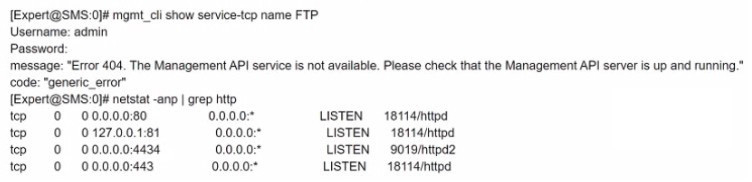
-
A
Wrong Management API Access setting^for Ihe client IP To correct it go to SmartConsole /
Management & Settings / Blades / Management API and press "Advanced Settings..' and choose GUI clients or ALL IP's.
-
B
The API didn't run on the default port check it with api status' and add '-port 4434' to the mgmt_clt command.
-
C
The management permission in the user profile is mrssing. Go to SmartConsole / Management &
Settings I Permissions & Administrators / Permission Profiles. Select the profile of the user and enable
'Management API Login' under Management Permissions
-
D
The API is not running, the services shown by netstat are the gaia services. To start the API run 'api start'
Reveal answer details
Close answer details
Correct answerD
ExplanationThe error message "Error 404. The Management API server is not available. Please check that the Management API server is up and running." indicates that the API is not running on the Management Server. The netstat command shows that there is no process listening on port 4434, which is the default
port for the API. To start the API, the command `api start' should be used. The other options are not relevant to this issue.
References:
Check Point R81 Installation and Upgrade Guide, page 18.
Question 21
Single choice
What SmartEvent component creates events?
-
A
-
B
-
C
-
D
Reveal answer details
Close answer details
Correct answerB
ExplanationThe SmartEvent component that creates events is the Correlation Unit, which is responsible for correlating and analyzing security events to identify patterns and potential threats. Option A, "Consolidation Policy," does not create events but is used to configure policies for event consolidation.
Option C, "SmartEvent Policy," is not responsible for creating events but is used to configure policies related to SmartEvent.
Option D, "SmartEvent GUI," is the graphical user interface for managing SmartEvent but does not create events itself. References:
Check Point Certified Security Expert (CCSE) R81 documentation and learning resources.
Question 22
Single choice
What is the difference between an event and a log?
-
A
Events are generated at gateway according to Event Policy
-
B
A log entry becomes an event when it matches any rule defined in Event Policy
-
C
Events are collected with SmartWorkflow form Trouble Ticket systems
-
D
Log and Events are synonyms
Reveal answer details
Close answer details
Correct answerB
ExplanationThe difference between an event and a log is that a log entry becomes an event when it matches any rule defined in Event Policy. A log entry is a record of a network activity that is generated by a Security Gateway or a Management Server. An event is a log entry that meets certain criteria and triggers an action or a notification. The other options are either not true or not accurate definitions of events and logs.
References:
Check Point R81 Logging and Monitoring Administration Guide
Question 23
Single choice
If SecureXL is disabled which path is used to process traffic?
-
A
-
B
-
C
-
D
Reveal answer details
Close answer details
Correct answerC
ExplanationIf SecureXL is disabled, which means that packet acceleration is not available, the traffic is processed by the Firewall path. The Firewall path is the slowest path in the Check Point architecture, as it involves a full inspection of each packet by the Firewall kernel and all the enabled Software Blades. The Firewall path is also known as the F2F (Firewall to Firewall) path or the INSPECT path.
References:
Check Point Architecture
Question 24
Single choice
What is the protocol and port used for Health Check and State Synchronization in ClusterXL?
-
A
-
B
-
C
-
D
Reveal answer details
Close answer details
Correct answerC
ExplanationClusterXL is a clustering technology that provides high availability and load sharing for Security Gateways. ClusterXL uses a proprietary protocol called Check Point Cluster Protocol (CCP) to communicate between cluster members. CCP has two main functions: Health Check and State Synchronization. Health Check is the mechanism that monitors the status and availability of each cluster member and determines which member is the active one. State Synchronization is the mechanism that synchronizes the connection and NAT tables between cluster members to ensure a smooth failover in case of a member failure. CCP uses UDP port 8116 for both Health Check and State Synchronization messages. The other options are not correct because:
A. CCP and 18190: This option is incorrect because CCP does not use port 18190. Port 18190 is used by
Secure Internal Communication (SIC) between Security Gateways and Management Servers.
B. CCP and 257: This option is incorrect because CCP does not use port 257. Port 257 is used by Check Point Security Management Protocol (CPM) for communication between SmartConsole and Management Servers.
D.
CPC and 8116:
This option is incorrect because there is no such protocol as CPC in ClusterXL.
References:
ClusterXL R81.20 Administration Guide, ClusterXL Administration Guide R80.40, sk25977 -
Ports used by Check Point software
Question 25
Single choice
Alice knows about the Check Point Management HA installation from Bob and needs to know which Check Point Security Management Server is currently capable of issuing and managing certificate. Alice uses the Check Point command "cpconfig'' to run the Check Point Security Management Server configuration tool on both Check Point Management HA instances "Primary & Secondary" Which configuration option does she need to look for:
-
A
Certificate's Fingerprint
-
B
-
C
-
D
Reveal answer details
Close answer details
Correct answerD
ExplanationCertificate Authority (CA) is a service that issues and manages digital certificates for secure communication between Check Point components. CA can be installed on a Security Management Server or on a dedicated server. CA can be configured as primary or secondary in a High Availability cluster. The cpconfig command is used to run the Check Point Configuration Tool on Gaia OS, which allows users to configure various settings for Check Point products. One of the configuration options is Certificate Authority, which shows if CA is installed on the server and if it is primary or secondary 5. Therefore, Alice needs to look for this option to check the CA status.
References:
5: cpconfig
Question 26
Single choice
Identity Awareness lets an administrator easily configure network access and auditing based on three items. Choose the correct statement.
-
A
Network location, the identity of a user and the identity of a machine.
-
B
Geographical location, the identity of a user and the identity of a machine.
-
C
Network location, the identity of a user and the active directory membership.
-
D
Network location, the telephone number of a user and the UID of a machine.
Reveal answer details
Close answer details
Correct answerA
ExplanationThe correct answer is A. Network location, the identity of a user and the identity of a machine.
Identity Awareness allows you to easily configure network access and auditing based on three items: network location, the identity of a user and the identity of a machine 1. This enables you to create granular and accurate identity-based policies that control who can access what, when and how. You can also monitor and log user and machine activities for compliance and auditing purposes. Geographical location, the telephone number of a user and the UID of a machine are not the items that Identity Awareness uses to identify and authorize users and machines.
References:
Identity Awareness - Check Point Software1
Question 27
Single choice
The admin lost access to the Gaia Web Management Interface but he was able to connect via ssh. How can you check if the web service is enabled, running and which port is used?
-
A
In expert mode run #netstat -tulnp | grep httpd to see if httpd is up and to get the port number. In dish
run >show web daemon-enable to see if the web daemon is enabled.
-
B
In dish run >show web ssl-port to see if the web daemon is enabled and which port is in use. In expert
mode run #netstat -anp | grep httpd to see if the httpd is up
-
C
In dish run >show web ssl-port to see if the web daemon is enabled and which port is in use. In expert
mode run #netstat -anp | grep httpd2 to see if the httpd2 is up
-
D
In expert mode run #netstat -tulnp | grep httpd2 to see if httpd2 is up and to get the port number. In dish
run >show web daemon-enable to see if the web daemon is enabled.
Reveal answer details
Close answer details
Correct answerC
ExplanationThe correct way to check if the web service is enabled, running and which port is used is to use option C.
In dish, run show web ssl-port to see if the web daemon is enabled and which port is in use. In expert mode, run netstat -anp | grep httpd2 to see if the httpd2 is up1. The httpd2 service is responsible for the
Gaia Web Management Interface2. If the web daemon is disabled, you can enable it by running set web daemon-enable on in dish 3. If the httpd2 service is down, you can start it by running service httpd2 start in expert mode 4.
References:
Gaia WebUI and CLI - Check Point CheckMates, Gaia R81.20 Administration Guide - Check Point Software, Gaia R81 Administration Guide - Check Point Software, How to restart Gaia Portal (WebUI) process - Check Point Software
Question 28
Single choice
Joey wants to upgrade from R75.40 to R81 version of Security management. He will use Advanced Upgrade with Database Migration method to achieve this. What is one of the requirements for his success?
-
A
Size of the /var/log folder of the source machine must be at least 25% of the size of the /var/log directory on the target machine
-
B
Size of the /var/log folder of the target machine must be at least 25% of the size of the /var/log directory on the source machine
-
C
Size of the $FWDIR/log folder of the target machine must be at least 30% of the size of the $FWDIR/ log directory on the source machine
-
D
Size of the /var/log folder of the target machine must be at least 25GB or more
Reveal answer details
Close answer details
Correct answerB
ExplanationOne of the requirements for Joey's success in upgrading from R75.40 to R81 version of Security management using Advanced Upgrade with Database Migration method is that the size of the /var/log folder of the target machine must be at least 25% of the size of the /var/log directory on the source machine. Advanced Upgrade with Database Migration method is a procedure that allows administrators to upgrade their Security Management Server to a newer version by migrating their database from an older version to a new machine with a fresh installation of the newer version. One of the steps in this procedure is to copy the /var/log folder from the source machine to the target machine, which contains important log files and configuration files. To ensure that there is enough disk space on the target machine for this operation, it is required that the size of the /var/log folder on the target machine must be at least 25% of the size of the /var/log folder on the source machine.
Question 29
Single choice
When using the Mail Transfer Agent, where are the debug logs stored?
-
A
$FWDIR/bin/emaild.mta. elg
-
B
-
C
-
D
Reveal answer details
Close answer details
Correct answerC
ExplanationWhen using the Mail Transfer Agent, the debug logs are stored in /var/log/mail.mta.elg. This file contains information about the email messages that are processed by the Mail Transfer Agent, such as sender, recipient, subject, size, action, etc. You can use the command mailq to view the current mail queue and the command maild -d to enable debug mode for the Mail Transfer Agent.
References:
[Mail Transfer Agent]
Question 30
Single choice
In Threat Prevention, you can create new or clone profiles but you CANNOT change the out-of-the-box profiles of:
-
A
-
B
-
C
General, Escalation, Severe
-
D
General, purposed, Strict
Reveal answer details
Close answer details
Correct answerA
ExplanationThreat Prevention has three out-of-the-box profiles: Basic, Optimized, and Strict. These profiles define the default actions for different threat prevention blades, such as Anti-Virus, Anti-Bot, IPS, etc. You cannot change the settings of these profiles, but you can clone them and create new profiles with customized settings.
References:
Training & Certification | Check Point Software, CCSE section
Question 31
Single choice
Check Point Support in many cases asks you for a configuration summary of your Check Point system.
This is also called:
-
A
-
B
-
C
-
D
Reveal answer details
Close answer details
Correct answerD
ExplanationCheck Point Support in many cases asks you for a configuration summary of your Check Point system.
This is also called cpinfo. Cpinfo is a utility that collects diagnostic data on a Check Point gateway, management server, or log server. It generates a file that contains information such as product version, license details, OS details, network configuration, installed hotfixes, status of Check Point processes, firewall tables, etc. This file can be used by Check Point Support to troubleshoot issues or analyze performance.
References:
[Cpinfo Utility]
Question 32
Single choice
What does the "unknown" SIC status shown on SmartConsole mean?
-
A
SIC activation key requires a reset
-
B
Administrator input the wrong SIC key
-
C
The management can contact the Security Gateway but cannot establish Secure Internal Communication
-
D
There is no connection between the Security Gateway and Security Management Server
Reveal answer details
Close answer details
Correct answerD
ExplanationThe "unknown" SIC status shown on SmartConsole means that there is no connection between the Security Gateway and Security Management Server. SIC stands for Secure Internal Communication, which is a mechanism that ensures secure communication between Check Point components using certificates and encryption. SIC status can be one of the following: Trust established, Trust expired, Uninitialized, or Unknown. Trust established means that SIC is working properly and the components can communicate securely. Trust expired means that the SIC certificate has expired and needs to be renewed. Uninitialized means that SIC has not been configured yet and needs to be initialized with an activation key. Unknown means that the Security Management Server cannot reach the Security Gateway or vice versa, and therefore cannot verify the SIC status. This could be due to network issues, firewall rules, routing problems, or other causes that prevent connectivity between the components.
References:
Check Point
R81 Security Management Administration Guide, page 32-33
Question 33
Single choice
When users connect to the Mobile Access portal they are unable to open File Shares. Which log file would you want to examine?
-
A
-
B
-
C
-
D
Reveal answer details
Close answer details
Correct answerA
ExplanationWhen users connect to the Mobile Access portal they are unable to open File Shares. The log file that you would want to examine is cvpnd.elg. This log file contains information about the Mobile Access VPN daemon, which handles the connections from the Mobile Access portal to the internal resources, such as File Shares, Web Applications, etc. The log file is located in the directory $FWDIR/log/ on the Security Gateway. You can use the command fw log -f cvpnd.elg to view the log file in real time.
References:
R81
Mobile Access Administration Guide, page 255.
Question 34
Single choice
Fill in the blank: Browser-based Authentication sends users to a web page to acquire identities using
________ .
-
A
-
B
Captive Portal and Transparent Kerberos Authentication
-
C
-
D
Reveal answer details
Close answer details
Correct answerB
ExplanationBrowser-based Authentication is a method of acquiring identities from unidentified users by sending them to a web page where they can log in and authenticate. Browser-based Authentication uses two techniques to acquire identities: Captive Portal and Transparent Kerberos Authentication1. Captive Portal is a simple method that attempts authentication through a web interface before granting a user access to Intranet resources. When a user tries to access a protected resource, they are redirected to a web page where they have to enter their credentials. The credentials are verified by the Identity Awareness Security Gateway or an external authentication server. If the authentication is successful, the user's identity is associated with their IP address and they are allowed to access the resource 12. Transparent Kerberos Authentication is a more seamless method that leverages the existing Kerberos infrastructure in the network. When a user tries to access a protected resource, the Identity Awareness Security Gateway intercepts the Kerberos ticket request and extracts the user's identity from it. The user's identity is then associated with their IP address and they are allowed to access the resource without any additional prompts. This method requires that the Identity Awareness Security Gateway is configured as a trusted proxy in the Active Directory domain 12.
Therefore, the correct answer is B. Browser-based Authentication sends users to a web page to acquire identities using Captive Portal and Transparent Kerberos Authentication.
References:
1, THE IMPORTANCE OF ACCESS ROLES - Check Point Software, page 2 2, Browser-based
Authentication Check Point - Bing 3, How to Configure Client Authentication - Check Point Software, page
1 4, Identity Sources - Check Point Software
5, Configuring Browser-Based Authentication - Check Point Software 6, Two Factor Authentication - Check
Point Software
Question 35
Single choice
What are the main stages of a policy installations?
-
A
Verification & Compilation, Transfer and Commit
-
B
Verification & Compilation, Transfer and Installation
-
C
Verification, Commit, Installation
-
D
Verification, Compilation & Transfer, Installation
Reveal answer details
Close answer details
Correct answerA
ExplanationThe main stages of a policy installation are Verification & Compilation, Transfer and Commit. Verification &
Compilation is the stage where the Security Management Server checks the validity and consistency of the policy and compiles it into a binary format. Transfer is the stage where the compiled policy is sent to the Security Gateways over a secure channel. Commit is the stage where the Security Gateways activate the new policy and update their connections table accordingly.
References:
Check Point Security Expert R81
Course, Policy Installation Process
Question 36
Single choice
What statement best describes the Proxy ARP feature for Manual NAT in R81.20?
-
A
Automatic proxy ARP configuration can be enabled
-
B
Translate Destination on Client Side should be configured
-
C
fw ctl proxy should be configured
-
D
local.arp file must always be configured
Reveal answer details
Close answer details
Correct answerD
ExplanationAccording to the Check Point R81 training course, the Proxy ARP feature for Manual NAT in R81.20 requires the configuration of the local.arp file on the Security Gateway. This file contains the mapping of IP addresses to MAC addresses for NATed hosts. The other options are either incorrect or irrelevant.
References:
Certified Security Expert (CCSE) R81.20 Course Overview
Question 37
Single choice
How do Capsule Connect and Capsule Workspace differ?
-
A
Capsule Connect provides a Layer3 VPN. Capsule Workspace provides a Desktop with usable applications.
-
B
Capsule Workspace can provide access to any application.
-
C
Capsule Connect provides Business data isolation.
-
D
Capsule Connect does not require an installed application at client.
Reveal answer details
Close answer details
Correct answerA
ExplanationCapsule Connect and Capsule Workspace are both components of Check Point's remote access solution, but they serve different purposes and have distinct features: A. Capsule Connect provides a Layer 3 VPN, which allows remote users to connect securely to their
corporate network. It typically provides network-level access, allowing users to access resources on the corporate network. On the other hand, Capsule Workspace provides a secure workspace environment, including a virtual desktop with usable applications. It is more focused on providing application-level access to users in a secure manner. B. This statement is partially true. Capsule Workspace is designed to provide secure access to a wide
range of applications and resources, not limited to specific applications. C. Capsule Connect does provide business data isolation by creating a secure VPN tunnel for remote
users, ensuring that their network traffic is isolated from the public internet. D. Capsule Connect usually requires an installed application or VPN client on the client device to establish
a secure connection to the corporate network. This statement is not entirely accurate because an installed application or client is typically required. Therefore, option A is the correct answer as it accurately distinguishes between Capsule Connect and Capsule Workspace based on their primary functionalities. References:
Check Point Certified Security Expert (CCSE) R81 documentation and learning resources.
Question 38
Single choice
After finishing installation admin John likes to use top command in expert mode. John has to set the expert-password and was able to use top command. A week later John has to use the top command again, He detected that the expert password is no longer valid. What is the most probable reason for this behavior?
-
A
"write memory" was not issued on clish
-
B
changes are only possible via SmartConsole
-
C
"save config" was not issued in expert mode
-
D
"save config" was not issued on clish
Reveal answer details
Close answer details
Correct answerD
ExplanationThe most probable reason for the expert password to be no longer valid after a week is that save config was not issued on clish. The clish command set expert-password sets the expert password for the current session only. To make the password persistent, the clish command save config must be issued after setting the expert password 2. The other options are not relevant for setting the expert password.
References:
2: Check Point Software, Getting Started, Setting Expert Password.
Question 39
Single choice
Which command can you use to enable or disable multi-queue per interface?
-
A
-
B
-
C
-
D
Reveal answer details
Close answer details
Correct answerA
ExplanationThe cpmq set command enables or disables multi-queue per interface. Multi-queue is a feature that allows distributing the network traffic among several CPU cores, improving the throughput and performance of the Security Gateway.
References:
Multi-Queue
Question 40
Single choice
What are the Threat Prevention software components available on the Check Point Security Gateway?
-
A
IPS, Threat Emulation and Threat Extraction
-
B
IPS, Anti-Bot, Anti-Virus, SandBlast and Macro Extraction
-
C
IPS, Anti-Bot, Anti-Virus, Threat Emulation and Threat Extraction
-
D
IDS, Forensics, Anti-Virus, Sandboxing
Reveal answer details
Close answer details
Correct answerC
ExplanationThe Threat Prevention software components available on the Check Point Security Gateway are IPS, Anti-
Bot, Anti-Virus, Threat Emulation and Threat Extraction. These components provide comprehensive protection against various types of cyber threats, such as network attacks, malware, ransomware, phishing, zero-day exploits, data leakage, and more. IPS is a network security component that detects and prevents malicious traffic based on signatures, behavioral patterns, and anomaly detection. Anti-Bot is a network security component that detects and blocks botnet communications and command-and-control servers. Anti-Virus is a network security component that scans files for known viruses, worms, and trojans.
Threat Emulation is a network security component that emulates files in a sandbox environment to detect unknown malware and prevent zero-day attacks. Threat Extraction is a network security component that removes malicious content from files and delivers clean files to users.
References:
[Check Point R81
Threat Prevention Administration Guide], page 9-10
Question 41
Single choice
You noticed that CPU cores on the Security Gateway are usually 100% utilized and many packets were dropped. You don't have a budget to perform a hardware upgrade at this time. To optimize drops you decide to use Priority Queues and fully enable Dynamic Dispatcher. How can you enable them?
-
A
fw ctl multik dynamic_dispatching on
-
B
fw ctl multik dynamic_dispatching set_mode 9
-
C
-
D
Reveal answer details
Close answer details
Correct answerC
ExplanationTo optimize drops you decide to use Priority Queues and fully enable Dynamic Dispatcher. You can enable them by using the command fw ctl multik set_mode 9. This command sets the SecureXL mode to 9, which means that Priority Queues are enabled and Dynamic Dispatcher is fully enabled.
References:
SecureXL Mechanism
Question 42
Single choice
Check Point security components are divided into the following components:
-
A
GUI Client, Security Gateway, WebUI Interface
-
B
GUI Client, Security Management, Security Gateway
-
C
Security Gateway, WebUI Interface, Consolidated Security Logs
-
D
Security Management, Security Gateway, Consolidate Security Logs
Reveal answer details
Close answer details
Correct answerB
ExplanationCheck Point security components are divided into the following components: GUI Client, Security Management, Security Gateway. GUI Client is the graphical user interface that allows administrators to configure, manage, and monitor Check Point products and security policies. Security Management is the server that stores and enforces the security policies and provides logging and reporting functions. Security Gateway is the device that inspects and filters network traffic according to the security policies.
Question 43
Single choice
What is the command used to activated Multi-Version Cluster mode?
-
A
set cluster member mvc on in Clish
-
B
-
C
set cluster MVC on in Expert Mode
-
D
set cluster mvc on in Expert Mode
Reveal answer details
Close answer details
Correct answerA
ExplanationThe command used to activate Multi-Version Cluster mode is set cluster member mvc on in Clish. Multi-
Version Cluster mode is a feature that allows cluster members to run different versions of Check Point software during a cluster upgrade. This reduces downtime and simplifies the upgrade process. To enable Multi-Version Cluster mode, the command set cluster member mvc on must be executed on each cluster member in Clish3. The other options are not valid commands for activating Multi-Version Cluster mode.
References:
3: Check Point Software, Getting Started, Multi-Version Cluster.
Question 44
Single choice
Fill in the blank: The IPS policy for pre-R81 gateways is installed during the _______ .
-
A
-
B
Threat Prevention policy install
-
C
-
D
Access Control policy install
Reveal answer details
Close answer details
Correct answerC
ExplanationThe IPS policy for pre-R81 gateways is installed during the Anti-bot policy install. The Anti-bot policy install includes both Anti-bot and IPS protections for pre-R81 gateways, since they share the same inspection engine. For R81 and above gateways, the IPS policy is installed separately as part of the Threat Prevention policy install, which also includes Anti-virus and Threat Emulation protections.
References:
R81 Threat Prevention Administration Guide, page 15.
Question 45
Single choice
R81.20 management server can manage gateways with which versions installed?
-
A
-
B
-
C
Versions R75.20 and higher
-
D
Reveal answer details
Close answer details
Correct answerC
ExplanationR81.20 management server can manage gateways with versions R75.20 and higher. However, some features may not be supported on older gateway versions. For example, R81 introduces a new feature called Infinity Threat Prevention, which requires R81 gateways to work properly. Therefore, it is recommended to upgrade your gateways to the latest version to take advantage of all the new features and enhancements in R81.
Question 46
Single choice
When performing a minimal effort upgrade, what will happen to the network traffic?
-
A
All connections that were Initiated before the upgrade will be dropped, causing network downtime.
-
B
All connections that were initiated before the upgrade will be handled by the active gateway
-
C
All connections that were initiated before the upgrade will be handled normally
-
D
All connections that were initiated before the upgrade will be handled by the standby gateway
Reveal answer details
Close answer details
Correct answerB
ExplanationAll connections that were initiated before the upgrade will be handled by the active gateway. According to the Check Point documentation1, a minimal effort upgrade is a procedure that allows you to upgrade each Security Gateway individually, without affecting the cluster operation. The active gateway continues to handle the traffic while the standby gateway is upgraded, and then they switch roles. This way, there is no network downtime and no need to synchronize the cluster members before or after the upgrade 1.
However, some connections may be dropped during the switch-over, so it is recommended to use a connectivity upgrade or a zero downtime upgrade for mission-critical environments 2.
References:
: Best Practices - Security Gateway Performance - Check Point Software : Checkpoint Cluster Firmware Upgrade
- Check Point CheckMates
Question 47
Single choice
Which Check Point daemon monitors the other daemons?
-
A
-
B
-
C
-
D
Reveal answer details
Close answer details
Correct answerC
ExplanationThe Check Point daemon that monitors the other daemons is cpwd (Check Point Watchdog). It is responsible for monitoring the health and status of various Check Point daemons and processes running on the Security Gateway. If any daemon or process stops responding or encounters an issue, cpwd can restart it to ensure the continued operation of the Security Gateway. References:
Check Point Certified Security Expert (CCSE) R81 documentation and learning resources.
Question 48
Single choice
Which of the following is an identity acquisition method that allows a Security Gateway to identify Active Directory users and computers?
-
A
-
B
-
C
-
D
Reveal answer details
Close answer details
Correct answerB
ExplanationActive Directory Query is an identity acquisition method that allows a Security Gateway to identify Active Directory users and computers by querying domain controllers for security event logs. The Security Gateway sends a WMI query to each domain controller and receives a WMI event when a user logs in, logs out, or unlocks their computer. The Security Gateway then maps IP addresses to user names based on these events. Active Directory Query does not require any software installation on domain controllers or clients, but it requires certain permissions and configurations on the domain controllers Reference :
https://sc1.checkpoint.com/documents/R76/CP_R76_IdentityAwareness_AdminGuide/62402.htm
Question 49
Single choice
When configuring SmartEvent Initial settings, you must specify a basic topology for SmartEvent to help it calculate traffic direction for events. What is this setting called and what are you defining?
-
A
Network, and defining your Class A space
-
B
Topology, and you are defining the Internal network
-
C
Internal addresses you are defining the gateways
-
D
Internal network(s) you are defining your networks
Reveal answer details
Close answer details
Correct answerD
ExplanationWhen configuring SmartEvent Initial settings, you must specify a basic topology for SmartEvent to help it calculate traffic direction for events. This setting is called Internal network(s) and you are defining your networks. You can specify one or more networks or IP addresses that are considered internal for SmartEvent. This helps SmartEvent to determine the direction of the traffic (inbound, outbound, or internal) and generate events accordingly.
References:
[SmartEvent Administration Guide]
Question 50
Single choice
The Firewall Administrator is required to create 100 new host objects with different IP addresses. What API command can he use in the script to achieve the requirement?
-
A
add host name <New HostName> ip-address <ip address>
-
B
add hostname <New HostName> ip-address <ip address>
-
C
set host name <New HostName> ip-address <ip address>
-
D
set hostname <New HostName> ip-address <ip address>
Reveal answer details
Close answer details
Correct answerA
ExplanationThe API command add host name <New HostName> ip-address <ip address> can be used in a script to create 100 new host objects with different IP addresses. This command adds a new host object with the specified name and IP address to the database. The other commands are either not valid or not suitable for creating new host objects.
References:
Check Point - Management API reference
Question 51
Single choice
Within the Check Point Firewall Kernel resides Chain Modules, which are individually responsible for the inspection of a specific blade or feature that has been enabled in the configuration of the gateway. For Wire mode configuration, chain modules marked with _______ will not apply.
-
A
-
B
-
C
-
D
Reveal answer details
Close answer details
Correct answerB
ExplanationFor Wire mode configuration, chain modules marked with 00000001 will not apply. Wire mode is a special configuration that allows a Security Gateway to pass traffic without inspection, acting as a bridge between two network segments. In Wire mode, only chain modules that are essential for basic functionality are applied, such as VPN, QoS, ClusterXL, and SecureXL. Chain modules that are related to inspection-based Software Blades, such as Firewall, IPS, Application Control, and so on, are skipped. The chain modules that are skipped are marked with 00000001 in the output of fw ctl chain command.
References:
Wire Mode
Question 52
Single choice
-
A
Messaging tool used to verify a user's credentials.
-
B
Communication tool used to inform a user about a website or application they are trying to access.
-
C
Administrator tool used to monitor users on their network.
-
D
Communication tool used to notify an administrator when a new user is created.
Reveal answer details
Close answer details
Correct answerB
ExplanationUserCheck is a communication tool used to inform a user about a website or application they are trying to access. UserCheck allows administrators to interact with users in real time, informing them of the security policy and the actions they need to take. UserCheck can also enable users to self-remediate incidents or
request exceptions from the administrator.
References:
Training & Certification | Check Point Software,
Check Point Resource Library
Question 53
Single choice
SandBlast Mobile identifies threats in mobile devices by using on-device, network, and cloud-based algorithms and has four dedicated components that constantly work together to protect mobile devices and their data. Which component is NOT part of the SandBlast Mobile solution?
-
A
-
B
-
C
-
D
Reveal answer details
Close answer details
Correct answerC
ExplanationSandBlast Mobile has four components: Management Dashboard, Gateway, Behavior Risk Engine, and On-Device Network Protection. Personal User Storage is not part of the SandBlast Mobile solution.
References:
SandBlast Mobile Architecture
Question 54
Single choice
Tom has been tasked to install Check Point R81 in a distributed deployment.
Before Tom installs the systems this way, how many machines will he need if he does NOT include a SmartConsole machine in his calculations?
-
A
One machine, but it needs to be installed using SecurePlatform for compatibility purposes.
-
B
-
C
-
D
Reveal answer details
Close answer details
Correct answerC
ExplanationTom will need two machines to install Check Point R81 in a distributed deployment, if he does not include a SmartConsole machine in his calculations. A distributed deployment consists of a Security Management Server that manages one or more Security Gateways. Therefore, Tom will need one machine for the Security Management Server and another machine for the Security Gateway. The other options are either too few or too many machines for a distributed deployment.
References:
Check Point R81 Installation and Upgrade Guide
Question 55
Single choice
Is it possible to establish a VPN before the user login to the Endpoint Client?
-
A
yes, you had to set neo_remember_user_password to true in the trac.defaults of the Remote Access Client or you can use the endpoint_vpn_remember_user_password attribute in the trac_client_1 .ttm file located in the SFWDIR/conf directory on the Security Gateway
-
B
no, the user must login first.
-
C
yes. you had to set neo_always_connected to true in the trac.defaults of the Remote Access Client or you can use the endpoint_vpn_always_connected attribute in the trac_client_1 .ttm file located in the SFWDIR/conf directory on the Security Gateway
-
D
yes, you had to enable Machine Authentication in the Gateway object of the Smart Console
Reveal answer details
Close answer details
Correct answerD
ExplanationYou can establish a VPN before the user login to the Endpoint Client by enabling Machine Authentication in the Gateway object of the Smart Console1. Machine Authentication is a feature that allows you to authenticate with a machine certificate and establish a VPN tunnel before the Windows Logon2. This feature provides the following benefits2: It enhances the security of the VPN connection by verifying the identity of the machine before allowing access to the network. It simplifies the user experience by eliminating the need to enter credentials twice (once for the VPN and once for the Windows Logon). It enables seamless connectivity to the network resources and domain services, such as Group Policy, login scripts, and mapped drives. Machine Authentication is supported on Check Point Endpoint Security Client for Windows with E80.71 and higher versions 2. It requires a hotfix on top of R77.30 jumbo 286 on the Security Gateway2. To configure Machine Authentication, you need to do the following steps2: Generate and distribute machine certificates to the Endpoint machines using a trusted Certificate Authority (CA).
Enable Machine Authentication in the Gateway object of the Smart Console and select the CA that issued the machine certificates. Install policy on the Security Gateway and reboot it. Enable Machine Authentication in the Endpoint Security Client and select the machine certificate to use.
Question 56
Single choice
Which of the following is NOT a method used by Identity Awareness for acquiring identity?
-
A
-
B
-
C
Cloud IdP (Identity Provider)
-
D
Reveal answer details
Close answer details
Question 57
Single choice
Security Checkup Summary can be easily conducted within:
-
A
-
B
-
C
-
D
Reveal answer details
Close answer details
Correct answerB
ExplanationSecurity Checkup Summary can be easily conducted within Views. Views is a feature in SmartConsole that allows you to create customized dashboards and reports based on various security data sources, such as logs, events, audit trails, and more. You can use Views to perform a Security Checkup Summary, which is a comprehensive analysis of your network security posture and potential risks. You can use predefined templates or create your own views to generate the summary.
References:
Check Point Security Expert
R81 Course, Views Administration Guide
Question 58
Single choice
When detected, an event can activate an Automatic Reaction. The SmartEvent administrator can create and configure one Automatic Reaction, or many, according to the needs of the system. Which of the following statement is false and NOT part of possible automatic reactions:
-
A
-
B
-
C
-
D
Reveal answer details
Close answer details
Correct answerA
ExplanationMail - Tell an administrator by email that the event occurred. See Creating a Mail Reaction.
Block Source - Instruct the Security GatewayClosed to block the source IP address from which this event was detected for a configurable timeframe . Select a timeframe from one minute to more than three weeks.
See Creating a Block Source Reaction.
Block Event activity - Instruct the Security Gateway to block a distributed attack that emanates from multiple sources, or attacks multiple destinations for a configurable timeframe. Select a timeframe from one minute to more than three weeks). See Creating a Block Event Activity Reaction.
External Script - Run a script that you provide. See Creating an External Script Automatic Reaction to write a script that can exploit SmartEvent data.
SNMP Trap - Generate an SNMP Trap. See Creating an SNMP Trap Reaction. https://sc1.checkpoint.com/documents/R81/WebAdminGuides/EN/CP_R81_LoggingAndMonitoring_AdminGuide/Topics-LMG/Automatic-Reactions.htm
Question 59
Single choice
What is the purpose of Captive Portal?
-
A
It authenticates users, allowing them access to the Gaia OS
-
B
It authenticates users, allowing them access to the Internet and corporate resources
-
C
It provides remote access to SmartConsole
-
D
It manages user permission in SmartConsole
Reveal answer details
Close answer details
Correct answerB
ExplanationCaptive Portal is a feature of Identity Awareness Software Blade that enables you to identify users who are not authenticated by other methods, such as Active Directory or VPN. Captive Portal redirects users to a web page where they can enter their credentials and be authenticated by an external server, such as LDAP or RADIUS. After authentication, users can access the Internet and corporate resources according to the security policy rules that apply to their identity.
The references are:
Check Point R81 Identity Awareness Administration Guide, page 9 Configuring Browser-Based
Authentication in SmartConsole
Question 60
Single choice
How many layers make up the TCP/IP model?
-
A
-
B
-
C
-
D
Reveal answer details
Close answer details
Correct answerD
ExplanationThe TCP/IP model is a four-layer model that describes how data is transmitted over a network. The four layers are: Application, Transport, Internet, and Network Access. The Application layer provides services and protocols for applications to communicate with each other. The Transport layer provides reliable or unreliable data delivery between hosts. The Internet layer provides routing and addressing of packets across networks. The Network Access layer provides physical and logical access to the network media.
References:
Training & Certification | Check Point Software, Check Point Resource Library
Question 61
Single choice
Which Operating Systems are supported for the Endpoint Security VPN?
-
A
-
B
Windows and macOS computers
-
C
Windows and SPARC Solaris
-
D
Windows and Red Hat Linux
Reveal answer details
Close answer details
Correct answerB
ExplanationEndpoint Security VPN is a lightweight remote access client that supports Windows and macOS computers. It provides secure connectivity to corporate resources using L2TP/IPSec, SSL, or Check Point's proprietary VPN protocol. Endpoint Security VPN also integrates with other Endpoint Security products such as SandBlast Agent, Full Disk Encryption, Media Encryption, and Firewall.
References:
Check Point R81 Endpoint Security VPN Administration Guide, page 5
Question 62
Single choice
What destination versions are supported for a Multi-Version Cluster Upgrade?
-
A
-
B
-
C
-
D
Reveal answer details
Close answer details
Correct answerD
ExplanationThe destination versions that are supported for a Multi-Version Cluster Upgrade are R81.20 and later. This means that the cluster members can be upgraded from any supported version to R81.20 or higher using the Multi-Version Cluster mode. R81.40, R76, and R70 are not supported destination versions for a Multi-
Version Cluster Upgrade.
References:
: Check Point Software, Getting Started, Supported Upgrade Paths
Question 63
Single choice
According to the policy installation flow the transfer state (CPTA) is responsible for the code generated by the FWM. On the Security Gateway side a process receives them and first stores them Into a temporary
directory. Which process is true for receiving these Tiles;
-
A
-
B
-
C
-
D
Reveal answer details
Close answer details
Question 64
Single choice
How can you see historical data with cpview?
-
A
-
B
-
C
-
D
Reveal answer details
Close answer details
Correct answerC
ExplanationTo see historical data with cpview, you can use the cpview -t <timestamp> command, where <timestamp> is the date and time you want to view. For example, cpview -t Jan 01 2023 12:00:00 will show you the cpview data for January 1st, 2023 at noon. You can also enter a partial date, such as Jan 02, to see the data for the whole day. This feature is available in R77.10 and higher versions of Check Point software 1.
You can also access the historical data by pressing the "t" key while running cpview in live mode and entering the desired date and time 1. The historical data is stored in the CPViewDB.dat file in the /var/log/
CPView_history directory on your gateway 2. You can export this file and import it into other tools for visualization, such as Grafana3.
Question 65
Single choice
Using Web Services to access the API, which Header Name-Value had to be in the HTTP Post request after the login?
-
A
X-chkp-sid Session Unique Identifier
-
B
-
C
-
D
uuid Universally Unique Identifier
Reveal answer details
Close answer details
Correct answerA
ExplanationThe header name-value that has to be in the HTTP Post request after the login when using Web Services to access the API is X-chkp-sid Session Unique Identifier. This header contains the session ID that is returned by the login command and identifies the session for subsequent API commands. The session ID is valid for a limited time and can be extended by using keepalive or logout commands.
References:
[Check Point R81 Management API Reference Guide]
Question 66
Single choice
Which VPN routing option uses VPN routing for every connection a satellite gateway handles?
-
A
To satellites through center only
-
B
-
C
To center and to other satellites through center
-
D
To center, or through the center to other satellites, to Internet and other VPN targets
Reveal answer details
Close answer details
Correct answerD
ExplanationThis VPN routing option uses VPN routing for every connection a satellite gateway handles, regardless of the destination. This means that all traffic from the satellite gateway will go through the VPN tunnel to the center gateway, and then be routed to the appropriate destination, whether it is another satellite, the Internet, or another VPN target. This option provides the highest level of security and control, but also consumes more bandwidth and processing power.
Question 67
Single choice
On what port does the CPM process run?
-
A
-
B
-
C
-
D
Reveal answer details
Close answer details
Correct answerD
ExplanationThe port that the CPM process runs on is TCP 19009. CPM stands for Check Point Management, and it is the main process that runs on the Security Management Server and interacts with SmartConsole clients.
CPM is responsible for managing policies, objects, logs, tasks, and other management functions. CPM listens on TCP port 19009 for incoming connections from SmartConsole clients. The other ports are either used by other processes or not related to CPM.
Question 68
Single choice
Which of the following technologies extracts detailed information from packets and stores that information in state tables?
-
A
-
B
-
C
-
D
Application Layer Firewall
Reveal answer details
Close answer details
Correct answerA
ExplanationAccording to the Check Point website, INSPECT Engine is the technology that extracts detailed information from packets and stores that information in state tables. INSPECT Engine is the core of Check Point's Stateful Inspection technology, which enables Security Gateways to inspect traffic at multiple layers and enforce security policies. The other technologies are either not related or not specific enough.
References:
INSPECT Engine
Question 69
Single choice
With SecureXL enabled, accelerated packets will pass through the following:
-
A
Network Interface Card, OSI Network Layer, OS IP Stack, and the Acceleration Device
-
B
Network Interface Card, Check Point Firewall Kernal, and the Acceleration Device
-
C
Network Interface Card and the Acceleration Device
-
D
Network Interface Card, OSI Network Layer, and the Acceleration Device
Reveal answer details
Close answer details
Correct answerC
ExplanationWith SecureXL enabled, accelerated packets will pass through the following: Network Interface Card and the Acceleration Device. SecureXL is a technology that accelerates network traffic processing by offloading intensive operations from the Firewall kernel to a dedicated SecureXL device. Accelerated packets are packets that match certain criteria and can be handled by SecureXL without involving the Firewall kernel. These packets bypass the OSI Network Layer, OS IP Stack, and Check Point Firewall Kernel, and are processed directly by the Network Interface Card and the Acceleration Device. The other options are either incorrect or describe non-accelerated packets.
Question 70
Single choice
Fill in the blank. Once a certificate is revoked from the Security Gateway by the Security Management Server, the certificate information is ________ .
-
A
Sent to the Internal Certificate Authority.
-
B
Sent to the Security Administrator.
-
C
Stored on the Security Management Server.
-
D
Stored on the Certificate Revocation List.
Reveal answer details
Close answer details
Correct answerD
ExplanationOnce a certificate is revoked from the Security Gateway by the Security Management Server, the certificate information is stored on the Certificate Revocation List (CRL). The CRL is a list of certificates that have been revoked by the Internal Certificate Authority (ICA) and are no longer valid for Secure Internal Communication (SIC). The CRL is signed by the ICA and issued to all the managed Security Gateways the next time a SIC connection is made 12. The CRL helps to prevent unauthorized access to the Security Management Server by revoked Security Gateways.
References:
1: How to renew SIC after changing IP Address of Security Management Server - Check Point
Software, Solution ID: sk43784 2: Check Point R81 Security Engineering Guide - Check Point Software,
page 162
Question 71
Single choice
You are asked to check the status of several user-mode processes on the management server and gateway. Which of the following processes can only be seen on a Management Server?
-
A
-
B
-
C
-
D
Reveal answer details
Close answer details
Correct answerB
ExplanationUser-mode processes are processes that run in the user space of the operating system, as opposed to kernel-mode processes that run in the kernel space. User-mode processes are usually less privileged and have less access to system resources than kernel-mode processes. Check Point products use both user-mode and kernel-mode processes to provide various functionalities and services.
The following are some of the user-mode processes that can be seen on the management server and gateway: fwd: This process is responsible for policy installation, logging, and communication with other Check Point components. It runs on both the management server and gateway. cpd: This process is responsible for licensing, certificate management, and communication with SmartConsole. It runs on both the management server and gateway. cpwd: This process is responsible for monitoring and restarting other processes. It runs on both the management server and gateway.
The following is a user-mode process that can only be seen on the management server: fwm: This process is responsible for managing the security policy database, compiling the security policy, and generating reports. It runs only on the management server.
Therefore, the correct answer is B.
References:
Check Point Processes and Daemons, Check Point Processes Cheat Sheet, Check Point
Firewall Security Solution
Question 72
Single choice
Where is the license for Check Point Mobile users installed?
-
A
-
B
-
C
-
D
The Security Management Server
Reveal answer details
Close answer details
Correct answerD
ExplanationThe license for Check Point Mobile users is installed on the Security Management Server. Check Point Mobile is a client application that allows remote users to securely access corporate resources from their mobile devices. To use Check Point Mobile, you need to have a valid license for the Mobile Access Software Blade on the Security Management Server. The license determines the number of concurrent users that can connect to the Security Gateway using Check Point Mobile. You can view and manage the license from the SmartConsole or the CPUSE WebUI. For more information, you can refer to the Check Point R81 Mobile Access Blade Administration Guide1 or the Check Point Cybersecurity BootCamp
R81.20 ?CCSA&; CCSE Training2.
Question 73
Single choice
Matt wants to upgrade his old Security Management server to R81.x using the Advanced Upgrade with Database Migration. What is one of the requirements for a successful upgrade?
-
A
Size of the /var/log folder of the source machine must be at least 25% of the size of the /var/log directory on the target machine
-
B
Size of the /var/log folder of the target machine must be at least 25% of the size of the /var/log directory on the source machine
-
C
Size of the $FWDIR/log folder of the target machine must be at least 30% of the size of the $FWDIR/ log directory on the source machine
-
D
Size of the /var/log folder of the target machine must be at least 25GB or more
Reveal answer details
Close answer details
Correct answerB
ExplanationOne of the requirements for a successful upgrade using the Advanced Upgrade with Database Migration is that the size of the /var/log folder of the target machine must be at least 25% of the size of the /var/log directory on the source machine. This is to ensure that there is enough space to copy the log files from the source machine to the target machine during the upgrade process.
References:
Advanced Upgrade with Database Migration
Question 74
Single choice
Using ClusterXL, what statement is true about the Sticky Decision Function?
-
A
Can only be changed for Load Sharing implementations
-
B
All connections are processed and synchronized by the pivot
-
C
Is configured using cpconfig
-
D
Is only relevant when using SecureXL
Reveal answer details
Close answer details
Correct answerA
ExplanationThe Sticky Decision Function in ClusterXL is primarily used in Load Sharing implementations. In Load Sharing, the pivot member is responsible for determining the destination of new connections and ensures that traffic from the same source IP address is directed to the same cluster member. This ensures session stickiness for the same source IP, improving load sharing efficiency. References:
Check Point Certified Security Expert R81 documentation and learning resources.
Question 75
Single choice
While enabling the Identity Awareness blade the Identity Awareness wizard does not automatically detect the windows domain. Why does it not detect the windows domain?
-
A
Security Gateway is not part of the Domain
-
B
SmartConsole machine is not part of the domain
-
C
Identity Awareness is not enabled on Global properties
-
D
Security Management Server is not part of the domain
Reveal answer details
Close answer details
Correct answerB
ExplanationThe verified answer is B. SmartConsole machine is not part of the domain. The Identity Awareness wizard uses the SmartConsole machine to detect the windows domain by querying the Active Directory server using DCOM protocol 1. If the SmartConsole machine is not part of the domain, the query will fail and the wizard will not automatically detect the domain. The user will have to manually enter the domain name and credentials to proceed with the configuration. The Security Gateway, the Security Management Server, and the Identity Awareness global properties do not affect the domain detection by the wizard. However, they are required for other aspects of the Identity Awareness blade, such as AD Query, Identity Collector, and Browser-Based Authentication2.
References:
Identity Awareness Configuration wizard authentication fails3 Identity Awareness - Check Point Software4
Question 76
Single choice
Can multiple administrators connect to a Security Management Server at the same time?
-
A
No, only one can be connected
-
B
Yes, all administrators can modify a network object at the same time
-
C
Yes, every administrator has their own username, and works in a session that is independent of other administrators.
-
D
Yes, but only one has the right to write.
Reveal answer details
Close answer details
Correct answerC
ExplanationMultiple administrators can connect to a Security Management Server at the same time. Each administrator has their own username and works in a session that is independent of other administrators.
This allows for collaboration and simultaneous management tasks by different administrators. References:
Check Point Certified Security Expert (CCSE) R81 documentation and learning resources.
Question 77
Single choice
Which Remote Access Client does not provide an Office-Mode Address?
-
A
-
B
-
C
-
D
Reveal answer details
Close answer details
Correct answerA
ExplanationIn the context of Check Point remote access clients and Office Mode, the correct answer is: A. SecuRemote: SecuRemote is a Check Point remote access client that does not provide an Office-Mode
Address. Office Mode is a feature that assigns a unique IP address from a designated IP pool to remote users when they connect to the corporate network.
SecuRemote does not support this feature. B. Endpoint Security Suite, C. Endpoint Security VPN, and D. Check Point Mobile are remote access
clients that support Office Mode and can provide an Office-Mode Address to remote users. Therefore, option A is the correct answer as it correctly identifies a remote access client that does not provide an Office-Mode Address. References:
Check Point Certified Security Expert (CCSE) R81 documentation and learning resources.
Question 78
Single choice
Which one of the following is true about Capsule Connect?
-
A
It is a full layer 3 VPN client
-
B
It offers full enterprise mobility management
-
C
It is supported only on iOS phones and Windows PCs
-
D
It does not support all VPN authentication methods
Reveal answer details
Close answer details
Correct answerA
ExplanationCapsule Connect is a full layer 3 VPN client that provides secure and seamless remote access to corporate networks from iOS and Android devices. It supports all VPN authentication methods, such as certificates, passwords, tokens, and challenge-response. It also supports split tunneling and seamless roaming.
References:
Capsule Connect Datasheet, Capsule Connect Administration Guide
Question 79
Single choice
What does the Log "Views" tab show when SmartEvent is Correlating events?
-
A
-
B
Reports for customization
-
C
Top events with charts and graphs
-
D
Details of a selected logs
Reveal answer details
Close answer details
Correct answerD
ExplanationThe Log "Views" tab shows the details of a selected log when SmartEvent is correlating events. You can select a log from the Logs tab and click on the Views tab to see more information about the log, such as source, destination, service, action, blade, rule number, etc. You can also customize the columns and filters in the Views tab to display only the relevant fields for your analysis.
References:
[SmartEvent User Guide]
Question 80
Single choice
Kurt is planning to upgrade his Security Management Server to R81.X. What is the lowest supported version of the Security Management he can upgrade from?
-
A
-
B
-
C
-
D
Reveal answer details
Close answer details
Correct answerD
ExplanationThe lowest supported version of the Security Management that can be upgraded to R81.X is R75 Gaia.
This means that the Security Management Server must be running on the Gaia Operating System and have a version of R75 or higher.
R76 Splat, R77.X Gaia, and R75 Splat are not supported for upgrading to R81.X1.
References:
1: Check Point Software, Getting Started, Supported Upgrade Paths.
Question 81
Single choice
What are scenarios supported by the Central Deployment in SmartConsole?
-
A
Installation of Jumbo Hotfix on a ClusterXL environment in High Availability Mode
-
B
Upgrading a Dedicated SmartEvent Server
-
C
Upgrading a Dedicated Log Server to R81
-
D
Upgrading a Standalone environment
Reveal answer details
Close answer details
Question 82
Single choice
When Dynamic Dispatcher is enabled, connections are assigned dynamically with the exception of:
-
A
-
B
-
C
-
D
Reveal answer details
Close answer details
Correct answerD
ExplanationWhen Dynamic Dispatcher is enabled, it dynamically assigns connections, but there are exceptions. The exception mentioned in the question is: VoIP (Option D): VoIP connections are an exception when Dynamic Dispatcher is enabled. They are not assigned dynamically but follow a different rule set to ensure quality and reliability for VoIP traffic. The other options, Threat Emulation (Option A), HTTPS (Option B), and QoS (Option C), are dynamically assigned when Dynamic Dispatcher is enabled. References:
Check Point Certified Security Expert (CCSE) R81 training materials and documentation.
Question 83
Single choice
You have existing dbedit scripts from R77.
Can you use them with R81.20?
-
A
dbedit is not supported in R81.20
-
B
dbedit is fully supported in R81.20
-
C
You can use dbedit to modify threat prevention or access policies, but not create or modify layers
-
D
dbedit scripts are being replaced by mgmt_cli in R81.20
Reveal answer details
Close answer details
Correct answerD
ExplanationIn R81.20, dbedit scripts are being replaced by the mgmt_cli utility for managing and configuring security policies and objects. Here's an explanation of each option: A. dbedit is not supported in R81.20: This is not entirely accurate. While dbedit is still available and
functional in R81.20, it is being phased out in favor of mgmt_cli for policy and object management. B. dbedit is fully supported in R81.20: This statement is not accurate because although dbedit can still be
used, it is not the primary recommended tool for policy management in R81.20. C. You can use dbedit to modify threat prevention or access policies, but not create or modify layers: This
statement is partially true, but it does not provide the complete picture. You can use dbedit for some policy-related tasks, but it's not the primary tool for policy management in R81.20. D. dbedit scripts are being replaced by mgmt_cli in R81.20: This is the correct and recommended
approach. mgmt_cli is the primary tool for managing security policies and objects in R81.20, and it is gradually replacing dbedit for these tasks. Therefore, option D is the most accurate and recommended answer. References:
Check Point Certified Security Expert (CCSE) R81 documentation and learning resources.
Question 84
Single choice
How does the Anti-Virus feature of the Threat Prevention policy block traffic from infected websites?
-
A
By dropping traffic from websites identified through ThreatCloud Verification and URL Caching
-
B
By dropping traffic that is not proven to be from clean websites in the URL Filtering blade
-
C
By allowing traffic from websites that are known to run Antivirus Software on servers regularly
-
D
By matching logs against ThreatCloud information about the reputation of the website
Reveal answer details
Close answer details
Correct answerD
ExplanationThe Anti-Virus feature of the Threat Prevention policy blocks traffic from infected websites by matching logs against ThreatCloud information about the reputation of the website. ThreatCloud is a collaborative network that collects and analyzes threat data from millions of sources worldwide. It assigns a reputation score to each website based on its malicious activity and behavior. If a website has a low reputation score, it is considered infected and blocked by the Anti-Virus blade.
References:
Training & Certification | Check
Point Software, CCSE section
Question 85
Single choice
To enable Dynamic Dispatch on Security Gateway without the Firewall Priority Queues, run the following command in Expert mode and reboot:
-
A
-
B
fw ctl Dyn_Dispatch enable
-
C
-
D
Reveal answer details
Close answer details
Correct answerC
ExplanationDynamic Dispatch is a feature that enhances CoreXL performance by dynamically assigning new connections to CoreXL FW instances based on their CPU utilization 1. To enable Dynamic Dispatch on Security Gateway without enabling Firewall Priority Queues (FPQ), you need to run the command fw ctl multik set_mode 4 in Expert mode and reboot 2. This command will set the CoreXL mode to Dynamic Dispatcher without FPQ. The other options are not correct because:
A. fw ctl Dyn_Dispatch on: This command does not exist and will return an error message.
B. fw ctl Dyn_Dispatch enable: This command does not exist and will return an error message.
D. fw ctl multik set_mode 1: This command will set the CoreXL mode to Static Dispatcher without FPQ,
which is the default mode 2. This mode will use a static hash function to assign new connections to CoreXL FW instances based on their IP addresses and protocol.
References:
CoreXL Dynamic Dispatcher, To fully enable Dynamic Dispatcher on a Security Gateway,
Running Dynamic Dispatch / Dynamic Split / Dynamic Balancing on VSEC/IaaS in Vmware, Dynamic Balancing for CoreXL
Question 86
Single choice
How is communication between different Check Point components secured in R81? As with all questions, select the BEST answer.
-
A
-
B
-
C
-
D
Reveal answer details
Close answer details
Correct answerB
ExplanationCommunication between different Check Point components is secured by using SIC, which stands for secure internal communication. SIC is a certificate-based channel that uses standards-based TLS 1.2 for creating secure connections and AES128 for encryption. SIC ensures that only authorized components can communicate with each other and that the communication is protected from eavesdropping and tampering. SIC is established by using a one-time password (OTP) that is generated when a Check Point component is created or installed. The OTP is used to initialize the trust relationship between the component and the Security Management Server, which acts as an internal certificate authority (ICA) that issues and revokes certificates for the components.
Question 87
Single choice
You have enabled "Full Log" as a tracking option to a security rule. However, you are still not seeing any data type information. What is the MOST likely reason?
-
A
Logging has disk space issues. Change logging storage options on the logging server or Security Management Server properties and install database.
-
B
Data Awareness is not enabled.
-
C
Identity Awareness is not enabled.
-
D
Logs are arriving from Pre-R81 gateways.
Reveal answer details
Close answer details
Correct answerB
ExplanationThe most likely reason why you are not seeing any data type information in your logs even though you have enabled Full Log as a tracking option to a security rule is that Data Awareness is not enabled on your Security Gateway. Data Awareness is a feature that allows you to monitor and control data types that are transferred over HTTP, HTTPS, FTP, SMTP, POP3, or IMAP protocols. Data Awareness can identify over 700 data types, such as credit card numbers, social security numbers, bank account numbers, medical records, etc., and provide visibility into the data usage patterns of your users. Data Awareness can also enforce data loss prevention (DLP) policies to prevent sensitive data from leaving your network or entering your network from untrusted sources. To enable Data Awareness on your Security Gateway, you need to activate the Data Awareness Software Blade in SmartConsole and install the policy on the Security Gateway.
Question 88
Single choice
Which command would disable a Cluster Member permanently?
-
A
-
B
-
C
-
D
Reveal answer details
Close answer details
Correct answerC
ExplanationThe clusterXL_admin down -p command disables a Cluster Member permanently, meaning that it will not rejoin the cluster even after a reboot. The other commands either disable a Cluster Member temporarily or are invalid.
References:
[ClusterXL Administration Guide]
Question 89
Single choice
Both ClusterXL and VRRP are fully supported by Gaia R81.20 and available to all Check Point appliances. Which the following command is NOT related to redundancy and functions?
-
A
-
B
-
C
-
D
Reveal answer details
Close answer details
Correct answerD
ExplanationThe command cphaprob all show stat is not related to redundancy and functions. This command does not exist in ClusterXL or VRRP. The other commands are valid commands for checking the status of cluster members, interfaces, and synchronization. ClusterXL and VRRP are both high availability solutions that provide redundancy and load balancing for Check Point gateways.
References:
Check Point Security Expert R81 Course, ClusterXL Administration Guide, VRRP Administration Guide
Question 90
Single choice
What is the purpose of the CPCA process?
-
A
Monitoring the status of processes.
-
B
Sending and receiving logs.
-
C
Communication between GUI clients and the SmartCenter server.
-
D
Generating and modifying certificates.
Reveal answer details
Close answer details
Correct answerD
ExplanationThe purpose of the CPCA process is to generate and modify certificates for Check Point products and features. CPCA stands for Check Point Certificate Authority and it is responsible for creating and managing certificates for internal communication between Check Point components, such as Security Gateways, Security Management Servers, SmartConsole clients, and OPSEC applications. CPCA also supports external certificate authorities and can import and export certificates from other sources.
Question 91
Single choice
You need to see which hotfixes are installed on your gateway, which command would you use?
-
A
-
B
-
C
-
D
Reveal answer details
Close answer details
Correct answerD
ExplanationThe command cpinfo all displays information about all the hotfixes that are installed on the gateway 1. This command also shows the hotfix ID, description, installation date, and status for each hotfix 2. The other commands are not valid options for this task. The command cpinfo all shows the hardware information of the gateway 3. The commands cpinfo hotfix and cpinfo hotfix do not exist and will return an error message.
References:
Hotfix installer - Configuration Manager, How to keep your Security Gateways up to date, Solved: Does it always need to have the higher hotfix vers...
Question 92
Single choice
Which of the following is a task of the CPD process?
-
A
Invoke and monitor critical processes and attempts to restart them if they fail
-
B
Transfers messages between Firewall processes
-
C
-
D
Responsible for processing most traffic on a security gateway
Reveal answer details
Close answer details
Correct answerB
ExplanationThe task of the CPD process that is listed among the options is transferring messages between Firewall processes. The CPD process is responsible for inter-process communication between various Check Point daemons, such as FWM, FWD, CPD, CPM, etc. It also handles licensing and status report requests from other processes. The other tasks are performed by different processes. The task of invoking and monitoring critical processes and attempting to restart them if they fail is performed by the WatchDog process. The task of log forwarding is performed by the FWD process. The task of processing most traffic on a security gateway is performed by the Firewall kernel module.
References:
[Check Point Processes and Daemons]
Question 93
Single choice
What is the responsibility of SOLR process on R81.20 management server?
-
A
Validating all data before it's written into the database
-
B
It generates indexes of data written to the database
-
C
Communication between SmartConsole applications and the Security Management Server
-
D
Writing all information into the database
Reveal answer details
Close answer details
Correct answerB
ExplanationThe responsibility of SOLR process on R81.20 management server is to generate indexes of data written to the database. SOLR is an open source search platform that provides fast and scalable indexing and querying capabilities. SOLR is used by the R81.20 management server to index data such as logs, objects, policies, tasks, and events, and to enable quick and efficient searches on this data by SmartConsole and SmartView applications.
Question 94
Single choice
Which of the following is NOT a component of Check Point Capsule?
-
A
-
B
-
C
-
D
Reveal answer details
Close answer details
Correct answerC
ExplanationCheck Point Capsule is a suite of solutions designed to provide comprehensive mobile security and secure access. The components of Check Point Capsule include: Capsule Docs (Option A): A component that secures document sharing and protects sensitive data. Capsule Cloud (Option B): A component that provides cloud-based security services. Capsule Workspace (Option D): A component that provides secure workspace on mobile devices. Option C, "Capsule Enterprise," is not a recognized component of Check Point Capsule based on the available information. Therefore, it is the correct answer as the component that is NOT part of Check Point Capsule. References:
Check Point Certified Security Expert (CCSE) R81 training materials and documentation.
|